Skill for Claude Code · Instagram · TikTok

Your carousel ready, from topic to post

You tell it the topic. Claude writes the script, Codex designs the cover, the system builds the slides and stories, and checks everything before you approve it.

carrossel-inema banner: ready-to-post carousel, from topic to post
In short

carrossel-inema is a skill (a set of instructions and scripts) for Claude Code that creates Instagram and TikTok carousels; the same images also work for Facebook. It’s for anyone who wants to post regularly without opening a design program. You provide the topic; it delivers the cover, 5 to 10 slides with one idea each, a final slide with “comment WORD,” and 3 stories, all in the right size. Before showing you the results, it checks whether any text was cut off or too small. To use it, you need a Linux or Mac computer (on Windows, use WSL, the Linux environment that runs inside Windows) with Node.js, Python, and Claude Code; for an illustrated cover, you also need Codex logged in to your ChatGPT account. Text is in Portuguese by default; change the language in PERFIL.md.

What it is

A complete carousel without opening Canva

Script, artwork, slides, stories, and checks in one place. You only approve.

The six main steps: topic, script, cover, slides, stories, and posting

🖼️ A cover that stops the scroll

Codex designs the cover with the title written inside the image. The check asks for a number, names the topic, allows no more than 4 lines, and measures whether the photo came out yellowish.

🧱 Clean slides, one idea each

Large number, title, 2 or 3 sentences, and the key passage in bold, sized for the feed (1080×1350). If the text doesn’t fit, the font shrinks and the report lets you know.

✅ Nothing goes live without you

It shows you all the images and the caption, then waits for your “approved.” Each correction you make becomes a rule in PERFIL.md, so you don’t have to repeat it.

How it works

Every step, from topic to post

The banner above shows the 6 main steps; here’s the full process, with two checkpoints: the automatic check and your approval. Steps involving you happen in your conversation with Claude; the rest is handled by scripts. The “word” is what you ask people to comment (e.g., GUIA); anyone who comments gets a link from you to a free resource (a page or PDF). The skill writes the invitation; sending the link to commenters is up to you or your messaging tool.

Topic→ Keyword + free guide→ Script (roteiro.json)→ Codex cover→ Image assembly→ Check→ Your approval→ Post via Metricool
Requirements

What needs to be on your computer

No paid API key. The artwork is created through your ChatGPT subscription.

Node.js 18+ (with npm) and Python 3

Node.js is the program that builds the images; npm installs the package it uses (version 18 or later: on Ubuntu, sudo snap install node --classic; on Mac, brew install node; or nodejs.org). Python runs the checks and calls Codex; Pillow, a Python add-on, measures whether the cover came out yellowish. Check the versions and install Pillow using the block for your system. ffmpeg is recommended: it adjusts the cover and assembles a sheet with the frames side by side for you to approve.

node -v && npm -v && python3 --version

Ubuntu

sudo apt install python3-pil ffmpeg

Mac

python3 -m pip install pillow
brew install ffmpeg

Chromium

Chromium is a browser; the system uses it without opening a window to draw each image. If it isn’t installed, the first command installs it (if asked “Ok to proceed?”, answer y). On Ubuntu, the second command installs the libraries the browser uses. On Mac with Google Chrome installed, you don’t need to do anything: the system finds it automatically.

Ubuntu

npx playwright install chromium
sudo npx playwright install-deps chromium

Mac without Google Chrome

npx playwright install chromium

Claude Code + Codex

Claude Code runs the skill (install it from claude.com/claude-code). Codex (OpenAI’s terminal program: npm i -g @openai/codex, then codex login) designs the cover through your ChatGPT account. It’s optional: without it, the cover uses text only.

claude --version && codex --version

Only for posting: gh + Metricool (Linux or WSL)

Automatic posting runs on Linux or WSL; on Mac, post the images manually. Metricool (a post scheduler) needs the images at a public link: the script puts them in your public GitHub repository (a folder of files on the internet) using gh, GitHub’s terminal program. Install it, sign in to your account, and create the repository with the commands below. Metricool must be connected to Claude Code as a connector (MCP: how Claude uses an external service). The last command below creates the connector named metricool; then, in Claude Code, type /mcp, choose metricool, and sign in to your Metricool account. Without this, download the images and post them from your phone.

sudo apt install gh
gh auth login
gh repo create carrossel-imagens --public --add-readme
claude mcp add --transport http --scope user metricool https://ai.metricool.com/mcp

User guide · step by step

From zero to your first carousel

Copyable commands, in order.

1

Install and run the self-test

Downloads the project, installs its only dependency, and generates a test carousel. It must finish with SELFTEST PASS (“self-test passed”).

git clone https://github.com/inematds/carrossel-inema ~/projetos/carrossel-inema
cd ~/projetos/carrossel-inema
bash setup.sh
2

Enable the skill in Claude Code and change the brand

The command creates the skills folder (if it doesn’t exist) and a shortcut to the project. Close and reopen Claude Code so it can find the skill. PERFIL.md comes with INEMA’s brand details (profile, name, sign-off, and hashtags): replace them with yours before the first carousel, or ask Claude: “fill out PERFIL.md with me.” SKILL.md (the step-by-step Claude follows) also mentions the INEMA account when posting; the details in your PERFIL.md take precedence.

mkdir -p ~/.claude/skills
ln -s ~/projetos/carrossel-inema ~/.claude/skills/carrossel-inema
3

Ask for a carousel

In Claude Code, tell it the topic (or ask “what should the next carousel be about?”). It suggests 3 cover titles and shows you the script before generating any images. The skill creates the work folder at ~/projetos/output/carrossel-inema/<date>-<topic>/, with roteiro.json (the text for each slide), legenda.txt (the text that goes with the post), and a slides/ folder containing the images.

create a carousel about AI agents for small businesses
4

Cover, images, and checks (handled by the skill)

The skill runs these commands for you. They’re shown here for anyone who wants to run them manually from inside the project folder. PASTA=… stores the folder path from step 3 under a nickname (replace the example with your folder’s name, which ls shows), and $PASTA uses that nickname. Codex designs the cover with the title inside it; the skill asks you to check the text in the artwork and only continues after you approve it.

ls ~/projetos/output/carrossel-inema/
cd ~/projetos/carrossel-inema
PASTA=~/projetos/output/carrossel-inema/2026-11-01-agentes
python3 scripts/capa.py $PASTA/roteiro.json --estilo 3d --cena "robotic arms organizing papers"
node scripts/render.mjs $PASTA/roteiro.json $PASTA/slides
python3 scripts/checa.py $PASTA/slides $PASTA/roteiro.json
5

Approve

It shows the frames side by side and the caption. You approve or request an adjustment; each adjustment becomes a rule in PERFIL.md. The finished images are in $PASTA/slides/ and are ready to post manually.

approved

You can reply in your own language: the skill understands.

6

Post through Metricool (optional, not yet tested)

For your first post, the easiest option is to download the images from $PASTA/slides/ and post from your phone. Automatic posting has not been tested yet and is configured for the INEMA account. To use your account, first set your public GitHub repository, Metricool connector name, and Metricool brand using export, which stores the values for the following commands; the script uses these three pieces of information in both lines. Replace you with your GitHub username and your.brand with the brand name shown in Metricool’s brand selector. The default is a draft: nothing goes live without AO_VIVO=1. Behind the scenes, the script opens Claude Code without a window to connect to Metricool: it uses your subscription and may take a few minutes.

export REPO=you/carrossel-imagens CONECTOR=metricool MARCA=your.brand
scripts/publicar.sh $PASTA/slides $PASTA/legenda.txt
AO_VIVO=1 scripts/publicar.sh $PASTA/slides $PASTA/legenda.txt
Examples

A carousel made by the system

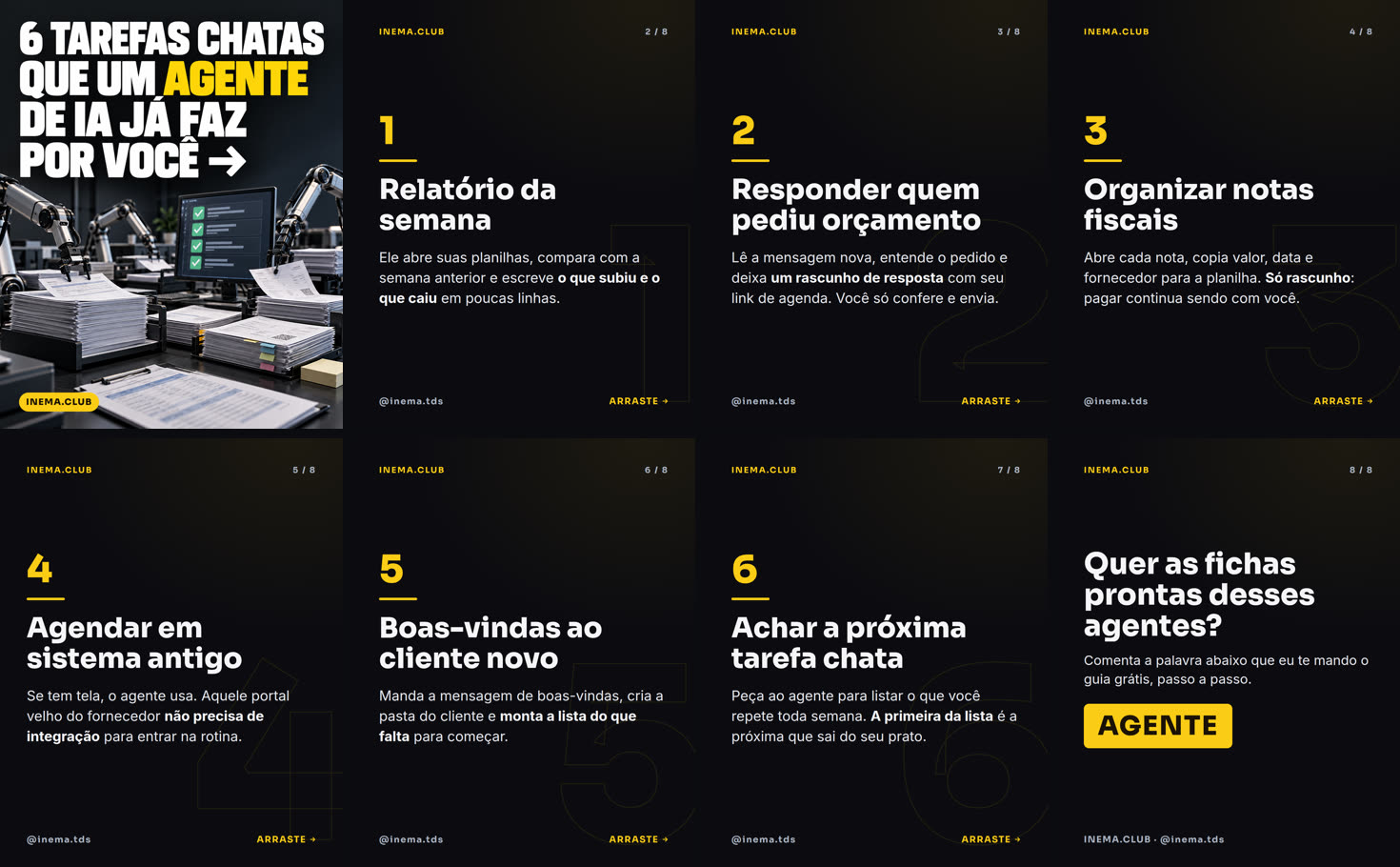
Topic: “6 tedious tasks an AI agent already handles for you”: a Codex cover, 6 slides, and the closing slide. All images in this example were generated in Portuguese.

Cover with a title designed by Codex and robotic arms organizing papers
Cover: title designed into the artwork, neutral lighting, number, and clearly named topic.
Slide 4: scheduling in an old system
Slide: large number, title, short text with the key passage in bold.
Final slide with the word AGENTE highlighted
Closing slide: the word to comment, in large type.
Story showing the cover and directing viewers to the post
Story 1 of 3: shows the cover and directs people to the post.
The carousel’s 8 frames side by side
Next steps

What comes next

What already works and what’s still missing.

1.0 ✔
Script, cover, rendering, and checksCodex cover, slides and stories, reports on cut-off text and yellowish covers, self-test.
Next
First real postTest publicar.sh as a draft in Metricool and adjust the carousel and story formats.
Later
Choose topics using dataConnect to the daily topic radar and the report on what worked best across our channels.