PTENES
Local-first creative studio

Stop renting the wrapper. Have the creative layer.

37 image and video routes, editable prompt refinement, a local results archive, and a ledger of actual costs β€” all running on your machine, with the keys kept server-side.
Bench Studio cover
What it is

A studio you can inspect, change, and take with you

Most creative AI products bundle model access, prompt refinement, routing, storage, and billing β€” and hide the seams behind a subscription. Bench keeps the convenience and makes every seam visible. It doesn't own the models; it gives you the portable layer that connects ideas, tools, providers, files, and costs.

πŸŽ›οΈ Controls that come from the model

Each endpoint accepts different inputs (one image, a list, a starting frame, or none). The curated registry describes each route's contract, and the interface shows only the controls that actually exist.

πŸ’Έ Cost before and after

A preflight estimate based on the model’s pricing unit and the requested parameters; then, the amount charged when the provider returns a sufficient receipt. Estimated, measured, and recorded amounts are distinct values β€” they are not the same thing.

πŸ—„οΈ Your files, your machine

Outputs mirrored to disk and metadata in local SQLite (data/bench.db). The browser never receives provider secrets: the loopback service keeps the key.

How it works

From idea to receipt, all in one flow

The React interface and MCP server communicate with the same local API. It validates the model-specific payload, stores credentials, streams progress, mirrors artifacts, and records durable metadata.

Your idea→ React UI or agent via MCP→ Loopback API→ Refined prompt (editable)→ Capability-based router→ Estimate + approval→ fal.ai→ Local mirror + ledger

🧠 Visible refinement

Bench adds the structure the selected model is likely to understand and shows you the rewritten draft. You can edit or reject it before spending. Without GOOGLE_API_KEY, the original prompt is passed through as is, and the interface indicates that refinement is turned off.

🧭 Discovery β‰  production

The provider catalog becomes a discovery snapshot with schema and pricing evidence. Only after review does the model enter the curated registry. This prevents a new, renamed, or poorly specified model from silently breaking a paid workflow.

πŸ”Œ Same capability via an agent

The MCP server exposes eleven tools: discover models, inspect contracts, upload references, generate images and videos, read results/previews/spending, create and track website and document projects, and find artifacts.

Prerequisites

What you need on your machine

It's a local, single-user tool β€” no hosted server. The essentials are recent Node and a fal.ai key; everything else is optional and disables specific features.

Node.js 22.5+

Node 24 is recommended because Bench uses node:sqlite. You also need npm.

node -v  # v22.5 or later

fal.ai key

Required to generate images and videos. The Google key is optional and is used only for prompt refinement.

# ~/.env (never in the repo)
FAL_KEY=<sua-chave-fal>
GOOGLE_API_KEY=<opcional>

Google Chrome

Used to print PDFs and for the visual overflow preflight. Optional: a logged-in Codex installation for site and document builds.

google-chrome --version
User guide Β· step by step

Up and running in three minutes

Real project commands. This is the sanitized public distribution: it comes without generation history, uploads, private database, personal paths, or credentials β€” your file starts empty.

1

Clone and install

Clone the repository and install the dependencies.

git clone https://github.com/inematds/bench-studio-public.git
cd bench-studio-public
npm install
2

Add credentials on the server side

Bench reads credentials from ~/.env. Never put a provider key in a Vite variable or commit it to the repository.

# ~/.env
FAL_KEY=<sua-chave-fal>
GOOGLE_API_KEY=<chave-google-opcional>
3

Start the studio

One command starts the local API and web interface together. Open http://localhost:5200. The API is available at http://localhost:8787 and the health/capacity summary in /api/health.

npm run dev  # studio on :5200, API on :8787

# if the ports are occupied:
PORT=8790 BENCH_API_PORT=8790 BENCH_WEB_PORT=5201 npm run dev
4

Create: image and video

In the tab Create, choose the route, attach the references that model accepts, review the prompt draft and estimate, and approve. The result appears inline and is saved to the local file along with the submitted prompt, model, provider URL, local file, and recorded cost.

# update the curated roster and input contracts
npm run registry
npm run capabilities
# refresh provider discovery and pricing evidence
npm run catalog:sync
5

Websites and documents

Websites generates original static sites with editable source, a local preview, and a downloadable bundle. Documents generates polished PDFs from editable HTML, printed by Chromium, with overflow preflight. Sites and documents can invoke a locally authenticated coding agent β€” review the source before publishing.

6

Connect Claude, Codex, or Cursor

Open Connect, choose the client and copy the generated configuration β€” Bench inserts the correct absolute path for the current machine (the repository doesn't include anyone's home directory). The skill in integrations/skills/bench-studio/ provides the judgment and workflow; MCP provides the execution.

npm run mcp       # MCP server over stdio
npm run test:mcp  # discovery and media smoke test
7

Check before you trust

The release gate covers the production build, API and database contracts, MCP discovery, browser journeys, accessibility, responsive containment, failure states, model transitions, and visual snapshots.

npm run test:contracts  # API, persistence, and model contracts
npm run test:e2e        # browser journeys + accessibility
npm run test:release    # the complete gate
8

Know where your data is stored

The repository starts without data/; Bench creates it on first run. The entire directory is ignored by Git. Deleting a result removes its database record and mirrored files β€” it doesn't promise to delete copies retained by an external provider.

data/
β”œβ”€β”€ bench.db     # generations, assets, spending, and projects
β”œβ”€β”€ inputs/      # mirrored uploads
β”œβ”€β”€ outputs/     # mirrored generations
β”œβ”€β”€ previews/    # local video posters
└── projects/    # source for sites and documents
Examples

Inside the interface

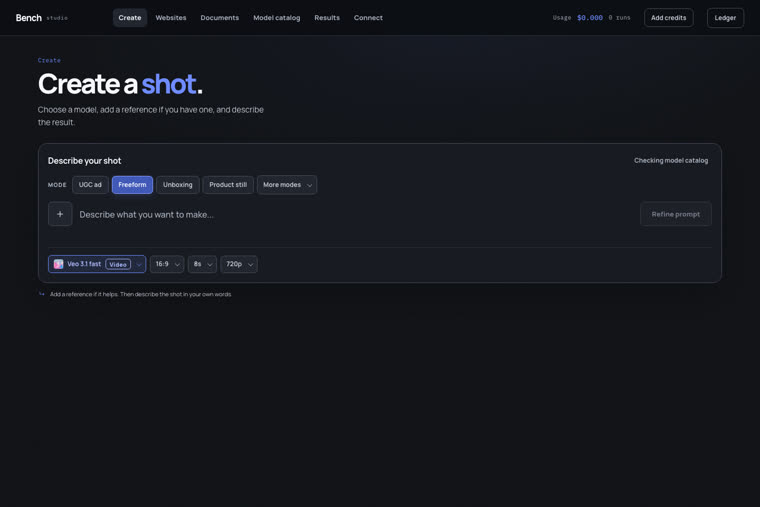
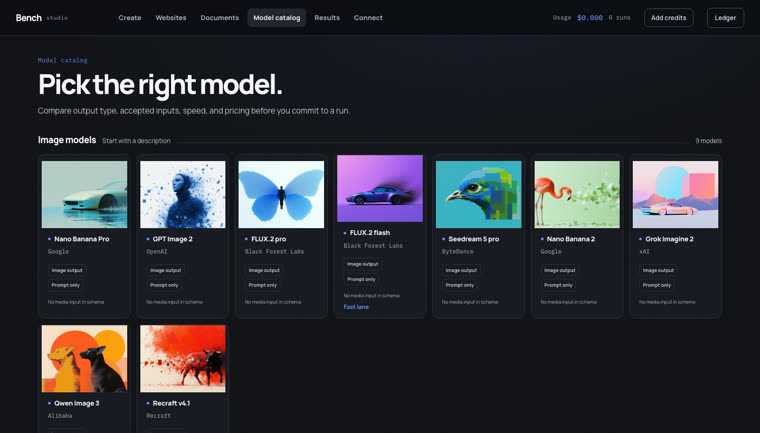
The two main screens: where you create, and the catalog that routes come from.

Bench Studio Workspace Create
Create β€” model-aware references, controls, editable prompt draft, quote, progress, and inline result.
Bench Studio model catalog
Catalog β€” curated text-to-image, image editing, text-to-video, image-to-video, and reference-video routes.
Honest limits

What Bench is β€” and what it doesn’t promise

Worth reading before adopting: these are the boundaries declared by the project itself.

Scope
Single-user local toolThis is not a hosted multi-tenant SaaS. The API listens on loopback by default; don’t expose it publicly without authentication and a deliberate threat model.
Catalog
Curation is intentionalBeing listed in the provider catalog doesn’t guarantee admission to production. Availability and pricing may change after a sync.
Fidelity
Accepted input β‰  faithful resultBench records what was submitted. It doesn’t claim that an attached reference influenced the output just because the API accepted the field β€” human review is still necessary.
Outputs
Static site, PDF via ChromeSite output is static by design, and PDF creation depends on a local Chrome installation.
Cost
Having the layer means maintaining softwareEstimates are not guarantees, and owning the portable layer means maintaining a small piece of software.