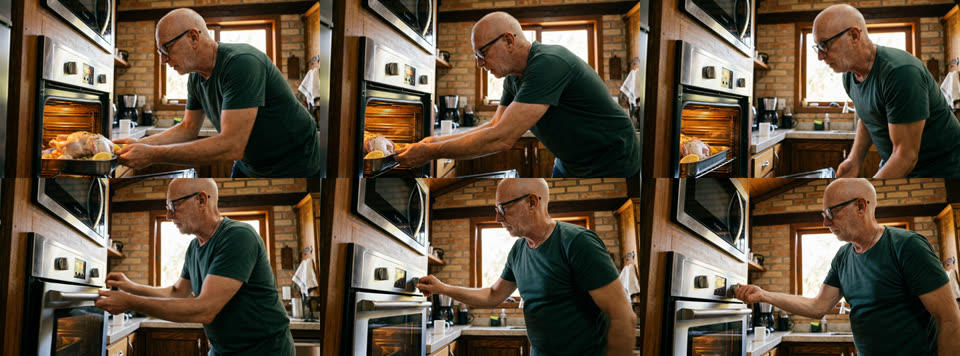
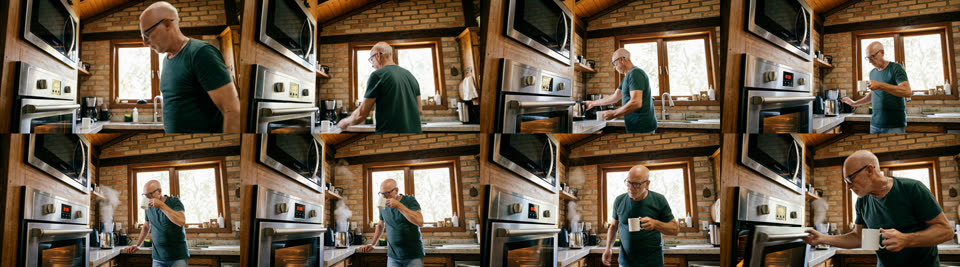
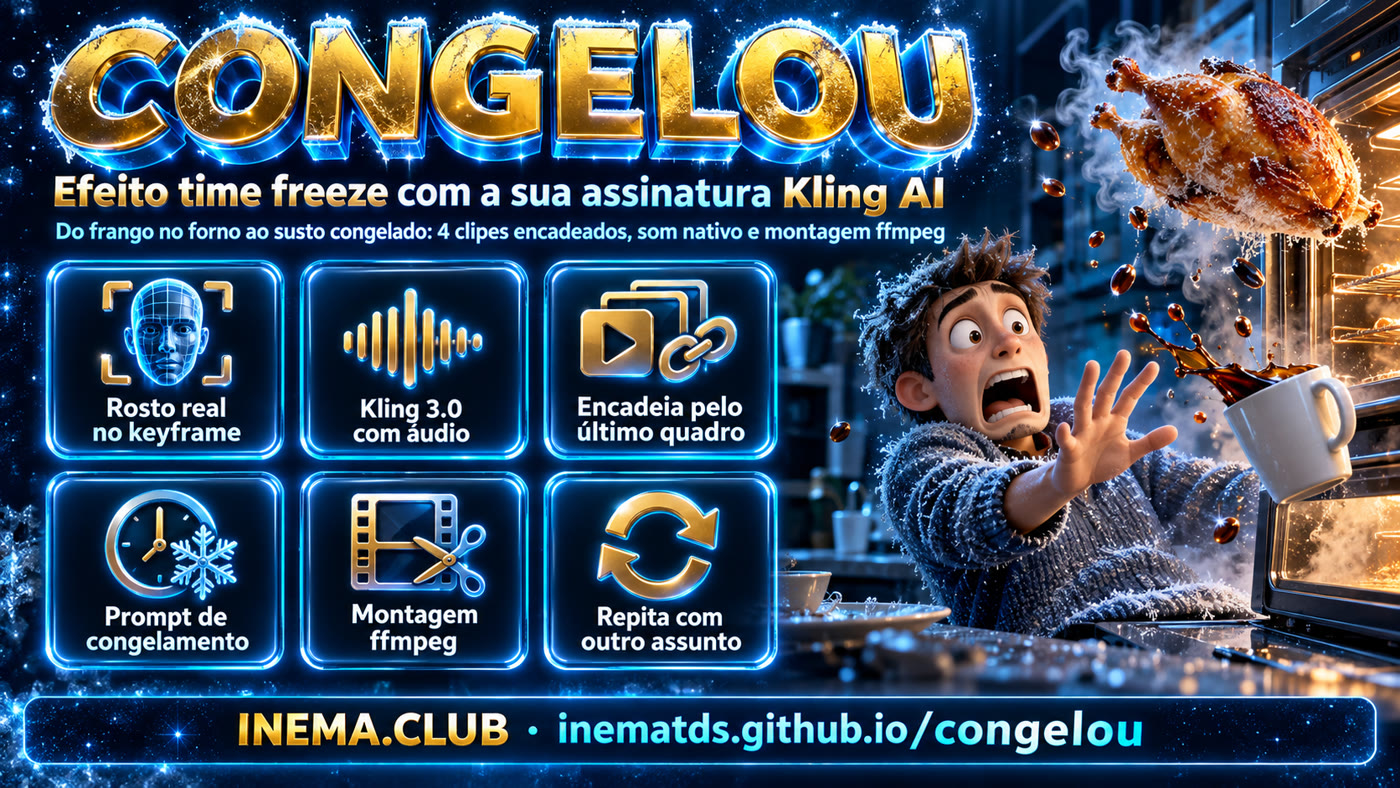
A ~38-second short made only with a Kling AI subscription through the official CLI: your real face in the first frame, 4 chained clips, the freeze effect and assembly with sound.

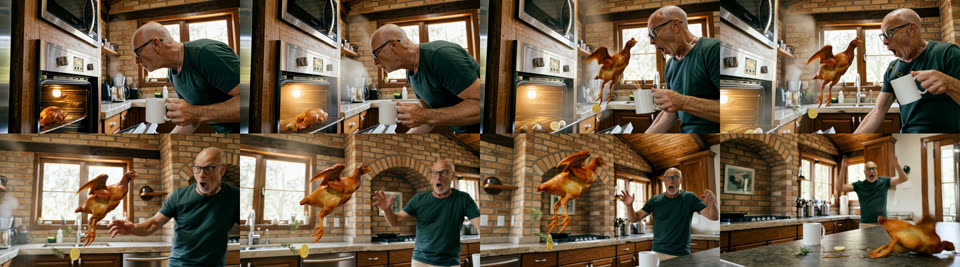
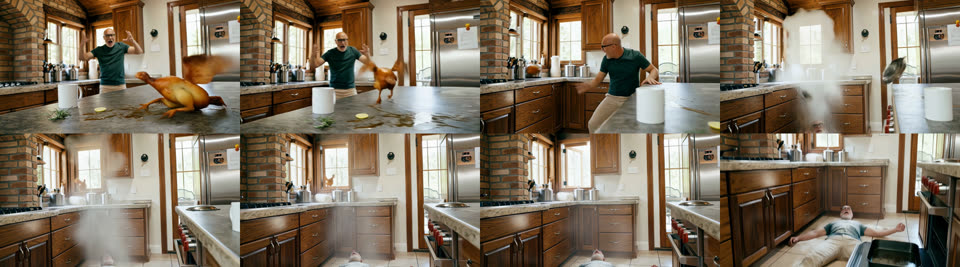
Chicken in the oven โ coffee โ opens the oven โ the chicken comes out alive โ everything freezes and the camera glides through the scene โ time resumes and the mess arrives.
The chicken bursts out the instant the door opens. During the freeze everything stops, you included, and only the camera moves. When time resumes, the motion moves a little and stops, moves and stops again โ 4 stops, each one shorter, with the sound cutting out at every stop โ and only then carries on at natural speed. No slow motion: real frames held in ffmpeg (montar_paradas.sh).
You are holding the plate and open the microwave to put the food in, and a live, frightened cat leaps out. In the scare, the plate slips. Two frozen moments, in 4K with no blur: the cat in mid-air with the food flying, and the plate shattering on the floor with shards and rice suspended. Then you knock over the whole kitchen. Each freeze is a sharp 4K still (nitido.sh) with the camera move done in ffmpeg (freeze.sh), so nothing in it moves or blurs. Prompts k4, N1, N3, F2, N5.
It's not an app, it's a tested recipe: 3 shell scripts + text prompts. Each piece can be swapped to tell a different story.
The first frame is generated from a real photo of your face (Nano Banana Pro, inside Kling itself). The rest of the film inherits that face.
Each clip starts from the last frame of the previous one. Same character, same kitchen, same light, with no "jump" between scenes.
Kling 3.0 with enable_audio: doors, footsteps, coffee, clucking and the silence of the freeze all come out along with the image. ffmpeg just joins and normalizes.
All through your own Kling AI account (the kling CLI). No Magnific, RunComfy or other reseller: it's your subscription, your credits.
| Clip | What happens | Duration | Kling credits |
|---|---|---|---|
| k1 | Still: you putting the chicken in the oven | 2k image | 20 |
| A | Pushes the pan in, closes the oven, turns the knob | 5s | 60 |
| B | Pours coffee, takes a sip, goes back and grabs the door | 8s | 96 |
| C | Chicken jumps alive, time freezes, camera orbits, time resumes | 15s | 180 |
| D | The mess in normal time: flour, pans, a slip, an escape through the window | 10s | 120 |
Measured on the account (Pro plan): Kling 3.0 at 1080p with audio costs 12 credits/second. The whole film cost around 476 credits.
Three things: the official Kling CLI logged into your account, ffmpeg and Python 3.
Official CLI, a client of Kling's MCP. Login via browser (OAuth).
npm i -g @klingai/cli-global kling login kling account # plan + credits
For extracting the last frame, generating contact sheets and assembling the final video.
sudo apt install ffmpegUsed by the scripts to read Kling's JSON and download the files.
python3 --version curl --version
The commands below are exactly the ones that generated the video. Run them inside the repo folder.
who_am_i lists the models and parameters your subscription unlocks. Watch the defaults: Kling 3.0 ships with 4k, audio off and multi-shot on, and the scripts override all three.
kling who_am_i -q > who_am_i.json kling account
A photo of you + the scene prompt. Out comes a 2k 16:9 still that becomes the film's first frame.
./keyframe.sh ref/nei.jpg prompts/k1.txt # โ keyframes/k1.png
Each clip.sh generates the clip, downloads it, measures the audio, makes a contact sheet and saves the last frame, which is the start of the next one.
./clip.sh A keyframes/k1.png 5 # chicken in the oven ./clip.sh B keyframes/A_last.png 8 # coffee and back to the oven ./clip.sh C keyframes/B_last.png 15 # chicken alive + TIME FREEZE ./clip.sh D keyframes/C_last.png 10 # the mess
Open clips/X_sheet.png (8 frames across the clip). If something broke, redo only that clip: the following ones start from its last frame.
xdg-open clips/C_sheet.png
Standardizes to 1920ร1080/24fps, trims the repeated frame at each splice, joins with the native audio and normalizes to -14 LUFS.
./montar.sh A B C D # โ congelou_final.mp4
They live in prompts/. The freeze one (C) was adapted from the freeze_effect_template_en.md template, which is a skeleton of scene, freeze, frozen camera, resume and continuity.
Photorealistic cinematic film still, 35mm, natural warm daylight. The man from image 1 (same face, bald head with short white hair on the sides, white stubble beard, black rectangular glasses, plain dark green t-shirt) stands in a cozy rustic home kitchen with exposed brick walls and dark wooden ceiling beams. He is bending slightly and sliding a metal roasting pan with a whole raw seasoned chicken (pale skin, herbs, garlic, lemon halves) into an open built-in stainless steel oven at waist height. [...]
ACTION: The man pulls the oven door open, holding his white coffee mug in his other hand. Hot steam pours out. Suddenly the whole plucked, half-roasted golden chicken jumps up ALIVE from the roasting pan and leaps out of the oven straight toward his face [...] droplets of hot grease, sprigs of rosemary, a lemon slice and a garlic clove fly out of the pan. [...] TIME FREEZE: At the peak of the chicken's leap, time stops completely. The chicken hangs motionless in mid-air [...] Nothing moves except the camera. FROZEN CAMERA: The camera slowly glides around the frozen scene [...] RESUME: Time resumes instantly at normal speed with no effect. The chicken crashes onto the kitchen counter [...] Sound: [...] during the freeze total silence with only a low high-pitched ringing tone [...]
Full prompts: github.com/inematds/congelou/prompts.
Every object suspended in the air needs a cause. The rosemary flies because the chicken jumped off the pan; the coffee flies because the mug tipped over from the scare.
Ask for "nothing moves except the camera" and describe the camera's path between the suspended objects.
Describe the audio of the freeze ("total silence with a low ringing tone"). The native audio follows the change.
Real contact sheets generated by fetch.sh.


The pipeline knows nothing about chicken. To make another video, you rewrite the prompts and run the same three scripts.
Setup โ preparation โ the impossible (freeze) โ consequence. Each beat becomes a 5 to 15s clip. Example: "I wash the car โ I go get the hose โ the car drives off on its own โ freezes mid-air over the puddle โ lands and splashes mud on me".
mkdir ~/projetos/meu-freeze && cd ~/projetos/meu-freeze cp ~/projetos/congelou/{keyframe,clip,fetch,montar}.sh . mkdir prompts ref && cp minha-foto.jpg ref/
prompts/k1.txt is the first frame, and A.txt, B.txtโฆ are the clips. For the freeze clip, copy the skeleton from freeze_effect_template_en.md and change only the content. Always include a Sound: line at the end.
./keyframe.sh ref/minha-foto.jpg prompts/k1.txt ./clip.sh A keyframes/k1.png 5 ./clip.sh B keyframes/A_last.png 8 ./clip.sh C keyframes/B_last.png 15 OUT=meu_filme.mp4 ./montar.sh A B C
You can ask in natural language. Say "use my klingai subscription" so it uses the kling CLI, and pass the story and the freeze template file.
# example request "use klingai directly and create this story: ... freeze it like this prompt ~/projetos/congelou/prompts/freeze_effect_template_en.md; join it with sound"
Details that save credits next time.
enable_audio true and prefer_multi_shots false.fetch.sh downloads as soon as the clip finishes.