Open source · official TSE data
Election results live, on a map of Brazil
A dashboard that reads the TSE's public files, checks the math, and shows each state filling in every 15 seconds.

A dashboard that reads the TSE's public files, checks the math, and shows each state filling in every 15 seconds.
INEMA Elections 2026 is an open dashboard for following the runoff count for President using official data from the TSE (Brazil's Superior Electoral Court). It is for anyone who wants to see the results for Brazil and for each state on a map, with no made-up numbers. A collector fetches the TSE's public files every 15 seconds, checks the math, and publishes ready-made files; the site only reads those files. To follow along, just open eleicoes.inema.club; to run your own, all you need is Python 3.
The collection reads the TSE and writes files; the contract defines the format of those files; the dashboard only reads the files and draws the screen. The collection knows nothing about the screen, and the dashboard never talks to the TSE.
It downloads only the state that changed. Before publishing, it checks: candidates' votes = valid votes; valid + blank + null = total; precincts never decrease. If something doesn't add up, that state is not published and the last valid value stays.
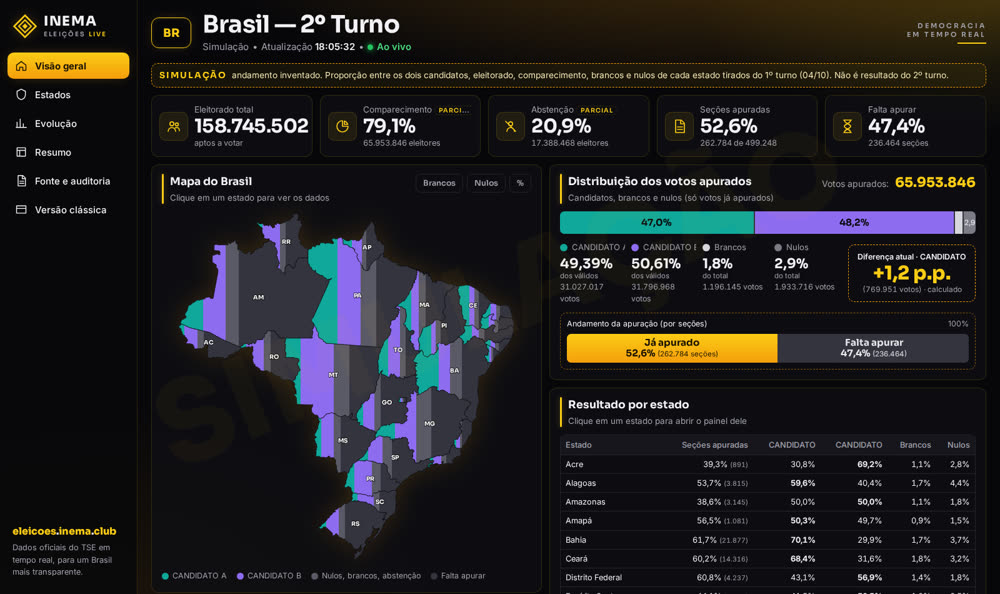
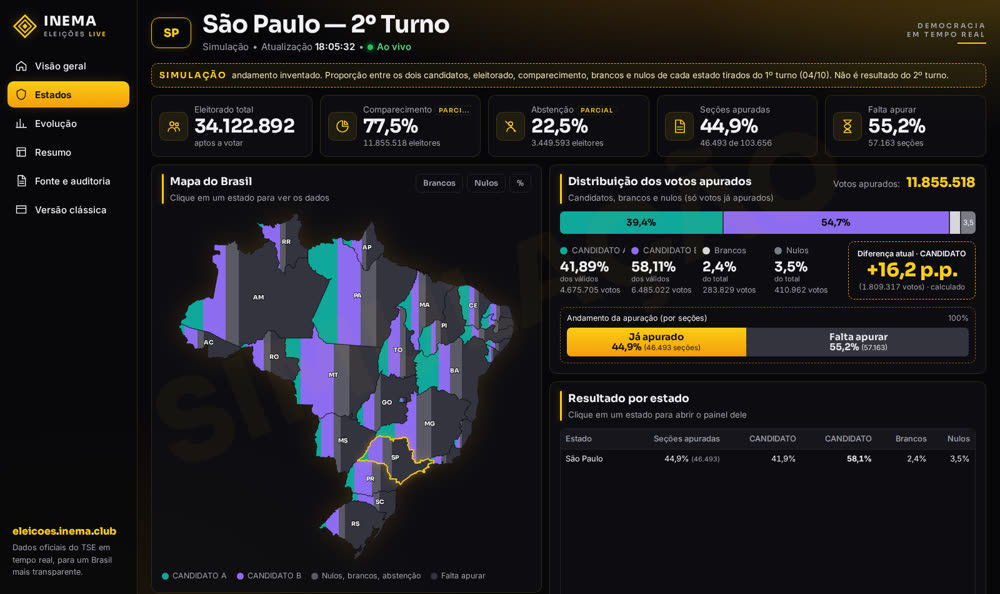
Central, with a real map of Brazil that fills in state by state, and Classic, with 4 styles (night, paper, newscast and high contrast). Click a state to open its dashboard.
Simulation button in the menu: the count goes from 0% to 100% in about a minute, with fictional names and with each state's electorate, turnout, blank and null votes taken from the 1st round.
Site visitors only download ready-made files. The only one that talks to the TSE is the collector, once every 15 seconds. The manifest (latest.json) is the list of what is currently valid; it is always the last file published, so it never points to a file that has not arrived yet.
The collector requests the index with a version tag (ETag). With nothing new, the TSE replies "not modified" and nothing is downloaded.
Percentages come from the TSE itself. Anything computed by the dashboard (the difference between the two candidates, for example) is marked as calculated.
Each published number carries the TSE's official time, the collection time, the version, and the fingerprint (sha256) of the original file.
To just follow the count: nothing, just open the site. To run your own dashboard:
Version 3.8 or newer. The collector and the test server use only the standard library: no packages to install. The commands are for Linux or macOS (bash); on Windows, use WSL.
python3 --versionTo download the project.
git --versionOnly if you want to publish on the internet. Requires Node.js and wrangler logged in to your account.
npx wrangler loginReal commands from the repository, in order. Run them from the project folder.
Clones the public repository.
git clone https://github.com/inematds/eleicoes2026
cd eleicoes2026
Starts the test server in the background (the & at the end) and opens the dashboard in accelerated simulation mode. It needs neither the TSE nor any data. The server shows nothing on screen; it keeps running until you stop it.
python3 coleta/servidor_local.py --pasta site --porta 8470 &
# open in the browser: http://localhost:8470/?sim=1
# don't stop it yet: step 4 uses this server. To stop it at the end:
pkill -f "porta 8470"
Reads the final 1st-round data (election 6257, 12 candidates), checks everything, and publishes to saida/teste1t/data. When run again, the TSE replies "not modified".
python3 coleta/coletor.py --saida saida/teste1t --eleicao 6257 --turno 1 --pleito 3220 --n-cand 0 --uma-vez
At the TSE, the "pleito" is the voting held on one day (3220 = election day of Oct 4, 2026), and each pleito has its own races (6257 = the race for President in the 1st round); --n-cand 0 turns off the check on the number of candidates (in the 1st round there are 12) and --uma-vez runs a single cycle. Steps 3, 4 and 5 need internet access: the first two access resultados.tse.jus.br and step 5 downloads from there the 1st-round data that the simulation uses as its base.
It keeps watching the TSE every 15 seconds (election 6258, President). Then point the site to the official data.
python3 coleta/coletor.py --saida saida/oficial --intervalo 15 &
ln -sfn ../saida/oficial/data site/data   # the site now reads the official data
sleep 20; cat saida/oficial/status.json             # last ok, errors, blocks
The & at the end of the first line keeps the collector running in the background, alongside the server from step 2; the sleep 20 waits for the 1st cycle before showing the status. Open http://localhost:8470/ (without ?sim=1): the data appears after the 1st cycle, about 15 seconds. Until the count starts (Oct 25, around 5 pm), the dashboard shows "Aguardando apuração" (Awaiting count) with everything zeroed: this is normal. To stop the collector: pkill -f "saida/oficial".
A local server imitates the TSE with deliberate problems: corrupted file, precinct counts decreasing, index and files out of order. The collector has to get through all of it without publishing anything wrong.
mkdir -p saida/tsefalso
python3 coleta/servidor_local.py --pasta saida/tsefalso --porta 8471 &
python3 coleta/simular.py --saida saida/simlixo/data --intervalo 6 --uma-vez --modo-tse saida/tsefalso &
timeout 240 python3 coleta/coletor.py --saida saida/testemock --base http://127.0.0.1:8471/ --intervalo 3
The collector stops by itself after 4 minutes (timeout 240), which is the time the simulation needs to go from 0% to 100%. It worked if saida/testemock/status.json shows empty pending items and blocks, and grep BLOQUEIO saida/testemock/coleta.jsonl shows one block for SP (corrupted file) and another for RJ (precincts decreased); BLOQUEIO is the name of the event in the log. The simulator finishes by itself; then stop the fake server: pkill -f "porta 8471". Before starting, the simulator downloads about 29 files from the TSE; on a slow connection, increase the timeout.
Replace the domain in ferramentas/cloudflare/wrangler.toml with yours and run the publisher: it sends to Cloudflare every time the data changes.
python3 ferramentas/publicar_cf.py --laco 20
wrangler is Cloudflare's command-line tool; the publisher runs npx --yes wrangler@4 deploy, which is why the npx wrangler login from the prerequisites is mandatory. It sends saida/oficial/data to the site root and, if it exists, the simulation at saida/simficticio/data to /simulacao/; so the collector from step 4 must be running. To publish the simulation too, generate it first: python3 coleta/simular.py --saida saida/simficticio/data --intervalo 60 --ficticio &. The publisher keeps running and watching; to stop it, press Ctrl+C. The domain must be in a zone of your Cloudflare account (a zone = a domain managed there).
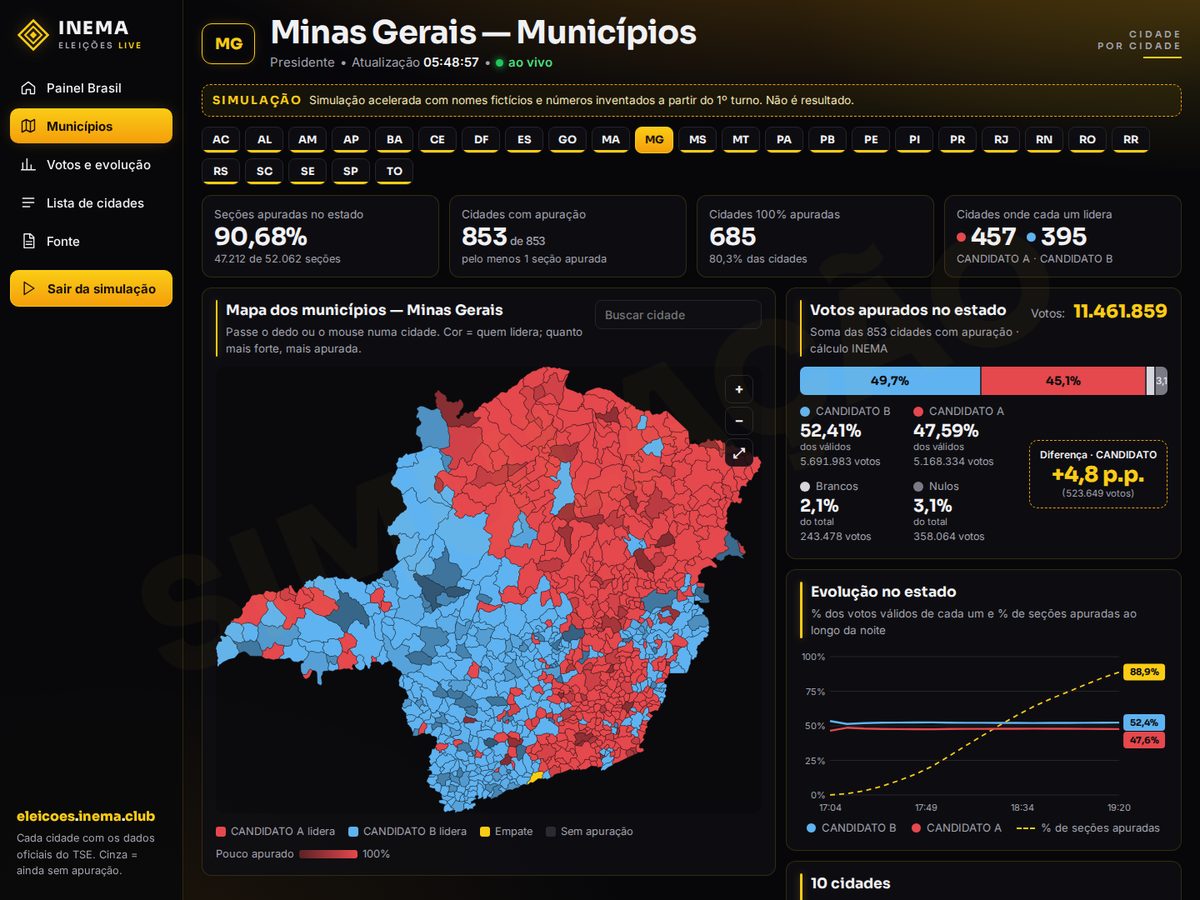
At municipios.inema.club every state appears with its municipalities drawn out. A city starts out gray and turns red or blue, in the color of whoever leads there; the stronger the color, the more polling sections have already been counted. In the dashboard, the Municipalities menu item and the See the municipalities button on the state panel take you straight there.
Choose the state using the buttons at the top. Hover or tap a city to see the numbers; click to open its full panel. It has zoom and search by name.
A bar with each candidate's total in the state (the sum of the cities already counted, marked as an INEMA calculation) and a chart of how it evolves through the night.
A list of 10 cities in three orders: largest (most voters), most counted and 100% counted.
Its own collector, files and site. The collector reads the TSE's 27 per-state indexes and downloads only the cities that changed, the ones that have waited longest first. If it stops, the main dashboard is not affected.
Every city goes through the same rules as the dashboard. A city whose numbers don't add up keeps its last good value; the rest of the state carries on.
The outlines of the 5,570 municipalities come from the official IBGE mesh, linked to the TSE by each city's IBGE code.
After step 1 of the guide (project downloaded). Real commands from the repository, run from the project folder.
# 1. (optional) the outlines already ship in the repository; this rebuilds them from the IBGE mesh
python3 municipios/gerar_malhas.py
# 2. runoff collector (keeps running; every 15 s)
python3 municipios/coletor_mun.py --saida saida/municipios &
# 3. local site
ln -sfn ../../saida/municipios/data municipios/site/data
python3 coleta/servidor_local.py --pasta municipios/site --porta 8471 &
# open: http://localhost:8471/   # or the simulation: http://localhost:8471/?sim=1
Details, tests with the first round and known limits: municipios/README.md.
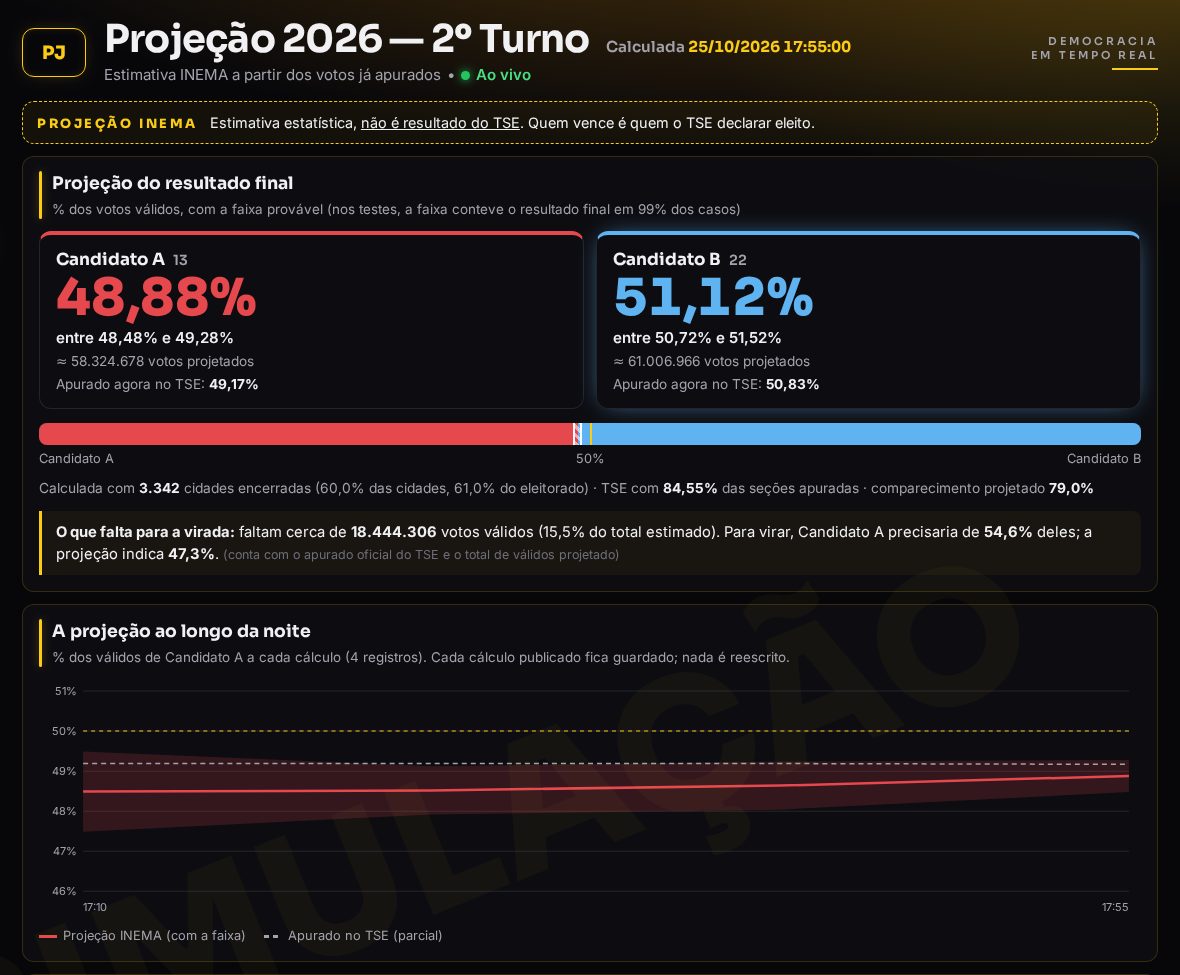
At eleicoes.inema.club/projecao.html (the Projeção item in the menu) INEMA estimates the final result from the votes already counted. The partial number is misleading because small cities and some regions close first; the projection corrects for that. It is an estimate, always labeled as such: the winner is whoever the TSE (Brazil's Superior Electoral Court) declares elected.
In the cities that have already finished counting, we compare the 1st and 2nd rounds and estimate where each group went (each candidate's voters, blank and null votes, and those who did not vote), by region, state, city size, and city profile. Then we apply this to the 1st round of the cities still to come.
Each number comes with a likely range. We tested it against the real 2022 election and the simulation: with 5% of cities finished, the average error was 0.3 point, versus 4.7 for the partial number, and the range contained the final result in 98.7% of the 224 scenarios.
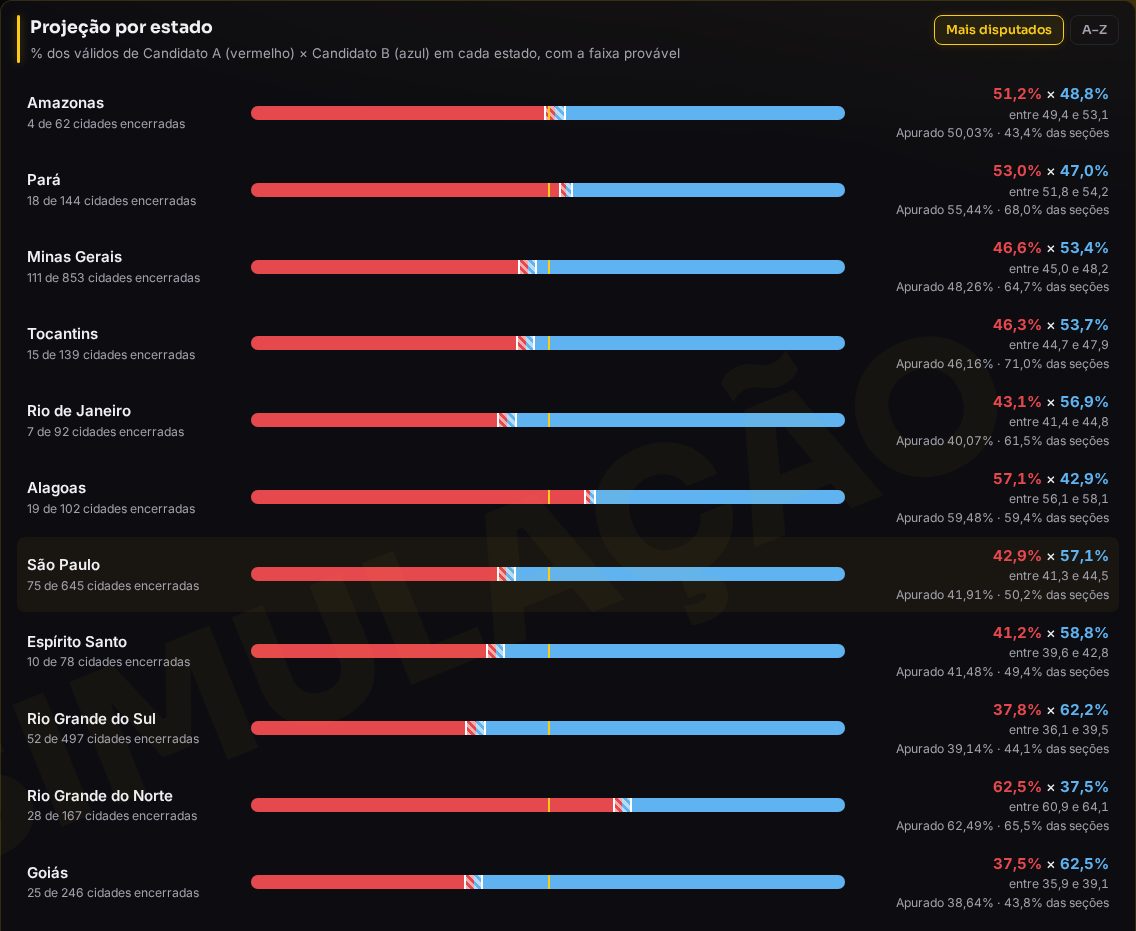
The Ver por estado (View by state) button shows each state on one line, with a bar, range, and the TSE count. A state with little counted appears as “unstable”. In tests, the state ranges were right in 95.5% of cases.
How many valid votes are still outstanding and what share of them the trailing candidate would need to turn the result around, compared with what the projection indicates.
Each published projection is stored without being rewritten, and becomes a chart comparing the projection with the TSE count. You can check afterwards where it was right and where it was wrong.
It only appears with at least 250 cities finished, 15 in each region, 3 in each of 20 states, and 1% of the electorate. It does not use opinion polls, only official TSE votes. In the simulation, it does not appear.
In the panel, the Fonte e auditoria (Source and audit) section shows the data on screen with the link to the official TSE file, the timestamps (tallying, generation, collection), the version, and the fingerprint (sha256), as well as how we fetch it, what we check, and how anyone can verify it. The Compartilhar (Share) button opens the phone's share menu or copies the link, with no server and no cost.
# teste com a eleição de 2022 (dados abertos do TSE em saida/backtest2022/bruto)
python3 projecao/backtest_2022.py saida/backtest2022/bruto
# medição da faixa (vários cenários, em paralelo)
python3 projecao/calibracao.py saida/backtest2022/bruto 14
# serviço: recalcula quando os dados mudam e grava saida/oficial/data/projecao.json
python3 projecao/projetar.py --laco 60
Code and details: projecao/. Requires numpy and scipy.
With the TSE's final result, the dashboard gained pages that compare the 1st and 2nd rounds city by city, always separating what is fact (arithmetic on the TSE numbers) from what is estimate (the Projeção (Projection) model). They are all in the dashboard menu.
What changed from the 1st to the 2nd round in each city and state, cities that flipped, and Senate and governor races compared with president.
Where the difference came from, where it was concentrated, and the role of turnout.
Brazil = sum of the states + abroad, each state = sum of its cities, integrity of the downloaded files, and abroad section by section through the ballot-box reports.
Allies elected on each side, where the vote split, and the possible explanations, labeled as hypotheses.
How Lula gained 10.4 million votes from the 1st to the 2nd round: the arithmetic that always adds up, the "coincidence" that proves nothing, and a check of the charts that circulated.
A large chat on the right of every page: an AI (Claude) answers only with the site's numbers and says which page they come from. Conversations are recorded anonymously for analysis.
Why the dashboard handles millions of people without bringing a server down, how much it costs, the backup VPS and the techniques used: How it was built page and ARQUITETURA.md (in Portuguese).
Images from the simulation (fictional names). On election day, the same dashboards show the official data.
The first version was built for the October 25, 2026 runoff.