Google Antigravity · /swarm

Still asking a single agent to do everything? With the Swarm Sheet, Antigravity’s /swarm splits up the work without the chaos.

One agent does one thing at a time and gets lost in a big task. Several agents without an agreement edit the same file, nobody checks the work, and your quota runs out. The sheet solves this before you type /swarm.

Swarm Sheet banner: split Antigravity’s /swarm without the chaos, with robots at separate desks connected to a message board
In short

Google introduced the /swarm command in Antigravity: you describe a task, and a coordinator splits it among several named agents who work at the same time while a verifier reviews and tests their work. This only works if their parts do not overlap. The Swarm Sheet is a short document you write first: who owns what, what each worker must leave alone, when it is done, who verifies it, and when to stop. This guide explains /swarm based on the official documentation and includes a free kit that checks your sheet and builds text you can paste. You need a Google AI Pro or Ultra plan for /swarm and Python 3 for the kit.

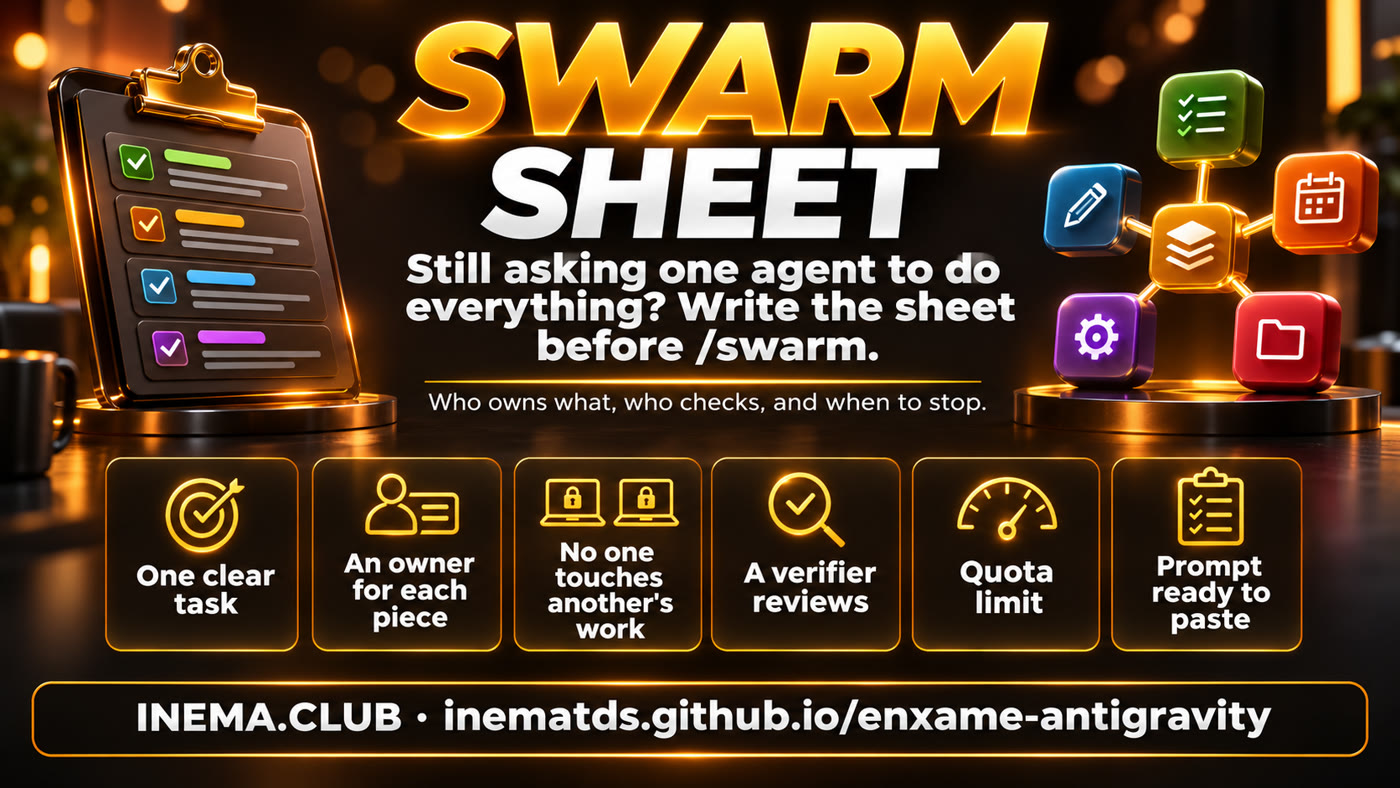
The sheet’s 6 points: one clear task, an owner for each piece, nobody edits another’s work, a verifier reviews, a quota limit, and a prompt ready to paste
Video

Understand it in a few minutes

Three videos will appear here: the basics (what it is and when to use it), the technical side (coordinator, board, and verifier), and the sheet (how to write the specification).

Basics: what /swarm is and when to use it
Technical: coordinator, board and verifier inside
Specification: how to write the Swarm Sheet
How /swarm works

One coordinator, several workers, and one verifier on a shared board

Everything in this section comes from the official Google Antigravity documentation. /swarm is available in the app and CLI, is in preview, and is for Google AI Pro and Ultra plans.

Transparency: We have not tested /swarm. Antigravity is not installed on the machine where this kit was made. The information here comes from the official documentation; third-party information is marked as a “report.”
You: /swarm + task→ Coordinator splits it up→ Workers @name work together→ @verifier reviews and tests→ Coordinator reports back

🧭 The coordinator

Your conversation becomes the coordinator. It names the swarm, splits the task into pieces that do not overlap (for example, one worker per file or package), and creates named workers such as @parser and @docs, or a numbered group like @fix-1 to @fix-4. It does not do the technical work: it assigns tasks, evaluates what comes back, and talks to you.

📋 Each worker’s brief

Each worker starts from scratch in its own conversation. Its brief goes on the board, where everyone can see it, and says three things: what it owns, what it cannot touch, and what “done” looks like. That is exactly what the Swarm Sheet helps you think through in advance.

🔍 The verifier

The coordinator usually assigns one @verifier for every 2 to 4 workers. It reads the changes (the diffs), runs the tests, and sends problems back to whoever wrote the code. You can ask it to run on a different model from the workers.

🗒️ One shared board

Tasks, questions, summaries, and test results go to one shared message board, with mentions like @name, @group, or @all. Workers do not talk privately: the whole conversation stays in one place, in order.

😴 Waiting costs nothing

A worker with nothing to do waits on the board without using tokens and wakes when someone mentions it. The @monitor stays asleep while there is progress and only speaks if everyone stops before the task is done.

📁 Workspace

By default, everyone uses your project folder. When several workers edit at the same time, the coordinator can give each one a working copy. Removing a worker deletes its copy, so the worker should hand over its changes first.

Which one to use

Subagent, /boost, /swarm, or /teamwork?

A swarm is not always the answer. The official table distinguishes four ways to get more than one agent working. The kit includes a helper that asks these questions for you (how to use it ↓).

Best forHow to startTypical durationPlan
SubagentA focused side task: search the code, check in the browser, run testsAutomatic delegation or mention @subagentSeconds to minutesAll plans
/boostA difficult, focused problem: a tricky bug, race condition, or algorithm/boost <task>Seconds to hoursPaid
/swarmA broad task that splits cleanly into independent files, packages, or questions/swarm <task>Minutes to hoursGoogle AI Pro and Ultra
/teamworkA project with several milestones: migrating an entire repository, running a simulation, or doing extended research; starts with an interview and uses its own folder/teamwork <goal>Hours to daysPaid

Source: the “Choose between Swarm, Teamwork, Boost, and subagents” table in the official documentation. For everyday tasks, the documentation itself recommends speaking directly with the default agent.

Follow along

How to follow the swarm while it works

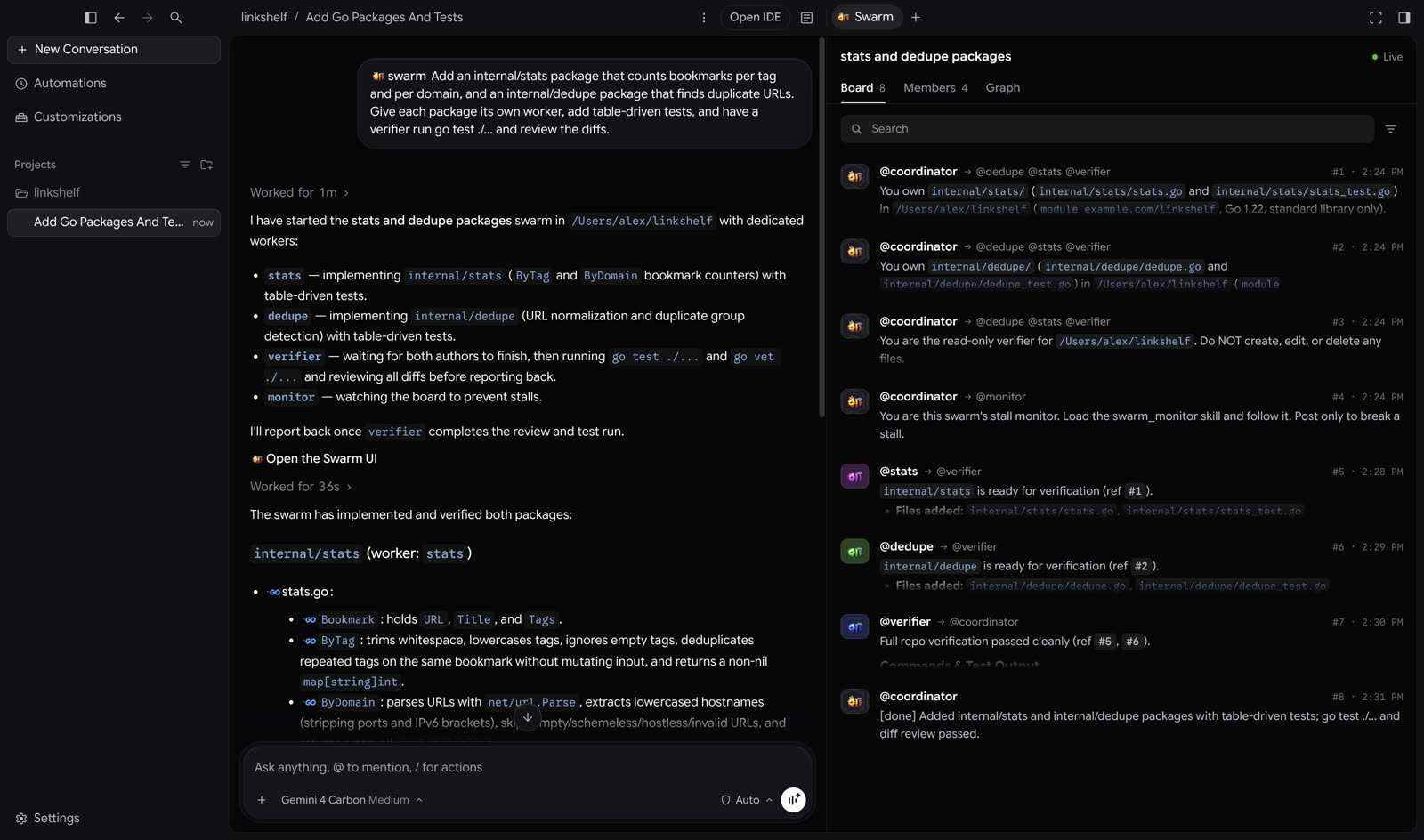
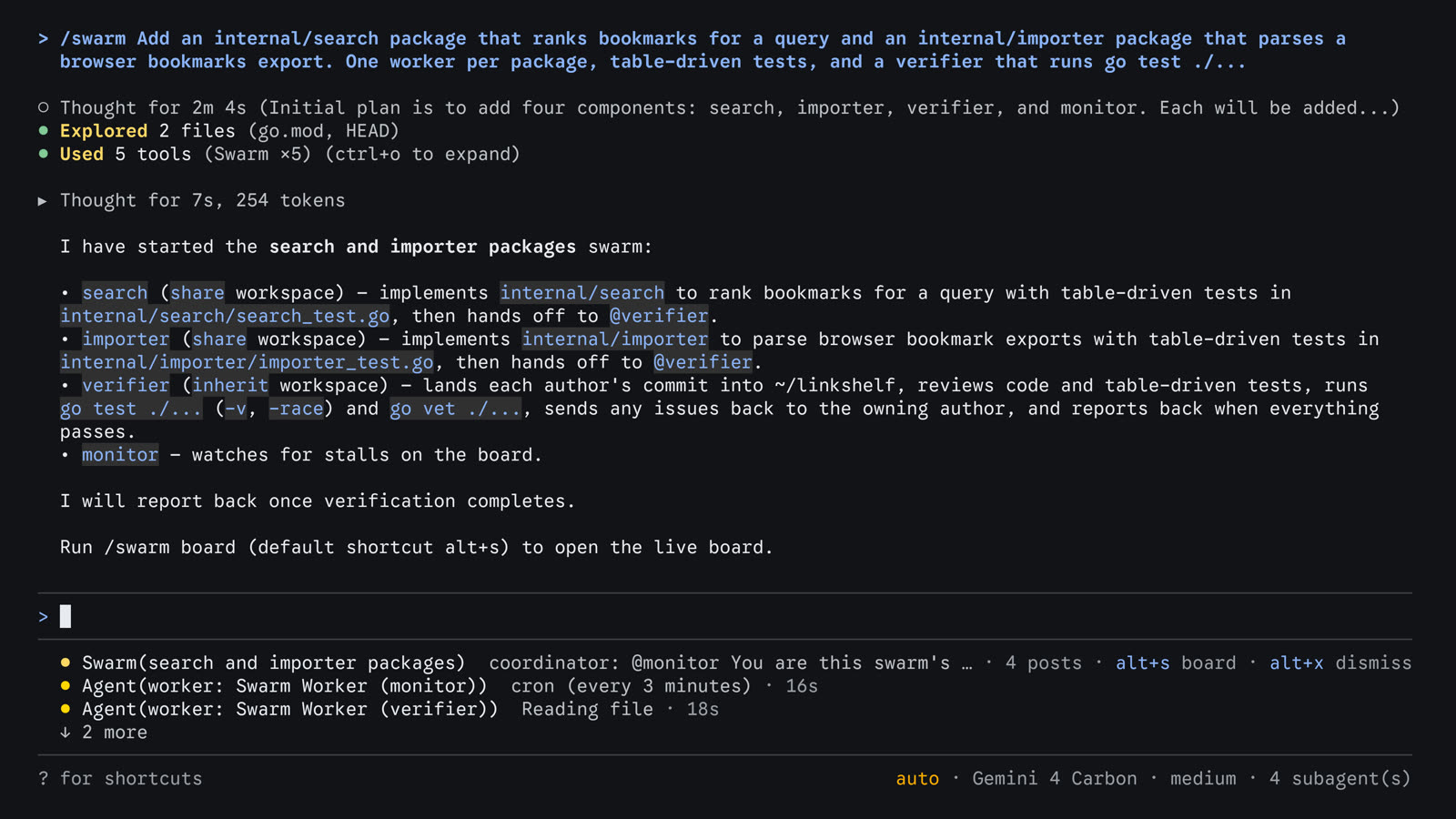
In the app, the Swarm panel opens beside the conversation through the “Open the Swarm UI” link in the coordinator’s response. In the CLI, a status line appears below the input field, and the board opens full screen.

Antigravity app with the /swarm conversation on the left and the Swarm panel’s Board tab on the right
App · Board tab: the live board, showing who posted, who it was for, and the number and time of each post. It has search, filters, and “Follow” to scroll automatically.Image: Google Antigravity documentation
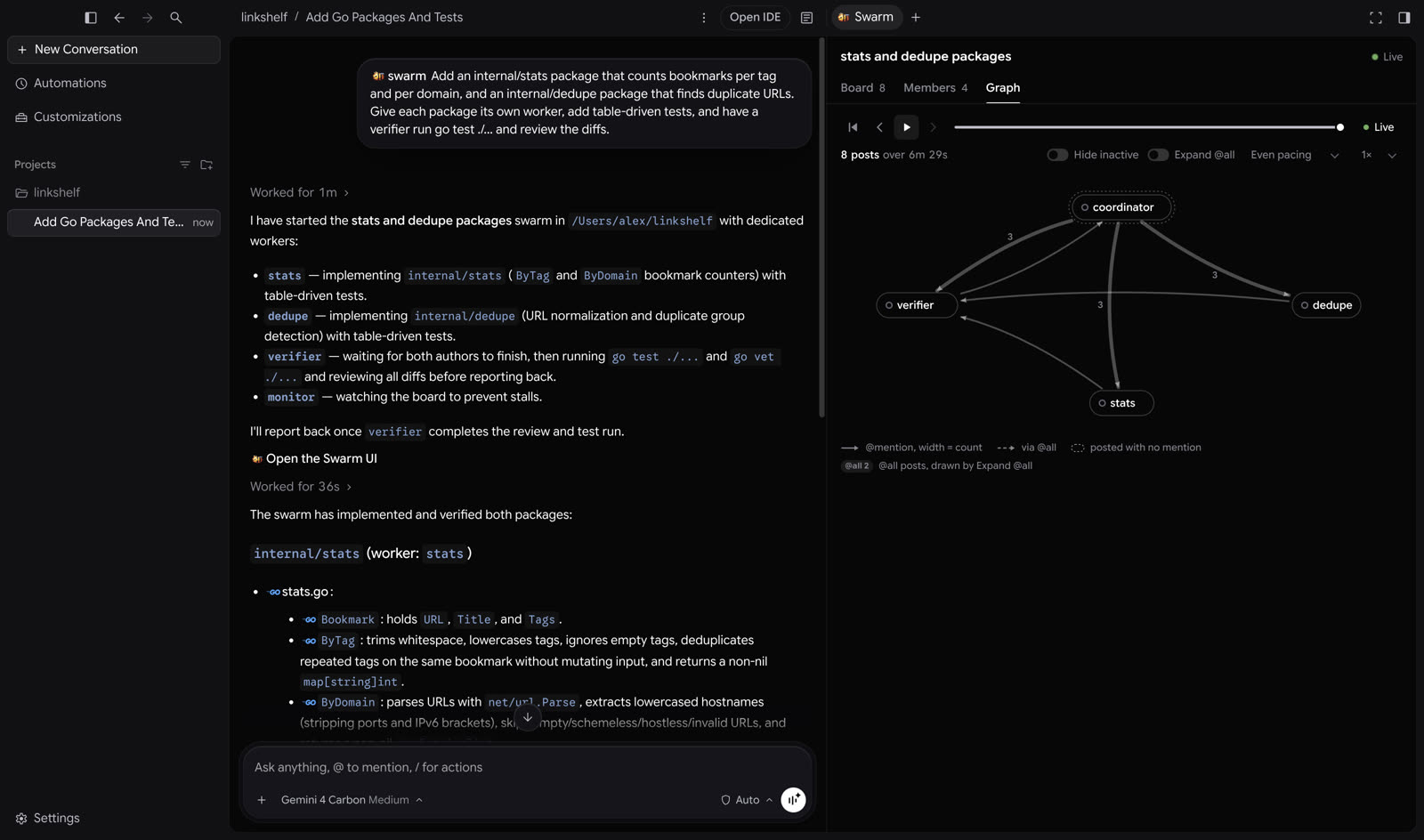
Swarm panel’s Graph tab with the coordinator, verifier, and workers connected by mention arrows
App · Graph tab: who mentioned whom, with thicker arrows for more posts, and a replay from the first post to the last. The Members tab lists each member with its status and model.Image: Google Antigravity documentation
Antigravity CLI with the swarm status line below the input field
CLI · status line: the swarm title, latest post, post count, and the alt+s board hint. Alt+X hides the line; a new post brings it back.Image: Google Antigravity documentation
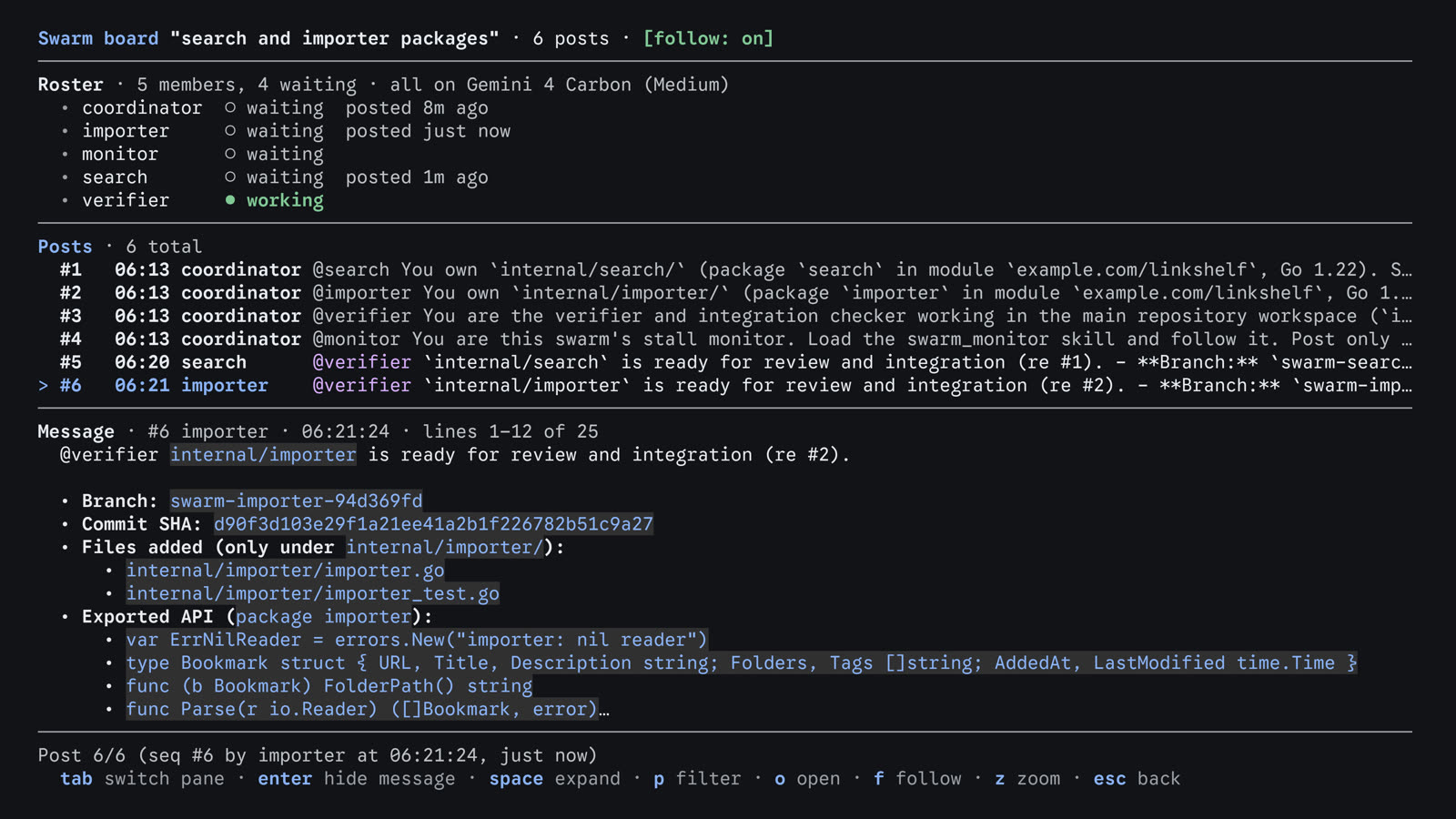
Full-screen swarm board in the CLI, with a member list, posts, and the selected message
CLI · board: opens with /swarm board or Alt+S. Three panels: members (working, waiting, killed), posts, and the full message. q closes it.Image: Google Antigravity documentation

Statuses

  • Active: working.
  • Waiting: waiting on the board without using tokens.
  • Killed: removed; it will not return, and the coordinator creates another.

CLI shortcuts

  • /agents lists the workers.
  • Alt+J jumps to whoever is waiting for approval; Ctrl+K approves without leaving the conversation.
  • On macOS, Alt+S only works if the terminal sends Option as Alt.

Message one worker directly

In the CLI, start with @ and the name: @verifier also run the integration tests. The message goes only to that worker, not to the board. In the app, open its conversation from the Members tab.

The Swarm Sheet

Five questions to answer before typing /swarm

The documentation asks you to say what you want and how to verify it, and lets the coordinator split up the work. The sheet takes one step earlier: you arrive with the division already planned, so the coordinator is less likely to assign two workers to the same file. Example: a one-page ROI calculator.

TaskA single-page HTML ROI calculator: enter monthly traffic, conversion rate (%), average order value, and estimated increase (%); get the estimated monthly gain, calculated as gain = traffic × (increase/100) × (conversion/100) × ticket. Example: 10,000 visits, 2%, R$ 150, and 20% give R$ 6,000.
How to verifyOne command that proves it worked: node --test tests/calculo.test.js.
Pieces@layout owns the page and style · @entradas owns the 4 fields · @calculo owns the calculation and test. Each one says what it will not touch (the other workers’ files) and when it is done.
VerifierOne, using a different model from the workers: reads the 3 diffs, checks that nobody edited another worker’s file, and runs the test.
LimitsOnly 3 workers; if the quota runs out, stop and report it; stop when the test passes or after 2 rounds; remove the workers at the end; do not run unattended loops.

The kit checks this sheet against 8 items and gives it a score from 0 to 8. It builds text to paste into /swarm only with a score of 7 or 8; below that, it shows what to fix (how to use it ↓).
Cautions

A swarm uses quota quickly. Start small.

Each worker is its own agent. By our count, three workers, one verifier, and the monitor make five agents in addition to the coordinator, not one.

💳 Quota

The documentation warns that a swarm uses quota much faster than a conversation. It is in preview and available only on Google AI Pro and Ultra plans.

⏸️ Out of quota? Pause.

A member that runs out of quota pauses instead of retrying. It resumes only when there is a new board post, a model change, or a message from you. It does not restart on its own when the quota renews.

🗑️ Removal is permanent

A removed worker does not return, and its working copy is deleted. Ask the coordinator to have the worker hand over its changes first.

🚫 No unsupervised loops

Report from a user: their account was blocked within minutes when another agent launched dozens of sessions without supervision, just seconds apart; access returned after an automatic appeal. According to the same report, a reply on Google’s forum said automated use is allowed and counts against the quota, but high-volume, unsupervised background loops may trigger anti-abuse protection.

Recommendation: start with 2 or 3 pieces and 1 verifier, follow the board, write down in the sheet how much quota you are willing to spend and when to stop, and do not run swarms in a loop overnight. Details in CUIDADOS.md (in Portuguese).
Technical section

The kit: write the sheet and check it before /swarm

You do not need this section to understand what came before.

What it is

A template, a checker, and a helper to choose

Python 3 with the standard library. No packages to install and no API key: the scripts only read text files.

📝 modelos/FICHA.md

The Markdown sheet template: Task, How to verify, Pieces (### @name with owner, leave alone, done when), Verifier, Limits, and, if you want, Worker model.

✅ checar.py

Checks 8 items, gives a score from 0–8 with the reason and how to fix it. --prompt builds the text to paste (only with a score of 7 or higher), --en in English, --json for another program. Exits with 0 if the score is 7 or higher.

🧭 escolher.py

Subagent, /boost, /swarm, or /teamwork, based on the official table; if none fits, it answers “the default agent, in a regular conversation.” Use flags (--divide-limpo sim, --dificil, --dias, --lateral) or answer prompts in the terminal.

How it works

The process, from start to finish

🧠 you · ⚙️ kit script · 🤖 /swarm in Antigravity

🧠⚙️ escolher.py→ 🧠 fill in the sheet→ ⚙️ checar.py→ 🧠 fix it until you get 7–8→ ⚙️ checar.py --prompt→ 🧠 paste into /swarm→ 🤖 coordinator splits it up→ 🧠 follow the board→ 🤖 verifier runs the test→ 🧠 review and clean up

1. The 8 items

Task · verification command · 2+ pieces · an owner for each · no overlapping owners · leave-alone and done-when instructions · verifier · limits without loops.

2. Overlap

Same file, a folder containing a file assigned to another piece, and simple globs (a pattern with * that matches multiple files, such as src/*.js). Always put paths in backticks; an owner without backticks is a question (investigation).

3. Verifier

Missing - roda: fails. The ratio (1 for every 2–4 pieces) and using the same model as the workers only trigger warnings.

4. Loops

Fails on “run all night without supervision,” “in a loop,” or “dozens of sessions.” A negation (“no loops”) passes.

Requirements

What you need

For the kit, just Python 3. To use /swarm, you need Antigravity (app or CLI) on a Google AI Pro or Ultra plan.

Python 3

Any recent version. Check:

python3 --version

The kit

Clone the repository:

git clone https://github.com/inematds/enxame-antigravity
cd enxame-antigravity
User guide · step by step

From the sheet to text you can paste

The outputs below are real outputs from checar.py and escolher.py running on the kit examples. They are not outputs from /swarm.

1

Check whether this is a swarm task

Without flags, the script asks 4 questions. With flags, it answers directly. (The scripts print in Portuguese.)

python3 escolher.py --divide-limpo sim
Use: /swarm <tarefa>
Por quê: Tarefa ampla que se divide limpo em arquivos, pacotes ou perguntas independentes: workers com nome trabalham ao mesmo tempo e um @verifier revisa os diffs e roda os testes, tudo num quadro único.
Plano exigido: Google AI Pro e Google AI Ultra (em prévia; gasta cota muito mais rápido que uma conversa) · horizonte típico: minutos a horas (tabela oficial: https://antigravity.google/docs/swarm)
Próximo passo: Antes de digitar, escreva a Ficha do Enxame: cp modelos/FICHA.md minha-ficha.md && python3 checar.py minha-ficha.md
2

Copy the template and fill it in

Always put files and folders in backticks. For an investigation, the owner can be a question: - dono: pergunta: quais módulos custam mais tempo? The empty template scores 1/8 in the checker; that is normal—it only passes once filled in.

cp modelos/FICHA.md minha-ficha.md
3

Check the sheet

Real output for the ROI calculator example:

python3 checar.py exemplos/calculadora-roi/ficha.md
Ficha do Enxame: exemplos/calculadora-roi/ficha.md
✔ 1. Tarefa escrita — tarefa: Criar uma página HTML única de calculadora de ROI: a pessoa digita tráfego mensal, taxa de…
✔ 2. Como verificar tem um comando — comando: node --test tests/calculo.test.js
✔ 3. Pelo menos 2 peças — 3 peça(s): @layout, @entradas, @calculo
✔ 4. Toda peça tem dono — todas têm dono
✔ 5. Donos não se sobrepõem — nenhum arquivo com dois donos
✔ 6. Toda peça diz o que não mexe e quando está pronta — todas completas
✔ 7. Verificador definido — 1 verificador(es) para 3 peça(s); roda: node --test tests/calculo.test.js
✔ 8. Limites de cota e de parada, sem laço sem supervisão — cota e parada definidas; nenhum laço sem supervisão
Nota: 8/8 — pronta para o /swarm

And in the bad example (excerpt), with the reason and how to fix it:

python3 checar.py exemplos/ruim.md
✘ 5. Donos não se sobrepõem — colisão: @design `site/` × @textos `site/index.html`
   → como corrigir: Dê cada arquivo a uma peça só. Se duas precisam do mesmo arquivo, quebre o arquivo em partes, junte as duas peças numa só, ou peça cópias de trabalho (working copy) para cada worker.
✘ 7. Verificador definido — sem seção '## Verificador'
✘ 8. Limites de cota e de parada, sem laço sem supervisão — falta limite de cota; falta quando parar; pede laço sem supervisão: - deixar o /swarm rodando a noite toda sem supervisão até ficar perfeito
Nota: 2/8 — ainda não: corrija os ✘ antes do /swarm
4

Generate the text to paste

One line that already starts with /swarm. It only appears with a score of 7 or 8; below that, the script shows what to fix and exits with code 1. With --en, the skeleton is in English (“Give each piece its own worker”, “Add 1 verifier…”), but the task and owners stay in the language you wrote them in. The sheet’s headings and keys (Tarefa, Peças, dono, não mexe, pronto quando...) stay in Portuguese because checar.py reads them that way. Real output (excerpt):

python3 checar.py exemplos/calculadora-roi/ficha.md --prompt
/swarm Criar uma página HTML única de calculadora de ROI: a pessoa digita tráfego mensal, taxa de conversão (%), ticket médio e aumento estimado (%), e a página mostra o ganho estimado por mês, com ganho = tráfego × (aumento/100) × (conversão/100) × ticket. Dê a cada peça o seu próprio worker. Peças: @layout é dono de index.html, estilo.css; não mexe em entradas.js, calculo.js, tests/; pronto quando … | @entradas é dono de entradas.js; … | @calculo é dono de calculo.js, tests/calculo.test.js; … Adicione 1 verificador num modelo diferente do dos workers. Verificador: lê os 3 diffs, confere que ninguém editou arquivo de outra peça e roda node --test tests/calculo.test.js. Para verificar, rode node --test tests/calculo.test.js. Limites: …
5

Paste into Antigravity and follow along

The line already starts with /swarm: paste the entire line into the conversation without typing /swarm first. The documentation shows the command being typed and completed with Tab; if the pasted command is not recognized, type /swarm, press Tab, and paste only the rest of the text. In the app, open the panel using the “Open the Swarm UI” link. In the CLI, run /swarm board or Alt+S. When the coordinator reports back, run the “How to verify” command yourself and ask the coordinator to remove the workers that are done.

/swarm board   # in the Antigravity CLI: opens the live board
6

Run the kit tests (optional)

36 tests with unittest: the 4 examples score 8, the bad example exits with code 1 (including with --prompt), and the prompt.txt files match what the script generates.

python3 -m unittest -v
Ran 36 tests …
OK
Examples

Four ready-to-use sheets, score 8

Each folder has the ficha.md, prompt.txt, and prompt.en.txt generated by checar.py. The real outputs for all of them are in exemplos/saidas.txt (in Portuguese).

🧮 calculadora-roi

One-page calculator with 4 inputs (traffic, conversion, average order value, estimated increase): @layout, @entradas, and @calculo, each with its own files, and 1 verifier running the calculation test.

🛬 landing-page

Six pieces (header, benefits, form, testimonials, FAQ, and assembly with the buttons), each section in its own file, a working copy for assembly, and 2 verifiers.

🐢 investigacao-lenta

Three read-only investigators (imports, configuration, plugins), owners of questions, and one verifier that repeats the measurements and ranks the fixes.

🧪 testes-por-pacote

One worker per broken package, without deleting or loosening assertions, and one verifier that compares the diffs and runs the full suite.

The slow investigation and tests-by-package examples are inspired by examples in the official documentation; the sheets, with a verifier and limits, come from the kit.

Roadmap

What’s next

The kit follows the documentation; when it changes, the kit changes.

Now
Kit v1Sheet template, checar.py with 8 items and PT/EN prompt, escolher.py, 4 examples and the bad example, 36 tests.
Coming soon
Three videosBasics, technical details, and the sheet, on this page and in all three languages.
Later
Real-world testWhen /swarm is available, run the 4 sheets and publish what happened, including the quota used.

What task would you give a swarm of agents first?

The Swarm Sheet, checker, and examples are free on inema.club, right here on the web.

INEMA.CLUB