Codex ยท Claude Code ยท HyperFrames ยท GSAP

Your recording becomes a video edited by an agent

It transcribes, cuts silences and mistakes, plans the scenes and builds motion graphics in animated HTML. You describe what you want in plain language, and the agent checks its own work before delivering.

Dark editing desk with a glowing video timeline and a film strip turning into HTML code
What it is

A skill kit for AI video editing, in Portuguese

Fifteen skills mirrored for Codex and Claude Code, 406 motion graphics cards in two styles, two scene templates, validators and a starter that runs without an API key.

โœ‚๏ธ Transcript-driven cuts

Removes silences, stutters, false starts and retakes with word-level timing. Every proposed cut is reviewed in context before it is applied.

๐Ÿงฉ Motion graphics at the right moment

Cards with CSS tokens and text slots, anchored to the exact phrase being spoken. A validator checks that each element comes in the moment you talk about it.

๐ŸŽž๏ธ From lesson to showreel

Full editing of lessons, reels and 9:16 Shorts, plus 15-second brand showreels cut to the timing of the music.

The method

Five steps, in a loop until it's good

This is the reasoning behind the kit. Each step has a skill or a script. The details are in docs/METODO.md (in Portuguese).

1 ยท Transcribeโ†’ 2 ยท Cutโ†’ 3 ยท Plan the beatsโ†’ 4 ยท Use and create skillsโ†’ 5 ยท Verify in a loop
1

Transcribe

Word-level timing: it is what makes each graphic come in at the right moment and lets the agent understand the story. ElevenLabs Scribe or local Whisper.

2

Cut

Dead air and mistakes go before any design, with cut-silences and then cut-mistakes. Useful even if you will finish in your own editor.

3

Plan the beats

"When I say X, show Y." The clearer the agreement, the closer you get to what you want. video-storytelling and hyperframes-video-beats.

4

Use and create skills

Anything you repeat becomes a skill. After each round, say what you liked and what you didn't, and ask for the skill to be updated.

5

Verify in a loop

The agent renders, extracts frames, looks, fixes and only delivers after a few passes. You get version 5, not version 1.

โ˜…

Reference โ†’ skill

Liked a video? Measure it with analyze-reference.mjs, ask for an analysis of why it works and turn it into a skill. That is how motion-showreel was born.

Prompt recipes

What to ask for, in the right words

Describe the result and even the emotion the video should create. The agent adds ideas of its own; review them as you would with an editor. All the recipes are in docs/PROMPTS.md (in Portuguese).

๐ŸŽฏ Anchored to speech

Each element tied to a phrase, with a position and a glass card for readability.

When I mention [A] and [B], show [A] where I
point on the left and [B] on the right, with
animated logos and a glass card behind. When I
say "[thesis]", show the words below,
highlighted. Check the render before delivering.

๐Ÿ“ธ Prove it live

The agent fetches the material: records the screen, takes screenshots, uses real images and generates whatever is missing.

When I talk about B-roll, screenshots or image
generation, do it for real: record the screen,
take the screenshot, generate the image, and show
it on the sides with a background that keeps it readable.

๐Ÿ–๏ธ One recording, three styles

Hand-drawn whiteboard; course style with a circular camera crop and large bullet points; or a dynamic short with B-roll.

Edit [recording] as a lesson. The camera starts
full screen and then sits in a circular crop.
Minimalist background, a few large bullet points
and simple AI-generated images.

๐ŸŽ‰ Sizzle from a folder

A folder of event recordings becomes a reel with the quotes that show the audience's energy.

Look at everything in [folder], transcribe the talks
and build a [duration] sizzle telling the story of
the event. Show me the quote selection first.

๐Ÿ›๏ธ Product video

Real catalog images, photos generated from them and short videos of those photos, timed to the music.

Make a [duration] video for [product] with
real catalog images. Where motion is missing,
generate a photo and video (Kling via my subscription).
Confirm before spending credits.

โœจ Brand showreel

The motion-showreel skill: a motif that transforms into chapters, a HUD, cuts on the timing grid and a logo lockup.

Use motion-showreel for a 15 s showreel
of [brand]. Measure the timing grid, map the
chapters to brand objects and show me the
storyboard before building.
Prerequisites

What needs to be installed

Node.js 22+, Git, FFmpeg with ffprobe and Chrome or Chromium. The starter and the tests need no paid key.

Local tools

Make sure they are on your terminal's PATH.

# versions
node -v   # 22 or later
ffmpeg -version
ffprobe -version

Assistant

Codex (desktop app or CLI) or Claude Code. The skills are discovered automatically when you open the folder. For full edits, use high effort.

# Claude Code, inside the folder
claude
# Codex: New project โ†’ Local โ†’ kit folder

Services (optional)

Transcription: ElevenLabs Scribe or local Whisper. Generated video: your Kling subscription via the kling CLI; Kie.ai only as a paid alternative.

# .env at the root
ELEVENLABS_API_KEY=your-key
# Kling: no key, OAuth login
kling login
User guide ยท step by step

From clone to your first edited video

The commands below are the ones from the repository. In Codex use $skill; in Claude Code, /skill.

1

Install the kit

Clone it, install the pinned dependencies (HyperFrames 0.7.109 and GSAP 3.14.2), check the tools and run the tests.

git clone https://github.com/inematds/hyperframes-student-kit.git
cd hyperframes-student-kit
npm ci
npm run setup   # checks node, ffmpeg, chrome and creates the .env
npm test        # tests without an API key
2

Render the example without a recording

Creates a project with the synthetic composition, opens the Studio for scrubbing and renders an eight-second MP4.

npm run demo
cd video-projects/demo
npx hyperframes lint
npx hyperframes preview   # Studio on localhost; Ctrl+C to exit
npx hyperframes render --quality draft --output renders/demo.mp4
3

Transcribe

In ElevenLabs: Developers โ†’ API keys โ†’ create a key restricted to speech_to_text and paste it into the .env. If you prefer local Whisper, tell the assistant and it will set it up.

# transcription with word-level timing, next to the video
node scripts/transcribe-elevenlabs.mjs video-projects/meu-video/assets/raw.mp4
4

Ask for the edit with anchored beats

Create the project, put the recording in assets/raw.mp4 and say what appears at each line. The more specific you are, the closer it gets to what you imagine.

npm run new-video -- meu-video
# in the assistant:
Use edit-video on video-projects/meu-video/assets/raw.mp4. Cut pauses and mistakes and
show me the mistake cuts. When I say "[phrase]", show [element] on the right
with a glass card behind it. Dark graph-paper style. Verify before delivering.
5

Or one step at a time

Silences first, then the mistake review using the already-cut video and the retimed transcript. Never mix original timings with the edited video.

node .claude/skills/cut-silences/scripts/cut-silences.mjs assets/raw.json --video assets/raw.mp4 --out-dir assets --output assets/silenced.mp4 --apply
node .claude/skills/cut-mistakes/scripts/find-cut-candidates.mjs assets/raw.silence-transcript.json --out-dir assets
# review, write approved-cuts.json, then:
node .claude/skills/cut-mistakes/scripts/apply-cuts.mjs assets/raw.silence-transcript.json --cuts assets/approved-cuts.json --video assets/silenced.mp4 --out-dir assets --output assets/clean.mp4 --apply
6

Reel or Short in 9:16

The short-form flow plans hook and payoff, exact captions and B-roll, and has plan and footage validators.

Use short-form-edit to turn video-projects/meu-reel/assets/raw.mp4 into a 9:16 reel.
A genuine hook, precise captions, purposeful B-roll and sound design. Prepare a draft.
npm run validate:short-form -- video-projects/meu-reel
npm run validate:footage -- video-projects/meu-reel
7

Showreel cut to the music

Measure the music's timing grid (your own or free music), generate the frame sheet and let the skill assemble the chapters. The audio scripts are local, FFmpeg only.

node .claude/skills/motion-showreel/scripts/music-grid.mjs assets/audio/musica.mp3 --bpm 128 --beats
node .claude/skills/motion-showreel/scripts/beatgrid.mjs --period 0.4644 --length 15 --chapters "01 Physics:4, 02 Type:8, Flurry:4, 07 End:rest"
node .claude/skills/motion-showreel/scripts/mix.mjs --bed music-bed.wav --events events.json --out master.wav
8

Verify, give feedback and turn it into a skill

Run preflight and lint, review in the Studio, render the draft and watch it. Give concrete feedback. When you like a result, or someone else's video, ask for it to become a skill and sync the Codex mirror.

node scripts/preflight.mjs video-projects/meu-video
node scripts/validate-beat-sync.mjs video-projects/meu-video
node .claude/skills/motion-showreel/scripts/analyze-reference.mjs referencia.mp4 qa/ref --fps 6 --bpm 128
npm run sync:skills   # after editing .claude/skills/
Examples

What comes out of the kit

Framing and concept references. The presenter photos in the repository are simulated; bring your own recording for the exercises.

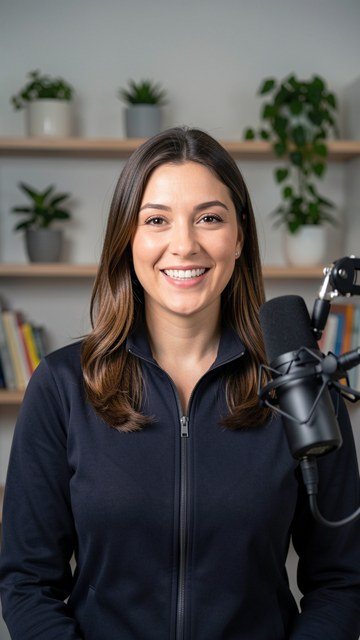
Presenter in a studio, 9:16 framing
9:16 talking-head framing: the starting point of a reel with word-by-word captions and cards in the upper third.
Cover: it's over, it's the end of an era
Cover of the video tutorial that accompanies the kit. The translated transcript, the quick guide and the method are in docs/.
Roadmap

Where the kit is and where it's going

The kit brings together the editing pipeline, the skills from the original and the method from the tutorial. The next steps are examples and styles in Portuguese.

Done
Translation and neutralizationDocumentation, working guide and tutorial transcript in PT-BR; simulated presenter photos; synced skills and 406 validated cards.
Done
motion-showreel skillBrought over from the original kit (Sep 2026) and translated: showreels cut to the music, with free music and SFX and the hero object via the Kling subscription; Kie.ai and ElevenLabs as paid options.
Done
Method and recipesThe five steps, the speech-anchored prompt, one recording in three styles, folder sizzle, product video and the reference โ†’ skill loop, in docs/METODO.md and docs/PROMPTS.md.
Next
Complete example in PortugueseA lesson recording edited end to end with the kit, with VERIFY.md and a reference render.
Later
New styles in the libraryINEMA dark amber, whiteboard and course style as card styles, with tokens, DESIGN.md and previews.