PTENES
Work kit · humans direct, agents execute

Your agent’s specification on one page

Seven fill-in templates in your browser, with nothing to install: enter a real company process and get a page that a technology team can build from, plus a prompt to rehearse the agent in an AI chat first.

A professional facing a clipboard with a process blueprint
What it is

The course method, ready to reuse for each process

The course AI Work Architect teaches you to redesign a process so humans direct and agents execute. The kit is the reusable part: the seven artifacts produced by the course, as forms that generate the specification automatically.

🧩 Seven blocks, one page

Process and outcome, six-link map, long-horizon request, orchestration chain, context inventory, quality checklist, and permissions matrix. Once you fill them in, the specification is assembled.

🔎 Gaps detected right away

The kit points out what’s missing before you hand it off: an outcome written as “spreadsheet sent,” with no approval point; permission with no owner; a loose matrix; context stuck in someone’s head.

🎭 Simulated rehearsal

One button builds the prompt with the specification included. Paste it into an AI chat: it plays the coordinator, follows the matrix, applies the checklist, and reports what’s missing.

How it works

From today’s process to the page that takes shape

Everything runs in your browser. Data stays in the page’s local storage and isn’t sent to any service. You can export a file to save or move to another computer.

Process and outcome→ 6-link map→ Request→ Chain→ Inventory→ Quality worksheet→ Permissions matrix→ Specification + test
1

Fill in

Each block has a one-line tip with the course rule and fields with real examples. The tables (chain, inventory, worksheet, matrix) expand with a button.

2

Generate

The text specification appears at the bottom of the page and updates with every keystroke. Copy it, print it to PDF, or download it as .md.

3

Test and revise

Describe a fictional case, copy the test prompt, and paste it into the chat. Each gap that comes back becomes a new row in one of the blocks.

Prerequisites

A browser and a real process

Nothing to install. For the simulated rehearsal, any AI chat that accepts long text (ChatGPT, Claude, Copilot).

Current browser

Chrome, Edge, Firefox, or Safari. It works on mobile, but the tables are easier to use on a computer.

# open the app
https://inematds.github.io/kit-arquiteto-agentes/

A selected process

A process that repeats every week, involves more than one person, and whose errors cost money or customers. If you’re unsure, take lesson 1 of the course.

# the course, if you want the complete method
https://inematds.github.io/pffia/

Fictional data for the test

The specification contains no customer data. The battery case uses made-up names and values: chat is a service outside the company.

# example case
Cliente Ferragens Sol, sem compra há 120 dias,
último produto: 40 sacos de cimento em maio
User guide · step by step

From a blank page to a tested specification

A 30- to 60-minute session for the first process. The next ones take half as long.

1

Open the kit and load the example for your area

The “load example by area” selector fills in the seven blocks with a complete case: sales (customer reactivation), healthcare (appointment confirmations and insurance claim denials), accounting (document collection and compliance obligations), or law (deadline tracking). When you load one, the “area” is marked, and the kit points out its specific gaps, such as patient data being out of reach in healthcare or a court deadline that always requires a human in law. Read the generated specification, then “reset” and select your area.

abrir https://inematds.github.io/kit-arquiteto-agentes/  # → load an example by area → read the specification → clear it → area: yours
2

Blocks 1 and 2: process, result, and the six links

Write the result to say what the person on the other end will know or have. In the decisions, start each line with R (rule) or J (judgment). The kit warns you if the result is just “spreadsheet sent” or if no decision has an R/J.

Decisões
R · cliente tem cobrança em aberto? não abordar
J · vale exceção de prazo para este cliente?  # J stays with the person
3

Block 3: the long-horizon request

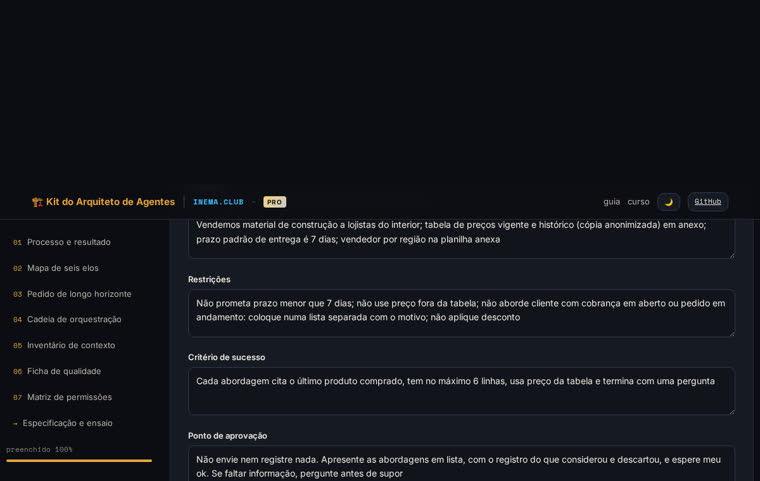
The five pieces translate the map: the objective is the result, context and constraints come from rule decisions, the criterion is the verification, and approval is where exceptions and judgment come in. Without a criterion or approval, the kit flags a gap.

Ponto de aprovação
Não envie nem registre nada. Apresente em lista, com o registro
do que considerou e descartou, e espere meu ok.  # a cheap mistake doesn’t become an expensive one
4

Block 4: the chain

One specialist per type of work, between two and five. For each one, list the tool and system it can access, with the question “is there a service endpoint?” (yes, no, ?). Write the coordinator’s rules and what the verifier checks.

+ especialista  # fewer than 2 or more than 5 → the kit warns you
Levanta a lista e o histórico · buscar no cadastro · cadastro de clientes · porta: sim
5

Block 5: the context inventory

One line for each piece of information the agent needs. In the “accessible” column, select the reason if it isn’t accessible: in someone’s head, format, no service endpoint. These lines appear in the specification as work to do before the agent.

+ linha
Catálogo atual · na cabeça do estoque · conversa · não: na cabeça de alguém · Jorge
6

Blocks 6 and 7: quality and permissions

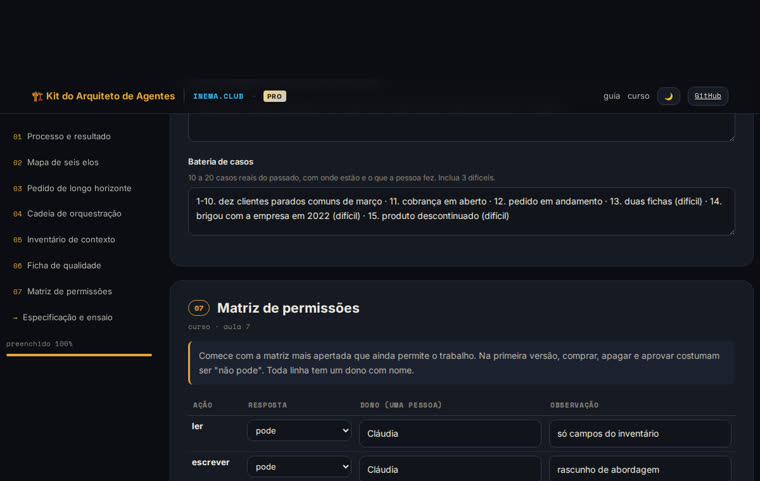
Observable conditions, each in one band (tolerable, blocking, prohibited). Keep stopping and calling separate, with no more than three reasons to call. In the matrix, the seven actions come prefilled with the standard first-version ladder; adjust them and assign an owner to each row that isn’t “not allowed.”

Matriz  # read/write: allowed · change/send: with approval · buy/delete/approve: not allowed
enviar · com aprovação · dono: vendedor da região
7

Generate, test, revise

Read the list of gaps below the specification and resolve what you can. Describe a fictional case, copy the rehearsal prompt, and paste it into the chat. Each item in the “what’s missing” list becomes a new line in one of the blocks. Run it with three cases: a typical one, a difficult one, and the exception.

copiar prompt com a especificação  # paste into ChatGPT / Claude / Copilot
baixar .md · imprimir / PDF · exportar (.json)  # save or take it to another computer
Examples

The kit with the example loaded

A customer reactivation case for a building materials distributor, the same through line as the course.

Block 7, permissions matrix, with all seven actions and owners filled in
Block 7: the permissions matrix with the first-version ladder and one owner per row.
One-page specification generated by the kit, with the list of gaps
The generated specification and the list of gaps: three lines of context still stuck in someone’s head.
Roadmap

What’s here and what’s coming

The kit is deliberately simple: one page, no account, nothing running outside your browser. The profession-specific workbooks (healthcare, accounting, law) use the kit’s presets as a through line.

v1 · today
Seven blocks, specification, gaps, and rehearsalLocal saving, export/import .json, copy/print/download .md, four examples by area (sales, healthcare, accounting, law) with area-specific gap rules, light/dark theme.
v1.1
Multiple processes in the same browserSwitch between saved specifications (the ten critical processes from lesson 8) without exporting and importing.
v1.2
Structured case batteryCase table with expected outcomes and a “passed/stopped/failed” column for each rehearsal run.