Instagram · Reels · Carousel

Anyone who comments the word gets a real guide

You choose the word, the topic, and where the content comes from. The tool publishes a free resource page and prepares replies you can paste into the comment, direct message, and story.

lead-comenta banner: a comment becomes a guide
At a glance

lead-comenta creates the “free guide” page you promise when you write “comment WORD and I’ll send it” in a post. It’s for people who publish a Reel or carousel with that invitation and need the resource ready before posting. You provide the word, topic, and a source (a web page or your own text file). The tool writes a short guide with 4 to 7 steps using only what’s in the source, publishes the page on GitHub Pages (GitHub’s free service for hosting pages), and prepares the replies. It doesn’t send messages on its own: for now, you paste the reply into the direct message yourself. To use it, you need Python 3, Claude Code, and a GitHub account. Today the page and the replies come out in Portuguese.

What it is

Your free resource, ready before you post

One page per word, with checked content and written replies. You just review and respond.

The six steps: word, source, guide with 4 to 7 steps, published page, ready-made replies, and you respond

📄 One page per word

Each word gets its own address, such as .../paginas/agente/: a title, who it’s for, 4 to 7 steps, one caution, and a link to the full resource. It works well on a phone and has a copy button for sample text.

🔒 Only what’s in the source

Claude writes the guide using only what’s on the page or in the file you provided. It doesn’t make up numbers or tools. If the source has little content, the guide will be short. You review it before publishing.

✍️ Replies ready to paste

For each word, the tool creates a respostas.md file with three texts: a comment reply (without a link, because Instagram tends to hide comments with links), a direct message with the link, and story text.

How it works

From comment to published page

One command creates everything; you review and publish it. Claude Code writes the text in the background (claude -p), using your subscription. No paid API key is used.

Word + topic→ Source (link or file)→ Guide with 4 to 7 steps→ Page + respostas.md→ You review→ git push → page is live→ You reply by direct message

What about automatic direct messages?

That feature isn’t available yet. lead-comenta doesn’t message anyone: you (or someone on your team) open the direct message from the person who commented and paste the ready-made text. The options for automating messages are described in DECISAO-DM.md (in Portuguese) and haven’t been chosen yet.

Requirements

What you need on your computer

A Linux or Mac computer (on Windows, use WSL, the Linux environment that runs inside Windows). You type the commands in the terminal, the computer’s text screen.

Python 3

This is the programming language used to write the tool. You don’t need to install any extra packages. Check if it’s already installed (on Mac, if needed: brew install python; on Ubuntu: sudo apt install python3).

python3 --version

Claude Code, signed in

It writes the guide. Install it from claude.com/claude-code, open it once with claude, and sign in to your account. It needs a paid Claude plan (Pro or higher). Then check:

claude --version

git, gh, and a GitHub account

git downloads and publishes the project; gh is GitHub’s terminal program. Your page is hosted with GitHub Pages on your account. The publishing file (.github/workflows/pages.yml) is already included in the project.

Ubuntu or WSL

sudo apt install git gh

Mac

brew install git gh

If Ubuntu says it can’t find the gh package, follow the instructions at cli.github.com.

User guide · step by step

From the word to your first published guide

Copyable commands, in order. Do steps 1 and 2 once; do steps 3 to 7 once for each word.

1

Download the project and try it

Download the tool and list the words that already exist. If you see the AGENTE line (the included example), it’s working.

git clone https://github.com/inematds/lead-comenta ~/lead-comenta
cd ~/lead-comenta
python3 lead.py lista
2

Create your GitHub copy (once)

The pages need to live in your account. First, sign in to GitHub from the terminal. The --scopes workflow option gives permission to upload the file that publishes the pages. The command asks four questions. Answer like this:

  • Where you use GitHub: GitHub.com
  • Protocol: HTTPS
  • Authenticate git with your account: Yes
  • How to sign in: Login with a web browser; copy the code shown, press Enter, and paste the code on the page that opens.
gh auth login --scopes workflow

The first time, git also asks for your name and email to record who made each change. Replace these with your own:

git config --global user.name "Your Name"
git config --global user.email "you@example.com"

Find your GitHub username; it appears on the screen. In the next block, replace YOUR-USERNAME with it. The first command creates your repository (the project folder on GitHub), the second enables GitHub Pages for it, and the third uploads the project.

gh api user -q .login
gh repo create lead-comenta --public --source . --remote mine
gh api -X POST repos/YOUR-USERNAME/lead-comenta/pages -f build_type=workflow
git push mine main

Finally, tell the tool your page address so the correct link appears in the replies. This export stays in effect until you close the terminal. To avoid repeating it, add the same line to the end of ~/.bashrc (on Mac, ~/.zshrc).

export LEAD_BASE_URL=https://YOUR-USERNAME.github.io/lead-comenta/paginas

Your copy includes the INEMA AGENTE example, which still points to INEMA’s address. Keep it as a reference or delete the paginas/agente folder and the "AGENTE" section from the palavras.json file.


3

Choose the word and the source

  • Word: the same word you ask people to comment in your post. One word, 3 to 14 letters or numbers, with no spaces. It becomes uppercase and gives the page its name.
  • Topic: the subject of the post, in one sentence.
  • Source: where the content comes from. It can be a public web page or your own text file (.md or .txt). Keep the file outside the project folder, in your home folder (~): everything inside the project folder goes to GitHub, which is public. To create the file, open a text editor (in the terminal: nano ~/my-material.md), paste the content, and save it (in nano: Ctrl+O, Enter, then Ctrl+X). Check that the source covers the same topic as the post.
4

Generate the page

Replace PROMPT, the topic, and the source with your own. The screen shows "lendo a fonte…" (“reading the source…”), then "escrevendo o guia (claude -p)…" (“writing the guide (claude -p)…”), and finally "pronto" (“done”) with the page path. It may take a few minutes.

python3 lead.py nova PROMPT --tema "5 prompts to answer customers" --fonte ~/my-material.md

The “View the full resource” button links to the source if it’s a web link. To point it somewhere else (your course or website), add --link-final https://seu-site. If the word already exists, the tool will tell you. To overwrite it and generate it again, add --refaz.

5

Review before publishing

Open the page in your browser and read every step. Nothing should go beyond what the source says. The first command is for Linux; on Mac, replace xdg-open with open; on WSL, with explorer.exe. If anything is wrong, improve the source and generate it again with --refaz.

xdg-open paginas/prompt/index.html
6

Publish

Upload the page to your GitHub copy. It should be live in about 1 minute (the first time, it may take a few minutes; progress appears in the Actions tab of your repository) at https://YOUR-USERNAME.github.io/lead-comenta/paginas/prompt/.

git add -A
git commit -m "guia PROMPT"
git push mine main
7

Reply to people who commented

Show the three ready-made texts. For each person who commented: first send them the message with the link by direct message; then reply to their comment with the short text (“I sent it by DM!”). The story text is a reminder for people who haven’t commented yet. The same texts are saved in paginas/prompt/respostas.md.

python3 lead.py resposta PROMPT
Example

The page for the word AGENTE

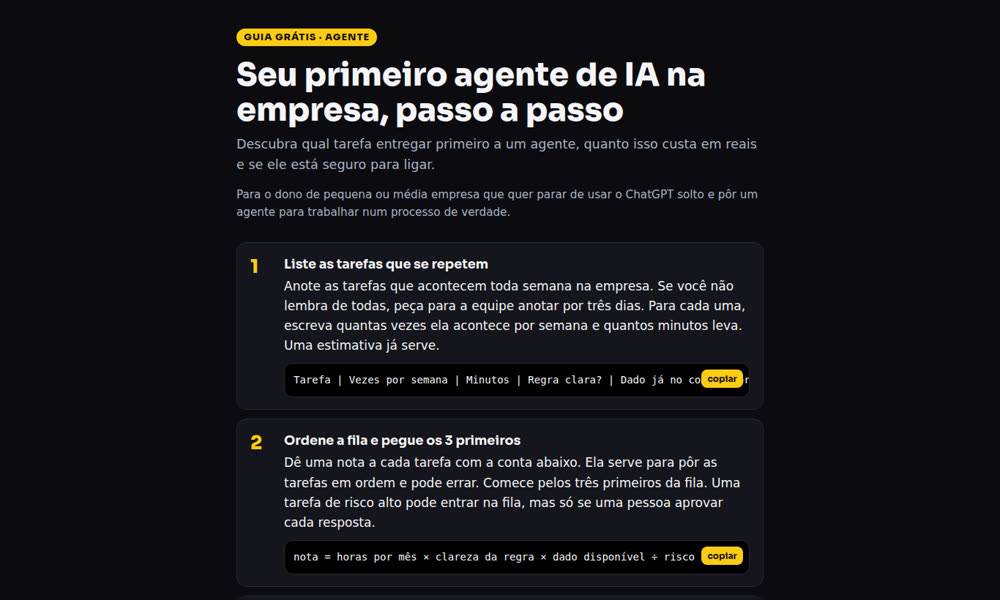
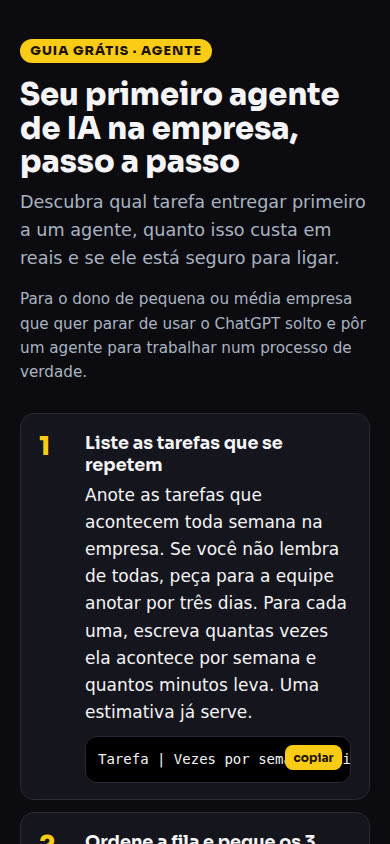
Topic: “6 boring tasks an AI agent can already do for you (small business),” using a free INEMA kit as the source. The tool produced a 6-step guide. Open the page.

AGENTE guide page on a computer: title, who it’s for, and the first steps
On a computer: the word label, title, who it’s for, and numbered steps.
AGENTE guide page on a phone, with the copy button on the first step
On a phone, as someone opens it from a direct message.

Today the tool writes the guide page and these replies in Portuguese. And the respostas.md file created with it:

## Resposta pública no comentário (curta, sem link: o Instagram esconde comentário com link)
Te mandei no direct! Se não chegar, me chama por lá com AGENTE.

## Mensagem direta (DM)
Oi! Aqui está o guia grátis que você pediu: **Seu primeiro agente de IA na empresa, passo a passo**
https://inematds.github.io/lead-comenta/paginas/agente/
São 6 passos curtos. Qualquer dúvida, responde aqui.

## Story (texto)
Quem comentou AGENTE: o guia já está no seu direct. Ainda não comentou? Vai no post e comenta AGENTE.
Limits and next steps

What it does now and what it doesn’t do yet

A clear view of what’s ready and what still needs a decision.

1.0 ✔
Page, replies, and trackingA guide with 4 to 7 steps using only the source, a GitHub Pages page, ready-made replies, and the word list in palavras.json.
Limit
The source sets the limitsThe guide only includes what’s in the source. A thin source means a short guide.
Open
Automatic message sendingThis isn’t available yet. The options (reply by hand, use a direct message automation tool, or use the official Instagram API) are listed in DECISAO-DM.md, awaiting a decision.