Claude Code skill Β· Reels Β· TikTok Β· Shorts

From topic to published short, in a single conversation

3-act script, voice or avatar, real b-roll, vertical editing, quality gate and social scheduling β€” locally with a GPU or on a VPS with just APIs.

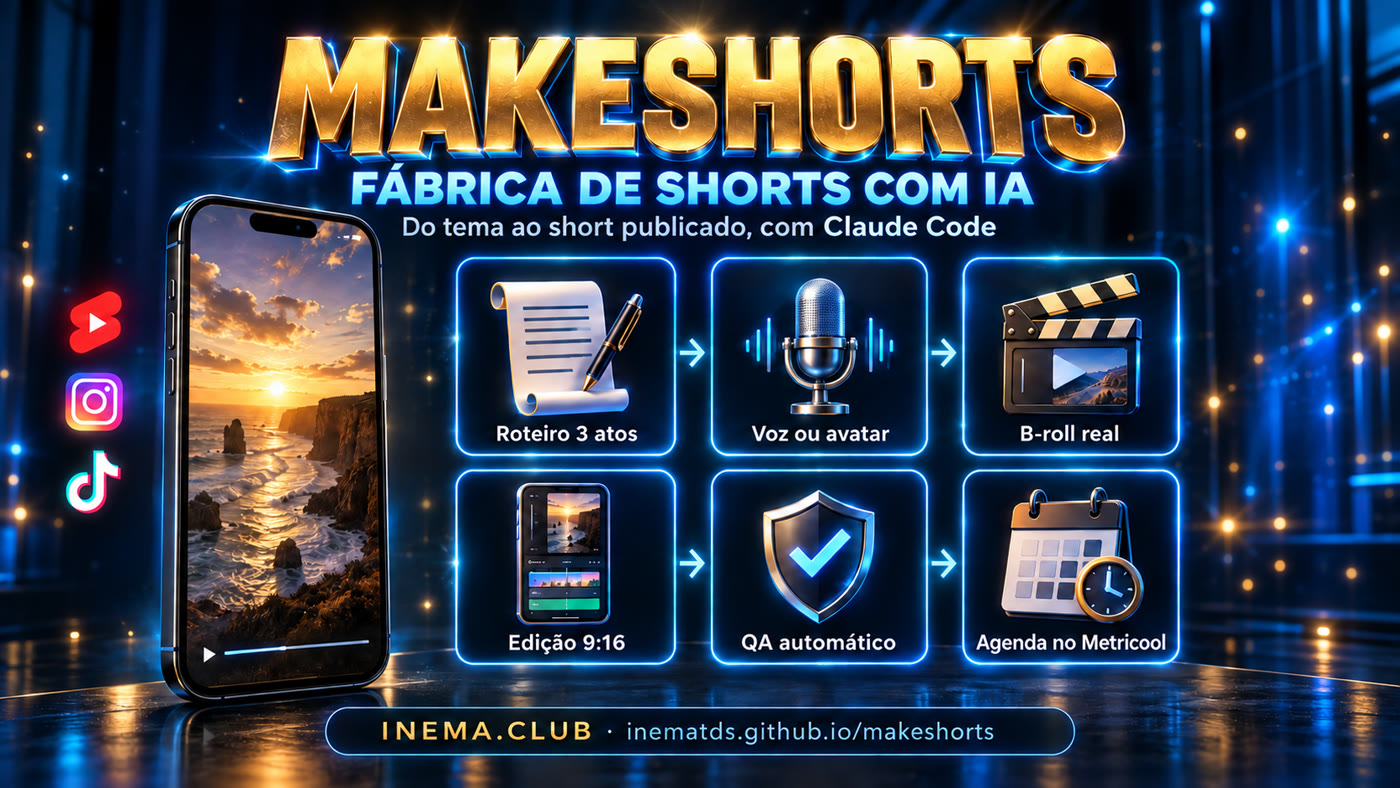
MakeShorts banner: AI shorts factory
What it is

A shorts factory inside Claude Code

MakeShorts is a skill (/makeshorts) with supporting scripts. You hand it a topic, a link or a recorded clip; it gives you back the short edited, checked and ready to schedule.

🧩 Orchestrates, doesn't reinvent

Calls what already works: HyperFrames for editing, inemavox for voice and transcription, HeyGen for the avatar, Metricool for scheduling.

πŸ“ Fixed formula, variable topic

Every short follows hook β†’ secondary hook β†’ 3 steps β†’ CTA. Three script versions for you to choose from.

βœ… Measured quality

Nothing ships without passing qa_short.py: duration, 1080x1920 format, loudness, visual hook, hashtags and CTA.

How it works

Seven stages, one request

Each stage can run on its own (the 5 modes) or in sequence. The ones that cost money or publish always ask for your confirmation.

Script→ Voice or avatar→ Real b-roll→ 9:16 editing→ QA→ Schedule→ DM funnel
1

Script

~75 words, hook within 3 s, facts only from official sources, 3 versions.

2

Voice / face

Human recording, synthetic voice (local or API) or HeyGen avatar.

3

Editing

Visual on top, face below, word-by-word captions, punch-in and SFX.

4

Publishing

Caption with a benefit, up to 5 hashtags, AI label, Metricool.

Prerequisites

What the machine needs

The basics run on any Linux or Mac. GPU and inemavox are optional: without them, switch the backends to APIs (see VPS).

Claude Code

Via subscription. It's where the skill runs.

npm i -g @anthropic-ai/claude-code

ffmpeg + Python + Node

Editing, QA and the HyperFrames engine.

sudo apt install -y ffmpeg python3 nodejs

HyperFrames

HTML β†’ MP4 editing engine, runs on CPU.

npx hyperframes skills update general-video
User guide Β· step by step

From clone to first short

Five steps. The commands are the repository's own, ready to copy.

1

Clone and install

The installer checks dependencies, links the skill at ~/.claude/skills/makeshorts (symlink) and creates the .env.

git clone https://github.com/inematds/makeshorts.git && cd makeshorts
bash scripts/instalar.sh --check   # check only
bash scripts/instalar.sh           # install the skill + create .env
2

Choose the backends in .env

One line per stage. On the GPU machine everything stays local; elsewhere, switch to APIs.

MS_VOZ=inemavox          # inemavox | edge | openai | elevenlabs
MS_TRANSCRICAO=inemavox  # inemavox | groq | openai
MS_IMAGEM=flux-local     # flux-local | nenhuma
MS_AVATAR=nenhum         # heygen | nenhum
MS_PUBLICAR=metricool   # metricool | manual
3

Ask for the short

In Claude Code, call the skill or just talk naturally. It figures out the mode from your request.

/makeshorts 3 scripts about Claude Code on your phone          # script mode
/makeshorts edit ~/Downloads/clip.mp4                         # human mode
/makeshorts short about https://tool-site, no recording        # AI mode
/makeshorts 5 shorts on this week's free AI tools, one a day at 6pm # batch mode
4

Pass the QA gate

The skill runs it automatically, but you can run it by hand. Exit 1 fails and tells you what to fix.

python3 .claude/skills/makeshorts/scripts/qa_short.py final.mp4 --caption legenda.txt
βœ… duraΓ§Γ£o        31.2s
βœ… formato        1080x1920
βœ… loudness       -14.1 LUFS
βœ… gancho visual  sem tela preta no inΓ­cio
βœ… hashtags       4: #claudecode #ia #automacao #shorts
RESULTADO: APROVADO
5

Schedule and turn on the funnel

The skill builds the caption and hashtags, shows you everything and only schedules on Metricool after your "go ahead". The "Comment AI" CTA becomes an automatic DM with the link (ManyChat, set up once).

/makeshorts publish final.mp4 to Instagram, TikTok and Shorts at the best time
Running on a VPS

No GPU, no local voice: only the .env changes

No code changes. The voz.py and transcreve.py scripts read the backend from .env and call the right API.

πŸ–₯️ GPU machine

Voice: inemavox (chatterbox, local cloned voice) Β· Transcription: inemavox (Whisper large-v3) Β· Image: flux-local.

☁️ VPS

Voice: edge (free), openai or elevenlabs (your cloned voice) Β· Transcription: groq or openai Β· Image: nenhuma (real b-roll).

# typical VPS .env
MS_VOZ=edge
EDGE_VOZ=pt-BR-AntonioNeural
MS_TRANSCRICAO=groq
GROQ_API_KEY=gsk_...
MS_IMAGEM=nenhuma

# test each piece
python3 scripts/voz.py --texto "Voice test." --out /tmp/t.mp3
python3 scripts/transcreve.py --in /tmp/t.mp3 --outdir /tmp/tr

Full Ubuntu install, reference costs and use with tmux: docs/vps.md (in Portuguese).
Examples

The script formula

A 30-second short, act by act. Same backbone, any topic.

0–3s

Hook

"There's a new AI that edits your videos on its own."

3–8s

Secondary hook

"And it's not CapCut. Not Premiere either."

8–28s

Delivery

"Step 1… step 2… step 3…" β€” straight to the point, no fluff.

28s+

CTA

"Comment AI and I'll send you the step by step."

Roadmap

What exists and what's coming

We only describe what's in the repository; the rest is a plan.

v1 βœ…
Skill + QA + backendsOrchestrator skill, script formula, visual spec, qa_short.py, voz.py and transcreve.py with local/API backends, VPS guide.
Next
Automated b-roll captureDedicated script to record website and GitHub scrolling at 1080x960, ready for the top half.
Later
Metrics dashboardWeekly report from Metricool: which hooks and topics brought the most views and comments.