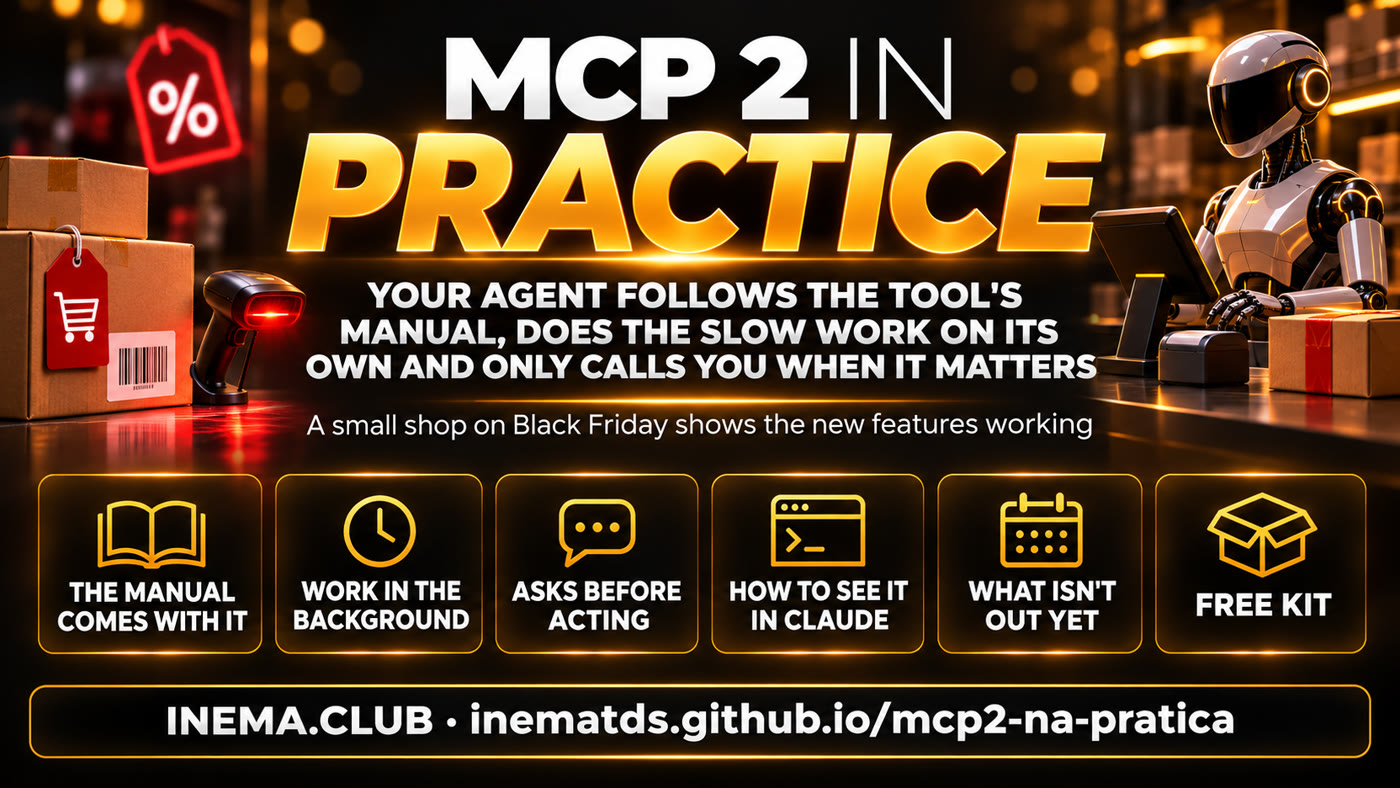
MCP 2in practice: The AI already knows the rules.Works on its own.Asks before deleting.
Today you explain the rules to the AI in every conversation, sit waiting for long jobs and hope it doesn't delete anything. On Nov 24, 2026, MCP, the standard that connects AI to software, got three new pieces that fix this. This kit shows all three working in a pretend little store.
Free and open kit. No coding: you paste a request.
You need Claude Code or Codex on your computer. Your real store stays out of it.
Actually run on Nov 26, 2026: 17 tests passed and Claude Code showed the store manual.
In one sentence
You want to let the AI work in your software without explaining everything again, without waiting around and without fearing it will do something that can't be undone. MCP is the open standard that connects AI to the rest of your software, and on Nov 24, 2026 it got three new pieces. This free kit shows each one in a pretend little store with 300 products:
the manual that comes along: the tool brings its usage rules, and the AI opens them only when needed;
background work: a long job becomes a task and the conversation doesn't freeze;
the question before acting: before publishing or deleting, the tool stops and asks you.
"MCP 2.0" is just a nickname going around: everything here comes from Anthropic's announcement and the official MCP blog.
Who it's for
Do you use agents or build connectors?
You use agents like Claude
Claude shows up already knowing the tool's rules, because whoever made the connector writes the manual (and you get improvements automatically). Long jobs don't freeze the conversation, and nothing irreversible happens without your yes.
See it in Claude Code: /mcp and /skills
You build connectors (MCP servers)
A small, open server in Python, with all three pieces working, tests against the real server and the official name of each piece. The limits are written down, so you don't discover them in production.
The technical details are in the README
How it works
The little store's Black Friday sale, in 4 steps
This is what the kit's demo does. You ask in step 1, check in step 3 and answer in step 4.
1
You ask for the sale
You
Ask for "20% off all products".
The AI
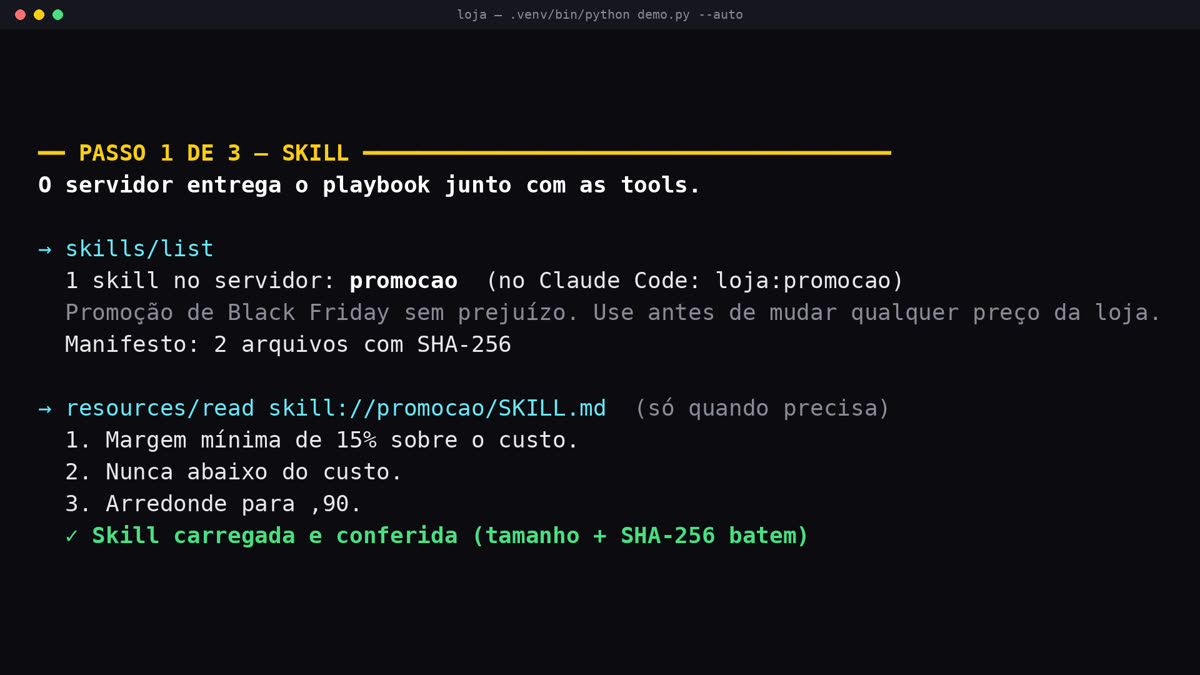
Opens the manual that came with the store: 15% minimum margin, never below cost, prices ending in .90.
WhyYou don't need to repeat the rules: they come with the tool.
2
The store works in the background
The store
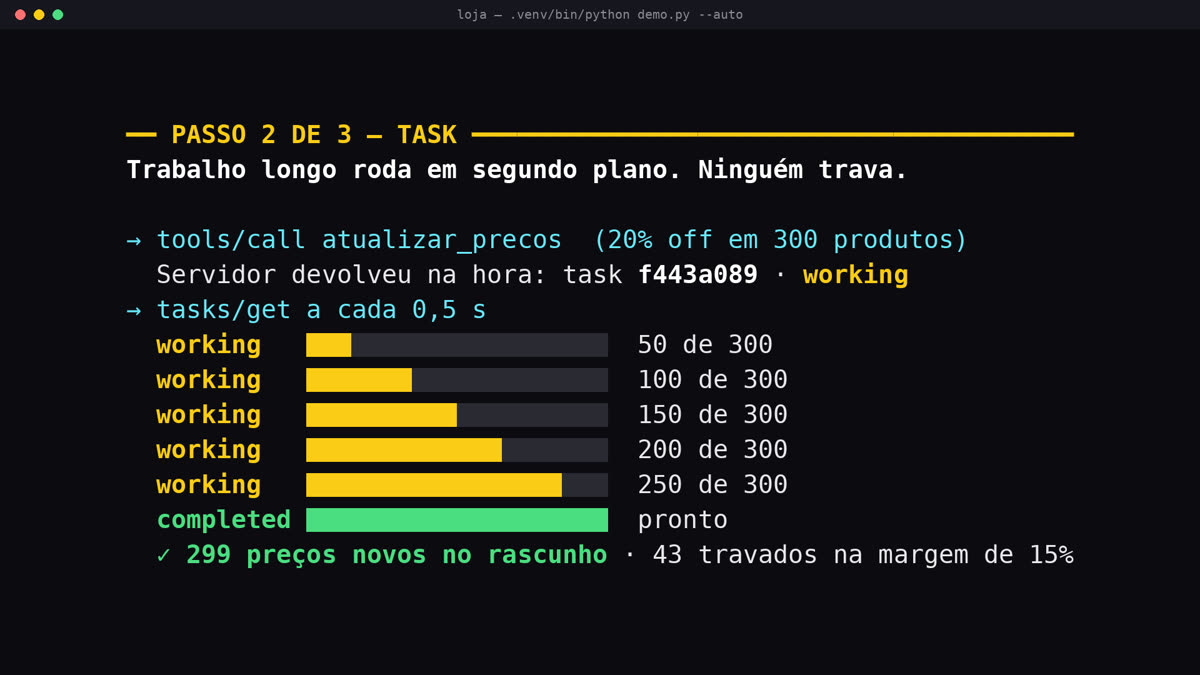
Replies right away with a ticket and calculates the 300 prices behind the scenes, showing progress.
You
Keep chatting. The conversation doesn't stall.
WhyA long job doesn't need to keep you glued to the screen.
3
The draft is ready
The AI
Reports: 299 new prices in the draft; of these, 43 stopped at the minimum margin.
You
Check the result before anything goes to the store.
WhyThe manual's rules held back the discount where it would cause a loss.
4
The store asks before publishing
The store
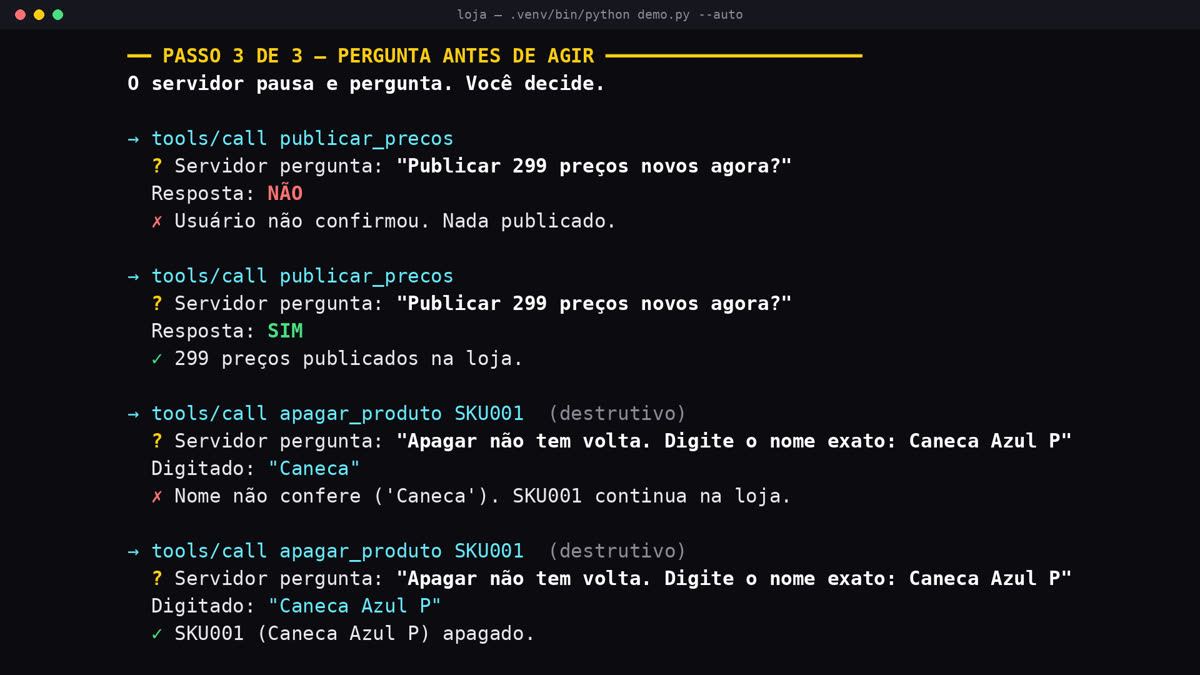
"Publish 299 new prices now?" With "no", nothing changes. To delete a product, it asks for the exact name.
You
Answer yes or no.
WhyWhat can't be undone only happens with your yes.
The 3 pieces
Three new MCP pieces. Each one solves a fear.
Each piece has its own animated flow, an everyday example and the real screen from the demo.
Manual included
Piece 1
The manual that comes along
So you don't repeat the rules in every conversation.
Besides the buttons the AI can press, the connector delivers the manual on how to use them, written by the tool's own company. The AI opens the manual only when needed, so it takes up almost no room in the conversation. In the kit, the demo checks that the manual arrived complete.
Like in everyday life: an appliance that comes with the manual in the box, and the maker swaps the manual for you when it gets better.
Public beta
Claude Code v2.1.331 or newer
~30 tokens until used
Official name: Skills over MCP (the server lists and delivers the manuals). In real tools: Shopify, HubSpot, Atlassian.
Real demo output, step 1.
Background
Piece 2
Background work
So a long job doesn't freeze the conversation.
Instead of leaving you waiting, the tool replies right away "got it, I'm working" and carries on by itself. The AI checks from time to time and tells you when it's done. In the kit, progress shows up 50 at a time until "done". One product kept its old price: with the minimum margin, there was no real discount to give.
Like in everyday life: dropping your clothes at the cleaners and getting a ticket. You leave and come back to ask if they're ready.
Available
Pro, Max and Ultra
Team and Enterprise: rolling out gradually
Official name: Tasks (the server returns a ticket and the client asks how it's going). In a real tool: ZoomInfo.
Real demo output, step 2.
Asks first
Piece 3
The question before acting
So nothing irreversible happens without your yes.
In the middle of the job, the tool stops and asks you. It can be a question right in the chat (yes or no, type the name) or a link to the company's website, for a password or payment: that way sensitive data doesn't go through the chat. In the kit, to delete, typing just "Caneca" is not enough: it has to be "Caneca Azul P".
Like in everyday life: the bank that asks you to confirm the amount before a transfer.
Available
Pro, Max and Ultra
2 safety locks in the kit
Official name: Elicitation (question in the chat or link to the website). In real tools: Supabase shows the cost before creating a paid project, Railway asks before removing a service and GitHub requires you to type the repository name before deleting it.
Real demo output, step 3.
Manual included
Background
Asks first
Solves
repeating the rules in every conversation
the conversation stuck waiting
the AI doing something irreversible
Status
public beta
available
available
In the kit
store manual checked
300 products, progress 50 at a time
yes/no to publish; exact name to delete
Official name
Skills over MCP
Tasks
Elicitation
Key questions
Three questions before you trust it
1What isn't out yet?
The kit says clearly what is beta, what already works and what is only announced.
Not released yet
File uploads
Sending a PDF, spreadsheet or image straight to the tool without filling up the conversation. The announcement says "coming soon", with no date. The kit only mentions it. (Official name: File Uploads.)
Public beta
The manual that comes along
It may change. It needs Claude Code v2.1.331 or newer and doesn't work in screenless mode (claude -p). On by default in the Pro, Max and Ultra plans; in Team, after the administrator turns it on; in Enterprise, "coming soon".
Available with limits
Background work and asking first
Both already work in the Pro, Max and Ultra plans. For Team and Enterprise, they are still being rolled out gradually.
And the name: "MCP 2.0" is not official. It's what people following along call the Nov 24, 2026 leap; the standard is still called MCP.
2Where does this come from? Official sources, not rumors
The kit only uses what was published by Anthropic and the MCP project. Why a standard matters: without it, every link between an AI and a program is custom-made; with MCP, one connector works for any AI that speaks the standard.
Anthropic announcement (Nov 24, 2026)
Introduces the four new features: the included manual, background work, asking first and file uploads (not released yet). It says there are already more than 10,000 connectors for Claude and more than 700 million monthly downloads of the MCP programming kits.
Official MCP blog
The "MCP turns 2" post (November 2026) and the one about joining the Agentic AI Foundation (Dec 9, 2025): ChatGPT, Claude, Cursor, Gemini, Microsoft Copilot and Visual Studio Code support MCP, and no company owns the standard.
No. The store is made up: 300 pretend products, and the server works on a copy of them. It doesn't connect to any real store. The kit is there so you can see the three pieces working from the inside; the new features themselves arrive through the official connectors of the tools you already use.
Before installing
What you need, and what the kit doesn't promise
You need
Claude Code or Codex on your computer.If you only use Claude in the browser, you can read the guide and see the connectors on claude.ai.
Claude Code v2.1.331 or newer,to see the manual that comes along (in /skills).
Python 3.10 or newer.Your AI checks and sets it up; you don't install anything by hand.
The kit doesn't promise
To touch a real store.The 300 products are made up and live in a copy.
To save the tasks.They stay only in the server's memory: if it restarts, they're gone.
To show everything inside Claude Code.There the kit proved the connection and the manual; the background work and the question were proven by the demo and the tests.
To upload files.That piece hasn't been released yet.
Hands-on
To get started, paste this request into your AI
Open Claude Code or Codex on your computer. They are AIs that work with files and run programs, always asking permission.
Paste the request. The AI reads the kit, explains what's new in plain language and tells you which of your connectors benefit from it.
Say yes only to what makes sense. Watch the demo run the three steps; at the end, ask the AI to remove the store server.
The text is for the AI. You don't need to understand it, just copy it.
Read the repository https://github.com/inematds/mcp2-na-pratica (the README, COMO-LIGAR-NO-CLAUDE.md and the exemplos folder). Explain to me in plain language the three new MCP features it shows (the manual that comes along, background work and the question before acting) and what hasn't been released yet. Then look at the MCP connectors I already use and tell me which ones gain something from these new features. Don't install or change anything before my yes. With my yes: download the kit into a separate folder, create the environment, run the tests and the demo, connect the "loja" server to Claude Code in the local scope, show me where to see /mcp and /skills and, at the end, tell me how to remove it.
Just want to use it, without installing anything?
There is no online version of the kit. The new features themselves already arrive through the official connectors in Claude, on the Pro, Max and Ultra plans. The kit is for seeing all three working from the inside.
Where to download?
There's no installer: it's a folder with a small Python program, which your AI sets up. Download the kit ZIP or see the repository.
Are you technical or building connectors?
The official names (skills/list, taskId, elicitation), the commands to run it and connect it to Claude Code, what the SDK does and the limits are in the README and in COMO-LIGAR-NO-CLAUDE.md.
Video
Understand it in a few minutes
The kit video is on the way. In the meantime, the animated flows of the 3 pieces show what happens at each step.
Measured
Actually run, on Nov 26, 2026
~30tokens: the room the store manual takes up in Claude Code until it's used (measured in /skills).
299of 300 new prices calculated in the background in the demo, with 43 held at the 15% minimum margin.
2safety locks: "yes or no" to publish and "type the exact name" to delete. Wrong answer, nothing happens.
17tests run against the real server, and all of them passed.
In Claude Code v2.1.332 (Linux), the "loja" server connected, showed "3 tools · 2 resources · 1 skill", and /skills listed loja:promocao. What this proof doesn't show: we didn't ask the model to run the tools there, so the background work and the question were proven by the demo and the tests. Full outputs in the repository: saida-demo.txt.
Questions
Questions before you start
Do I need to code?
To see it working, no: you paste the request and your AI does the rest. To build your own connector, yes, and the Python kit is the starting point.
Does it cost anything?
The kit is free and open (MIT license). The new features in Claude are turned on in the Pro, Max and Ultra plans, which are paid.
Does it work with other AIs?
MCP is open: ChatGPT, Claude, Cursor, Gemini, Microsoft Copilot and Visual Studio Code support it. Each AI app needs to accept the new pieces; the kit was tested in Claude Code. The demo runs by itself in the terminal, with any agent.
What is a connector?
It's the piece that links the AI to a program (the store, the database, the company's tool). In MCP it's called a server. With the standard, one connector works for any AI that speaks MCP.
Can I send a file to the tool?
Not yet. File uploads were announced as "coming soon", with no date.
And you: which tool would you like to stop and ask you before acting?
Come tell us and get this and other free kits at inema.club, right on the web.