PTENES
the collection showcase Β· INEMA MUSICAVIDEO V2

A music video collection on the web β€” without hosting a single byte of video.

The videos, tracks, and covers live in a public Hugging Face dataset, and the browser fetches them directly from there. This app loads only the text, which makes it lightweight and inexpensive, and keeps it running even if the media goes down.

Project cover for musicavideo-pub
What it is

The split that makes the numbers work

Video is the most expensive file to serve and the hardest to host. Here, it never passes through this app: only text travels during deployment, while the heavy files stay where they’re already served for free with range requests.

🎞️ The media never passes through here

Videos, tracks, and covers come from the public dataset Inematds/musicavideo-acervo. O resolve/main from Hugging Face responds range request β€” the video bar navigates without any proxy, and the app pays nothing for bandwidth or storage.

πŸ“ The text travels in the build

Titles, lyrics, prompts, and the shot breakdown come from a manifest.json versioned in the repo itself. The page renders without a network trip β€” if Hugging Face goes down, it still shows the entire collection as text.

🎡 One song, one page

Suno delivers two tracks per request, and each one is a different song: same lyrics, another interpretation. Each track has its own card, address, and page, with the video opening at the top.

How it works

Approval is the only human action

This app is the final stop on a path that starts in the local musicavideo dashboardβ€”the workbench where you listen, compare, and send things to the trash. Uploading isn’t what happens when something is finished: finished production is work material; a showcase is a choice.

local dashboard→ approves→ publica-hf→ dataset on Hugging Face→ manifest.json in the repo→ this app→ audience likes→ back to the dashboard
Prerequisites

Node and a dataset. Everything else is optional.

The app runs without any keys β€” the collection is public and the manifest is in the repo. Only likes need infrastructure, and without it, the showcase still works as a showcase.

Node.js

Next.js 16, no database and no service dependencies for rendering. The manifest is imported as a module.

npm install
npm run dev   # http://localhost:3000

The collection on Hugging Face

Public dataset, written by the musicavideo publica-hf. Switching datasets is a variable.

# optional β€” this is already the default
HF_REPO=Inematds/musicavideo-acervo

Redis REST β€” only for likes

It's the only writing from the audience, which is why the app isn't pure static HTML. The app keeps running without these variables: the counter disappears and the click isn't persisted.

KV_REST_API_URL
KV_REST_API_TOKEN
# in Vercel: Storage β†’ Upstash Redis
User Guide Β· step by step

From disk to public address

Commands with musicavideo run in the pipeline repo (inematds/musicavideo); those for npm, here.

1

Approve in the local dashboard what goes to the showcase

One click on the card marks the production in the estado.json. Unchecking doesn't delete what was already uploaded β€” it creates a removal task, executed on the next publication.

musicavideo painel          # the workbench, on :5400
musicavideo nuvem MVD#113   # or the button on the card
2

Publish β€” one command that ends with the push

Uploads to Hugging Face only what changed, write the manifest.json in this repo and commits it. Running it twice in a row doesn't reread anything.

musicavideo publica-hf --dry   # what would be uploaded, without uploading it
musicavideo publica-hf         # upload, write the manifest, commit, and push
musicavideo publica-hf --manifesto  # metadata only, without resending media
3

Run the showcase on your machine

The manifest is imported as a module, so the app works offline for all textβ€”the media is what needs a network connection.

npm install
npm run dev     # :3000
npm run build   # make sure all pages build
4

Find a song by its address

Each production has a number β€” the same one as the bot that generated it β€” and each track has its own page. The old route by production still responds and redirects to the approved version.

/mvd-113-v1   # track 1 of that production
/mvd-113-v2   # track 2 β€” same lyrics, different interpretation
/mvd-113      # old route: redirects to the approved version
/analises     # what analisevideo measured from real videos
5

Enable likes (optional)

In Vercel: Storage β†’ Create Database β†’ Upstash Redis, connect it to the project, and redeploy β€” the variables are injected automatically. The token must be the one for writing; read-only access won't work.

# the counter is an atomic INCR per track: MVD#113:1
curl "$URL/api/like?mvd=mvd-113:1"
6

Bring likes back to the dashboard

It's the only audience signal the project has. Without that feedback, it would die here.

MUSICAVIDEO_PUB_URL=https://sua-vitrine.vercel.app \
  musicavideo likes   # turns into β™₯ on each card in the local dashboard
7

Publishing app changes means git push

Import this repo into Vercel with Root Directory ./. From then on, the webhook handles the rest β€” there's no manual deploy step.

git push   # deploy happens through the git β†’ Vercel webhook
Examples

The showcase, running

Screenshots of the live app, with today's collection: 27 productions and 53 songs.

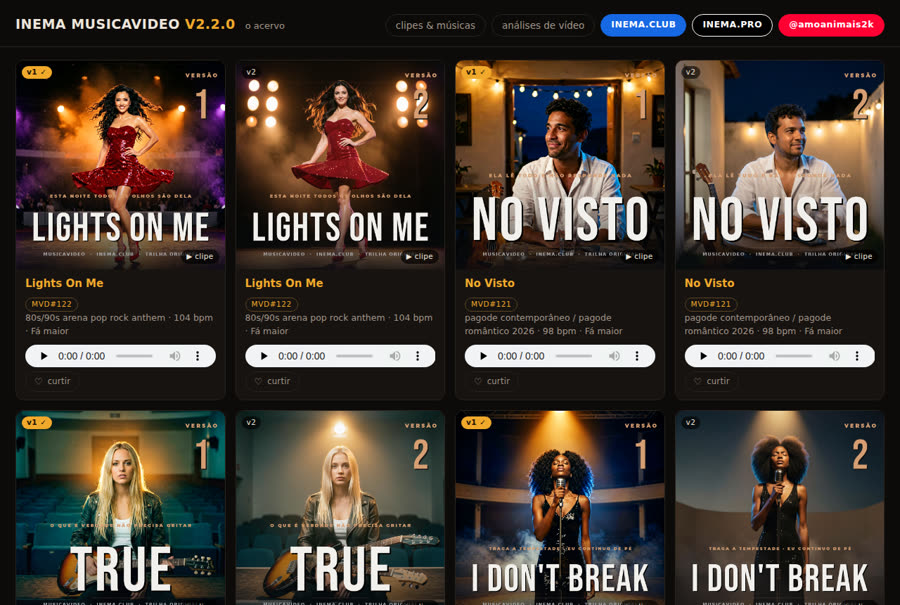
The collection grid, one card per song
The grid: one card per music, not per production. Each cover shows the version badge, who approved it, and a β–Ά clip badge when there's a video.
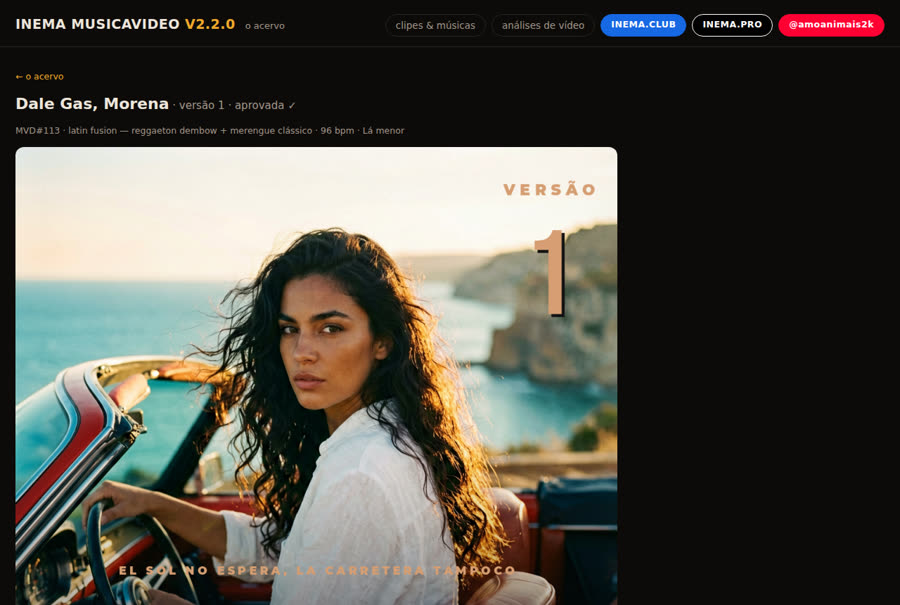
A song page, with the video at the top
A song page: the video opens first and fills the width. Below are the cover, audio, like, and the prompt that generated it all.
Roadmap

Where it is and what’s missing

V1 (the local dashboard) and V2 (this showcase) are two apps, not a migration: turning this one off doesn't turn the other off.

live
Public collection, one page per songMedia on Hugging Face via range requests, manifest in the repo, stable route by bot number (MVD#113), and the video analytics tab.
live
Publish with one commandO publica-hf uploads only what changed and ends at git push from the manifest β€” no uploading gigabytes only for the showcase to keep displaying the previous version.
is missing
Likes enabledThe code is ready, and the app runs without it. You still need to create the Redis REST database and redeploy β€” see step 5.
is missing
Likes come back automaticallyToday, the musicavideo likes runs manually. A like comes in when the audience clicks, not when it's approved β€” it's the only part of the cycle without a natural human action to trigger it.