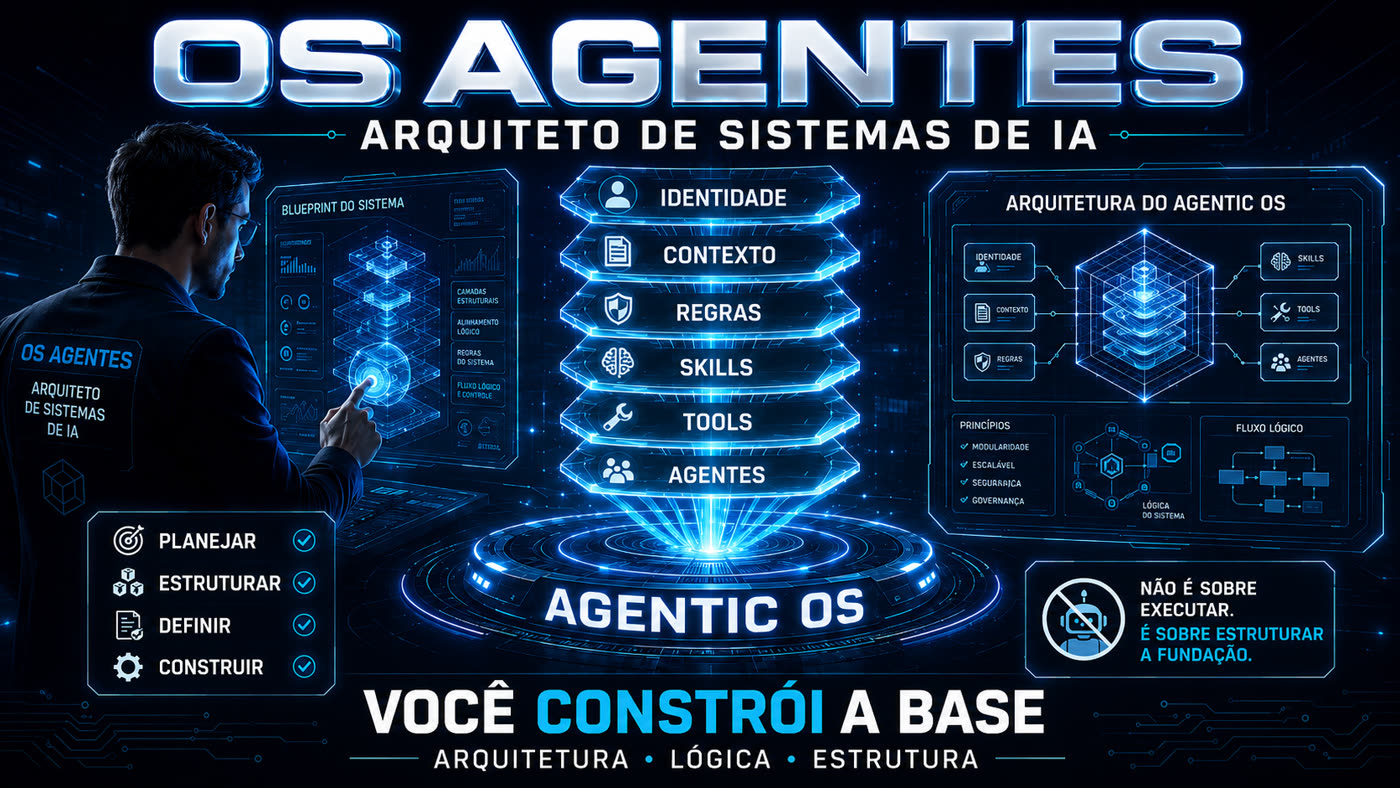
You build the foundation. It guides you through building.
A skill that guides you, step by step, as you build your own agentic OS—a file system that understands your goal and works for you. You don’t need to know how to code; the skill handles the technical work, and you make the decisions.
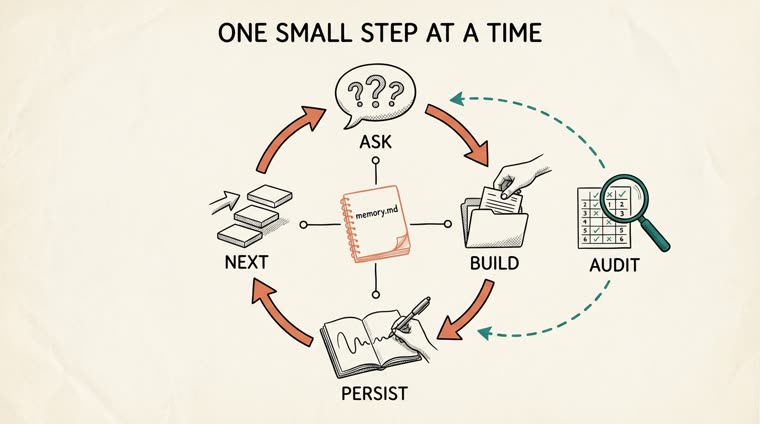
You tell it where you want to go, it asks two or three questions in plain English, then builds the actual files and folders for you, explaining what it did and why. Session after session, it remembers exactly where you left off.
🧭 One layer at a time
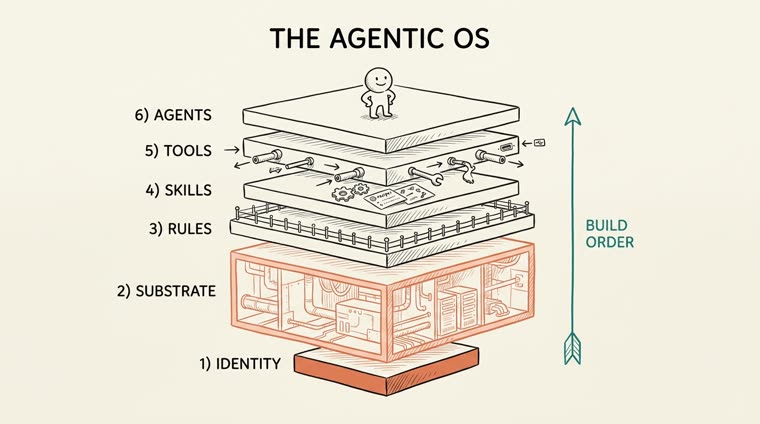
Trains you in Identity, Substrate, Rules, Skills, Tools, and Agents in the order that actually works—never all at once.
🗣️ No jargon
Speak like a person. When a technical term is unavoidable, it comes with a short sentence and an everyday analogy. Assume you've never opened a terminal.
🔒 Protects sensitive information
If you mark a field as private, it never writes that value to the folder—instead, it stores a reference that doesn’t identify you.
How it works
The six layers, from the ground up
Identity is the foundation, the Substrate (the behind-the-scenes setup) is the largest layer, and Agents sit at the top — only after everything beneath them is solid. The core idea: an agentic OS is mostly plumbing. The AI model is the cheap 20%.
#
Layer
What it is
Lives in
1
Identity
The soul. Who this OS is, who it serves, and what it refuses to do.
CLAUDE.md
2
Substrate / Context
The inner workings. The distilled knowledge the OS runs on. The largest layer.
substrate/
3
Rules & Hooks
The guardrails. Black-and-white restrictions and automatic reflexes.
rules/
4
Skills
The verbs you’ve mastered. Repeatable tasks packaged to run the same way every time.
skills/
5
Tools / Connections
The connections outward. Read-only, well-scoped connections to real data sources.
tools.md
6
Agents
Roles with judgment that orchestrate skills.
agents/
Question→Builds→Persists in memory.md→Next→Audit when you ask
Prerequisites
That’s all you need
No dependencies, no API keys, no build step.
Claude Code installed
The coach runs as a skill inside Claude Code.
# install the skill in any foldercp -r skills/os-agentes ~/.claude/skills/
A folder for your OS
Any empty (or existing) folder you want to turn into an agentic OS.
A goal in mind
It doesn't need to be polished. The skill refines it with you through the first few questions.
User guide · step by step
From installation to the first audit
Real commands, in the order you would normally use them.
1
Install the skill
Copy the skill folder to Claude Code's skills directory.
cp -r skills/os-agentes ~/.claude/skills/# available from any folder
2
Start a brand-new OS
Inside the folder you want to turn into an OS, state your goal in plain language.
/os-agentes start Quero nunca mais perder o prazo de um cliente
3
Move forward layer by layer
With each answer you give, it builds the actual files and explains what it did.
/os-agentes next# move on to the next unfinished layer and train it
4
Jump straight to a specific layer
When you already know what you want to train first.
The progress map comes straight from memory — nothing gets lost between sessions.
/os-agentes status
6
Audit the entire OS
Scores all six layers against your goal and gives you the three highest-leverage next steps, written in OS-AUDIT.md.
/os-agentes audit
7
Ask for help anytime
Explains what the skill does and shows all available commands.
/os-agentes help
Real example
A photographer who stopped missing deadlines
/os-agentes start Eu vivo perdendo prazos de cliente e quero nunca mais atrasar uma entrega — the skill asks three short questions (who it’s for, the question they’d like to ask, one always and one never), writes the Identity, and in the next step builds a deadline tracker that responds right away: "Couple B, the full gallery expires in 3 days." One audit identifies your three next priorities—including a security one: write rules/never.md before a public backup exposes client data.
The six layers, from the ground up: the foundation supports the top.The training loop: ask → build → persist → next → audit.
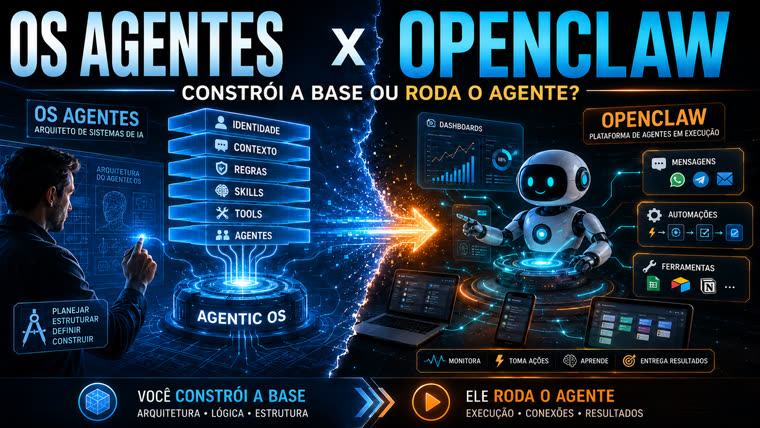
THE Agents × OpenClaw
You build the foundation. It runs the agent.
The Agent OS doesn't carry out tasks for you day to day — it structures the foundation (Identity, Substrate, Rules, Skills, Tools, Agents) that a reliable agent can run on. An execution platform such as OpenClaw takes that ready-made foundation and puts it to work: messages, automations, tools, dashboards.
The #1 mistake is jumping straight to execution without a foundation — that's why the Agent OS comes first.
Foundation
THE AgentsArchitecture, logic, and structure — Identity, Context, Rules, Skills, Tools, Agents.
Execution
OpenClawRuns the agent on top of the foundation: messages (WhatsApp, Telegram, email), automations, tools, and dashboards.