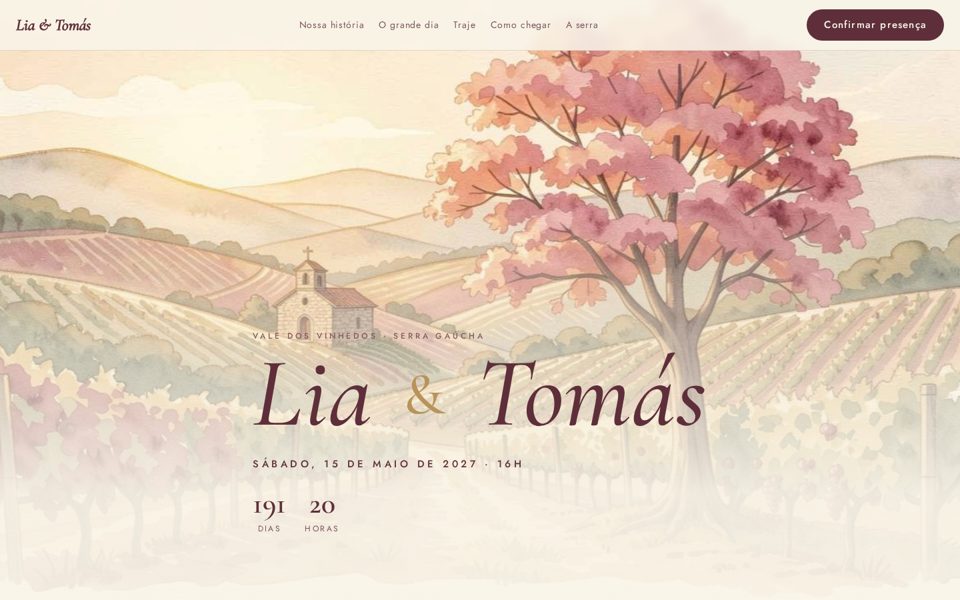
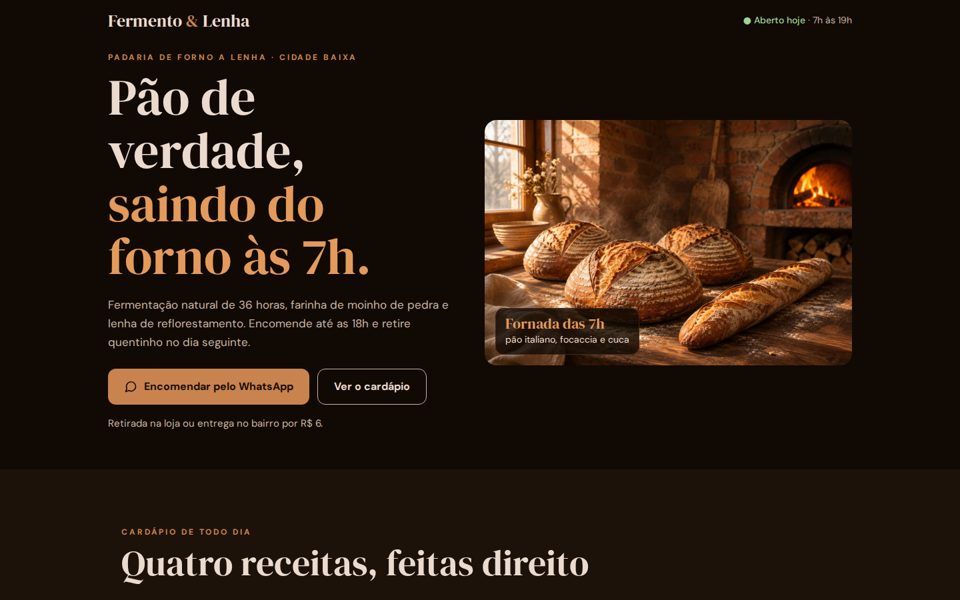
Gather 2 to 5 images you like. AI asks questions before generating, creates every image in the same style, builds the page with motion, and checks that visitors can still find the button.

site-inspirado is a toolkit with a Claude Code skill for creating websites that don’t look “AI-generated.” You provide reference images (from Pinterest, a printed invitation, or a photo of a shop), and AI asks questions and does research before generating anything. It then measures the images’ style, creates website images in the same style with Codex, and builds the page with transitions. Finally, an automated test checks that the main button is visible and the page works on mobile. You’ll need Claude Code, Codex signed in with your subscription, Python, and Node.
Asking for “a beautiful website” gets you the same old site. Providing references, answering questions, and reviewing the result gives you a site with its own character.
A set of questions for each type of website (event, business, service, portfolio). Anything the person doesn’t answer is researched or left out.
estilo.py extracts a palette from the references and calculates contrast. Every image gets the same style prompt and the same references.
portao.js opens the page on desktop and mobile and blocks sites that hide the button, break, or ignore “reduce motion.”
No stage starts until the previous one is approved. The guide below has 8 steps: install, these 6 stages (steps 2–7), and publish. The “gate” is the final automated test.
Works on Linux and Mac (on Windows, use WSL, Linux inside Windows). Everything runs on your machine. Images are generated by Codex through your subscription, with no API key.
Generates images with image_gen (Codex’s image generator), using your references. The script runs Codex without asking for confirmation for every image (--dangerously-bypass-approvals-and-sandbox): use it in a folder dedicated to this website.
npm i -g @openai/codex # install (if you get EACCES, run with sudo) codex login # sign in with your ChatGPT account codex login status # check status
Measures the palette and creates the contact sheet.
python3 -m pip install --user pillow # if you get “externally-managed-environment”: sudo apt install python3-pil # Ubuntu/Debian brew install pillow # Mac python3 -c "import PIL" # check
Install Node first (npm, which Codex uses, comes with it) and Git. Node runs the gate (which opens the page in a headless browser installed in step 1). gh publishes in step 8.
brew install node git gh # Mac (or nodejs.org) sudo apt install nodejs npm git gh # Ubuntu/Debian node -v # 18 or later gh auth login # gh: cli.github.com
T is your website folder (one per site). S is the skill folder. You do steps 3 and 6 by chatting with Claude Code; the rest are terminal commands.
Clone the repository and link the skill to Claude Code. $T is the my-site folder inside your home folder: put references in my-site/refs. S and T only apply in the terminal where you created them; in a new terminal, run the third line again. Run these lines in the folder where you want to store the toolkit (the ln -s command uses the current folder).
git clone https://github.com/inematds/site-inspirado mkdir -p ~/.claude/skills && ln -sfn "$PWD/site-inspirado/skill/site-inspirado" ~/.claude/skills/site-inspirado S=~/.claude/skills/site-inspirado; T=~/my-site; mkdir -p $T/refs cd $S/scripts && npm install && npx playwright install --with-deps chromium && cd - # gate browser
Use 2 to 5 images in $T/refs/: things you already have (an invitation, logo, or shop photo) and inspiration (on Pinterest, search for “bakery website” or “watercolor wedding website”). An image showing what you DON’T want can help too.
Open Claude Code in your website folder (so the brief, style, and page all stay in $T) and use the prompt that changes the result. Questions for each type of website are in referencias/perguntas.md; answers go into $T/BRIEF.md, along with the type: negocio (the site exists to prompt an action, such as ordering or booking) or visual (an event or portfolio site, where more motion can work).
Steps 4, 5, and 7, the cp command in step 6, and step 8 are terminal commands: open a second terminal (leave Claude Code in the first) and run the S=…; T=… line from step 1 there first.
# in the terminal cd $T && claude
# inside Claude Code (type this; it is not a terminal command) /site-inspirado "I want a website for my bakery. Before generating anything, ask me everything you need to know and research what this type of website usually includes."

The script measures the reference palette and suggests background, text, and accent colors using calculated contrast. The style prompt describes technique, lighting, and colors in English: ask Claude Code to write it based on your references. The number followed by “:1” is the text-to-background contrast ratio (below 4.5:1 is hard to read).
python3 $S/scripts/estilo.py $T/refs $T/estilo.json --prompt "honest food photography, warm window light, dark walnut, terracotta" # estilo.json: 12 colors · background #110a04 · ink #ebdbce (14.55:1) · accent #b07042
Write $T/plano.json (one line per image: nome, subject prompt, largura, altura). Each image uses the first 2 references (in alphabetical order: give the most important ones names like 1-invitation.jpg) and the first generated image as a model (the “anchor”), so the series looks consistent. At the end, you get folha.jpg, a contact sheet with all images side by side: review it and redo anything that looks out of place. You don’t need to write the JSON by hand: ask Claude Code to “write plano.json from the BRIEF,” or copy pilotos/padaria/plano.json and replace the text. Each image takes about 1 minute and uses your Codex subscription quota.
# plano.json: [{"nome": "hero", "prompt": "bread cooling on the table", "largura": 1536, "altura": 1024}, ...] python3 $S/scripts/imagens.py $T/plano.json $T/estilo.json $T/img --refs $T/refs python3 $S/scripts/imagens.py $T/plano.json $T/estilo.json $T/img --refs $T/refs --so croissant # regenerate one
Ask Claude Code: “build the page using the BRIEF, style, and images.” It designs a page for the subject and marks the main button (the CTA, the action you want visitors to take) with data-cta. Transitions come from movimento.js, using attributes: data-revela makes a block appear when it enters the screen, data-parallax makes an image move more slowly than the page scrolls, data-intro creates a short opening, data-conta counts a number, and data-contagem shows the days until a date. All motion stops when the system requests “reduce motion.” Copy movimento.js into your website folder before running the gate:
<section data-revela="cortina"> … sobe | surge | lado | zoom | cortina <img data-parallax="0.12"> <b data-conta="36"> <div data-intro="900"> <a data-cta href="#encomendar">Encomendar</a> <script src="movimento.js"></script> cp $S/runtime/movimento.js $T/
It opens the page at 1440×900 and 390×844, with and without “reduce motion.” Use the --tipo specified in the BRIEF (negocio or visual). If the result is FAIL, the list explains why: paste it into Claude Code and ask for a fix. Publish only when it says PASSA.
node $S/scripts/portao.js $T/index.html --tipo negocio --fotos ~/fotos-portao # portão visual × conversão — meu-site (negocio) # desktop CTA na 1ª tela: sim · CTAs: 3 · peso 0.22 MB · erros 0 # celular CTA na 1ª tela: sim · CTAs: 3 · peso 0.55 MB · erros 0 # desktop+reduzir … · celular+reduzir … # PASSA
$T is already a complete static website. Push it to GitHub and enable GitHub Pages, GitHub’s free web hosting (or use Vercel or your client’s hosting). Replace YOUR_USERNAME with your GitHub username. The site will be available at https://YOUR_USERNAME.github.io/my-site/ a few minutes later.
# don't publish client data or drafts: printf 'BRIEF.md\nrefs/\nfotos/\nimg/.codex/\nimg/folha.jpg\n' > $T/.gitignore git config --global user.name "Your Name"; git config --global user.email "you@email.com" # first time only cd $T && git init -b main && git add -A && git commit -m "site" gh repo create my-site --public --source=. --push gh api -X POST repos/YOUR_USERNAME/my-site/pages -f "source[branch]=main" -f "source[path]=/"
Same toolkit, different references. Names, places, and prices are fictional. Click to open.
A website exists to help someone do something. The type in the BRIEF determines how much motion fits. The gate checks the button (above the fold within 1.5 seconds for business sites), page size, mobile layout, and “reduce motion.” The skill sets the rest of the motion dose (a short opening, sticky bar), which you can review in the gate screenshots.
Button above the fold within 1.5 seconds, no opening animation, sticky mobile bar, up to 3 MB.
# bakery PASSA
Opening animation up to 1.2 seconds, curtain, parallax, and countdown; the button can appear later, but it must be visible. Up to 8 MB.
# event PASSA
An opening that takes up one and a half screens, a button far below, and endless animation. This is the tests/ruim.html test.
# ruim.html NÃO PASSA: CTA fora da primeira tela animação rodando com "reduzir movimento"
Items marked as done are in the repository and have been tested.
bash tests/rodar.sh).