Skill for Claude Code and Codex

The top of the site becomes a film that moves with the scroll.

AI video chained frame by frame, with no jumps, and an animated graphic made in code in every section. With the Off, On and X-ray switch, which shows what is video and what is code.


Site em Movimento: the top of the site becomes a film that moves with the scroll
In short

Site em Movimento is a skill for Claude Code (and Codex) that builds a site whose top is a continuous video: the camera moves forward as the person scrolls the page. The video is generated by AI in short chained clips, and scripts check that there are no jumps between them. Below the film, each section gets an animation made in code that explains what it says. It is for anyone who wants an opening page that feels like a movie. You need Claude Code and, if you want real video, a video generator (Kling, Agnes, Kie or another); without a generator, it builds everything in code.

What it is

A process, not a template

Each site is designed from scratch. What repeats is the method, the scripts that check the work and the page engine.

The steps of Site em Movimento: references, keyframes, chained film, motion layer, critics and X-ray

🎞️ Film with no jumps

Each clip starts on the real last frame of the previous one. Scripts measure whether the generator respected the start and end frames and whether there is a hidden cut in the middle.

🔌 Any generator

Kling through the subscription, Agnes, Kie or your own (a command with start, end, prompt and output). Without a generator, the film becomes scenes in code.

🩻 X-ray

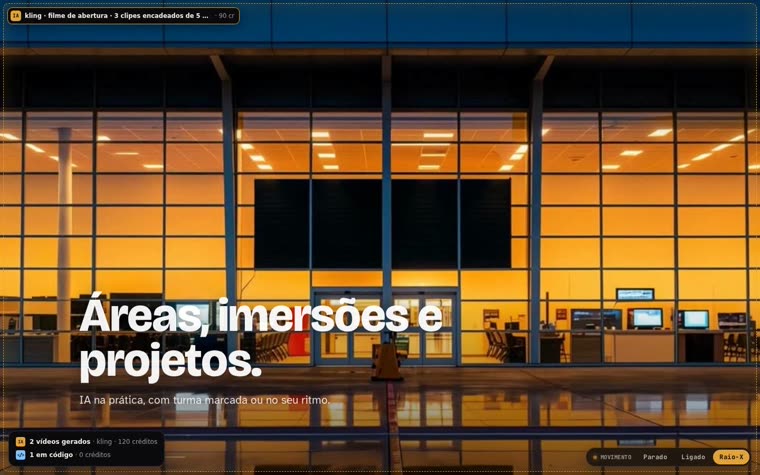
A switch in the corner toggles between Off, On and X-ray. In X-ray, everything that moves gets a label: AI video (with the cost) or code.

How it works

Seven steps, each with a gate

No step moves forward without passing its gate. The gates are scripts with no AI, at zero cost.

1 · References → bar→ 2 · Interview + budget→ 3 · Keyframes→ 4 · Chained film→ 5 · Page + motion→ 6 · Three critics→ 7 · Text + verification

Keyframes by approximation

Asking an image model to "move the camera" usually returns the same photo. The skill crops the center of the previous frame, enlarges it and only redraws the detail: the camera axis is guaranteed.

Measured gates

vetor.py checks the direction of the film before spending; fixacao.py measures whether the generator respected the frames; cortes.py and continuidade.py find cuts and freezes.

Critics that see pixels

Three critics with a clean context judge the captures, never the code: briefing, visual system and craft (against the reference, blind). The verdict is only PASS or FAIL.

Prerequisites

What needs to be on the machine

The video generator is optional: without it, the site comes out in pure code.

Tools

Claude Code (or Codex), ffmpeg, Python 3 with numpy and Pillow, Node 18+ with Playwright.

pip install numpy pillow
npx playwright install chromium

Video generator

One of the engines: kling (CLI through the subscription), agnes or kie (your own key) or custom (any command).

kling login        # once
kling account -q   # balance

Image generator

For the keyframes: a local server (flux2-klein) at no cost, or the generator you prefer.

curl localhost:8000/health
User guide · step by step

From the repository to the first site

Real commands. The skill drives everything from step 3 on; the commands below show what happens underneath.

1

Install the skill

Clone the repository and link the skill folder into Claude Code (and into Codex, if you use it).

git clone https://github.com/inematds/site-movimento ~/projetos/site-movimento
ln -s ~/projetos/site-movimento/skill/site-movimento ~/.claude/skills/site-movimento
bash ~/.claude/skills/site-movimento/tests/motores-contrato.sh   # 4/4 engines OK
2

Call it with your references

Gather 3 to 10 images or links to sites you admire, each chosen for a reason.

/site-movimento
I want a moving site about <subject>. The references are attached.
Read the references, interview me and use the kling engine.
3

Answer the interview and approve the budget

A single batch of short questions (subject, mood, the camera journey, sections, action, engine). Nothing is spent before your yes.

# Proof plan on Kling 720p: 3 clips + 1 loop = 120 credits (measured)
# Standard plan: 5 clips + 2 loops = 210 · Full: 7 + 4 = 330
4

Chained keyframes

The first keyframe comes from the prompt; the following ones, by approximation. The sheet shows whether any step turned the camera or stood still.

python3 $S/motores/imagem_local.py kf/kf01.png "<opening scene>"
python3 $S/scripts/kf_aproxima.py kf/kf01.png kf/kf02.png "<the scene closer up>" --fator 1.8
python3 $S/scripts/folha_kf.py kf/   # ok / OLHE / QUEBRA? / PARADO
5

The film, one clip at a time

Check the direction for free; then the film comes out in order, each clip starting on the last frame of the previous one.

python3 $S/scripts/vetor.py filme/roteiro.json          # PASS before spending
MOTOR=kling bash $S/scripts/filme.sh filme/                # fixacao + cortes on every clip
python3 $S/scripts/montar.py site filme/clipes/c1.mp4:0:-1 filme/clipes/c2.mp4:1:-1
python3 $S/scripts/continuidade.py site/frames 4      # PASS: a single movement
6

Page, critics and verification

The page uses the scroll engine and the motion switch. The critics judge captures; the text and the stutters go through gates.

bash $S/scripts/pacote-criticos.sh topo "http://127.0.0.1:8871/site/"
node $S/scripts/portao-texto.js site/index.html          # clean text
node $S/scripts/verificar.js jank "http://127.0.0.1:8871/site/"   # max < 50 ms
7

Use another video generator

Any AI plugs in through the custom engine. Test the frame pinning on the first clip before chaining the film.

export MOTOR=custom
export MOTOR_CMD='meu-cli --start {inicio} --end {fim} -p {prompt} --sec {segundos} -o {saida}'
bash $S/scripts/filme.sh filme/
Pilot

The INEMA events home with a film at the opening

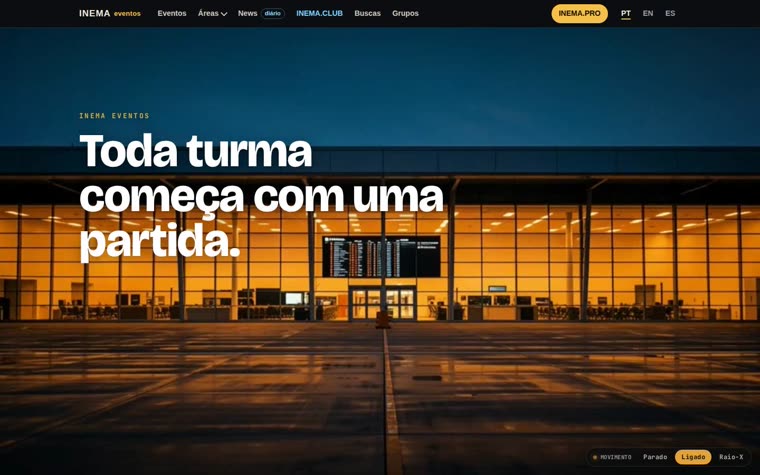
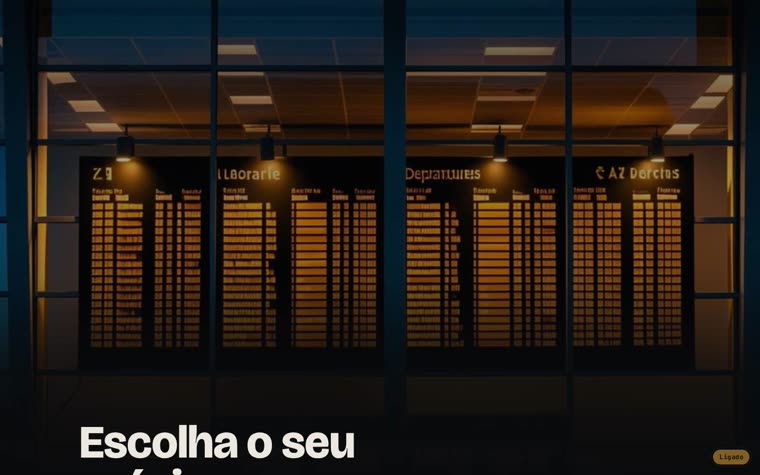
A test copy of the eventos.inema.pro home. The camera leaves the runway at dusk, enters the terminal and stops at the departures board, and the page's real board rises over the filmed one. Open the pilot.

Pilot opening: the terminal at dusk with the phrase Toda turma começa com uma partida
Opening: the film starts on the runway.
The page's real board rising over the filmed board
Handoff: the real board rises over the filmed one.
X-ray mode with labels over the film and the summary of videos and code
X-ray: what is AI video and what is code, with the cost.
Sheet with the pilot's four keyframes, from the runway to the board
The 4 keyframes, made by approximation.

Pilot numbers

Kling 720p, 5 s clips: 300 credits in total. 150 for the 1st version (3 clips + loop, one loop redone), 60 to remove the letters from the board (30 wasted: the letters were born in the keyframe, and the 1st redo started from a frame that already had letters) and 90 for the vertical phone film (3 clips at 9:16). Pinning between 0.91 and 0.997, zero cuts, 285 frames on desktop and 361 on mobile.

Six graphics in code

A frame that slides across the areas, a route with a plane in the schedule, a recording bar, a line that connects the four doors, files entering the folder and a plane that takes off in the footer.

What the critics caught

1st round: an empty news list, a faded final sentence, the switch covering content and the film not "landing" on the real board (fixed). 2nd round: garbled letters on the board and black bands while frames load. Both were fixed afterwards (board without letters, sparse frames loaded first and a poster instead of black), but they have not gone through a 3rd round yet. Still open: the colors inherited from eventos (yellow PRO block, salmon buttons).

Who does what

What can be handed to a smaller model (measured)

Same briefing for a fast, cheap model and for the strongest model. Details in 7-delegacao.md (in Portuguese).

Building with taste: top model

15 interface pieces judged blind: the smaller model had 2 of 5 approved, the top model 8 of 10. The smaller one passed every automatic test and got the visual identity wrong.

Judging: smaller model

The three critics run on both models gave the same verdicts and the same biggest difference, in under a minute each.

Rule of thumb

The smaller model judges and fixes; the top model creates. Ffmpeg, SSIM, cuts, assembly and captures stay with scripts, with no model.

Motion layer

20 ready-made pieces in the INEMA Motion Lab

Before inventing an animation, the skill looks in the catalog: ⌘K search, bento grid, playable 404, day and night, footers with physics, curtain, flower, map and block breaker, a menu that transforms, full-screen menu, a jumping navigation, holographic sticker, a mascot that follows the cursor, liquid dock, jelly buttons, a sign marquee, image trail, rotating gallery and a loader that reveals the page. All with X-ray.

Roadmap

Where it stands and what comes next

Only what was done is marked as done.

Done
Skill 1.0 + engines + pilotSeven steps, four engines with the same contract, Kling engine measured, public pilot on the events home.
Done
Delegation measurementBuilding and critics compared between the smaller model and the top model.
Done
9:16 film on mobileVertical keyframes taken from the horizontal ones (same axis), 3 Kling clips at 9:16 and montar.py --vertical. On a phone held upright the page uses frames-v/.
Done
Agnes measured1 clip with the same endpoints and prompt as Kling: it pins the ends (0.91), no cut, 80 s to render. But in the middle the place transforms (another hall, the board turns into a wall), while Kling kept the geometry. Good for short transitions, not for the continuous top shot.
Next
Kie measuredBuilt and tested against the contract, with no real clip yet.