Framework · Python with no dependencies
The agent is a tool. The center is the outcome.
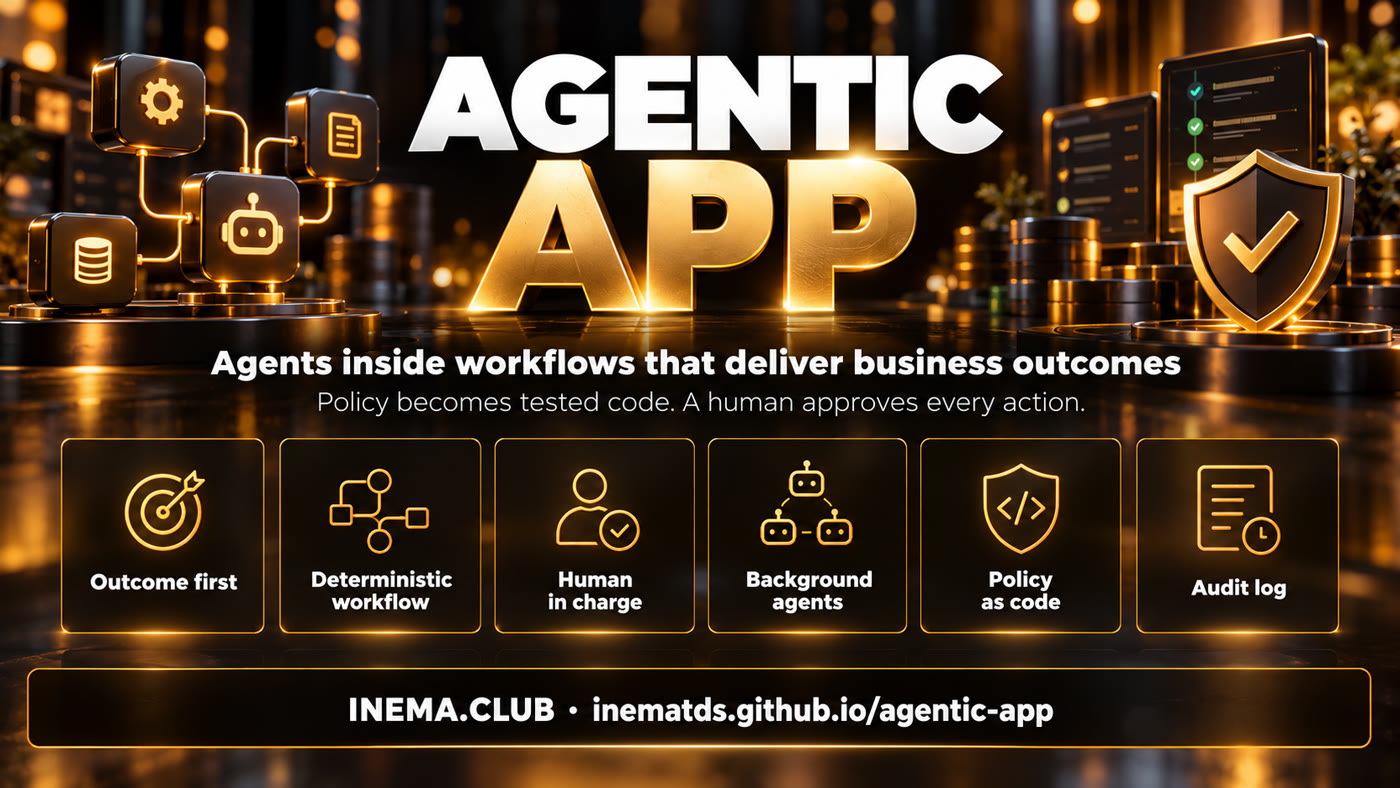
Build AI apps where the LLM runs inside a fixed workflow, a person approves every action and company policy becomes tested code.
Build AI apps where the LLM runs inside a fixed workflow, a person approves every action and company policy becomes tested code.
agentic-app is a Python framework for companies to build AI apps starting from a business outcome, not from the agent. It is for anyone who needs to put AI inside a real process (HR, people management, support) with control: the LLM runs inside a fixed workflow, every external action waits for human approval, rules with numbers become tested code and every run is recorded. It ships with a complete example app (manager coaching) and runs with just Python 3 installed, no key and no internet.
The starting question is not "which agent do we build?". It is "who decides what, and how do we measure whether it got better?". The agent comes later, as one piece of the process.
Each LLM use is one node among four others: context, code, condition and formatting. Same input, same output.
The workflow only proposes. The email waits in the queue until the person reads, edits and approves it. Everything goes to the audit log.
The vacation manual becomes functions with strict input and 13 policy tests. Change one number, a test breaks.
Each pillar has a file and at least one test. Use the list to review any AI app in your company, even if you do not use this code.
A canvas with the user, the decision and the success metric before thinking about an agent.
templates/canvas-resultado.md
Nodes context → code → condition → LLM → formatting. The model is chosen by the task, not by taste.
workflow.py · config.py
The panel button sends the input to the workflow and the result comes back on the same screen, as an editable draft.
painel.html · serve.py
Every external action goes through review, editing and approval. Sensitive fields, such as the recipient, stay locked.
acoes.py
They watch the data (overdue goal, late 1:1, falling engagement) and suggest next steps with a run button.
workflow proximos_passos
It classifies the question, loads only the right policy and gives the agent only that policy's tools. Search is left for open-ended questions.
policies/ferias.py
Roles allowed to run it, a service identity with minimal scope and an audit log with chained hashes.
seguranca.py
Manual, scheduled (Monday 08:00) and event-based (email received), declared in the workflow's own JSON.
gatilhos.py
An HTML and PDF report, generated per workflow, instead of a wall of text.
relatorio.py
The engine checks who asked, assumes the workflow identity, validates the input and runs the nodes in order. The output is validated JSON. Actions become proposals. One audit line per run.
profile (context, identity svc-rh) → category (LLM classifies: vacation, parental leave or other) → condition → data (code pulls the numbers out of the question) → agent (LLM chooses among the tools of THAT policy only) → explanation (code) → formatting.
team (context) → overdue goals (code) → any pending? (condition) → drafts (LLM writes one per person) → formatting validates and proposes 6 emails. None goes out before approval.
Nothing to install with pip. No API key. The tests block the network on purpose.
Linux, Mac or Windows.
# check
python3 --version
To download the repository.
git --versionOnly if you want to swap the fake LLM for a local model.
# optional
ollama list
The first four steps run the example. The others show what you swap for your company. The full walkthrough, with a rollout checklist, is in docs/PASSO-A-PASSO.md (in Portuguese).
104 checks, no network. The last line must be OK.
git clone https://github.com/inematds/agentic-app
cd agentic-app
bash tests/run.sh          # 104 checks, 0 failures → OK
Runs the 5 workflows: RBAC denying, drafts, approval with editing, HR assistant, the Monday 08:00 scheduled run, the email-received event and the report.
python3 -m agentic_app.demo
# generates saida/relatorio.html, saida/relatorio.pdf, saida/audit.jsonl
Switch person at the top (manager, HR, employee) and see what each role can do.
python3 -m agentic_app.serve --porta 8765
# http://127.0.0.1:8765  (only on your machine)
The script changes nine numbers in the manual, one at a time, and checks that some test breaks.
bash tests/prova_mutacao.sh # 9× "quebrou (bom)" → OK
The user, the decision, today's cost and a success number with a deadline. No metric, no start.
cp templates/canvas-resultado.md docs/meu-canvas.md
One constant per number in the document, one test per limit (the exact value and its neighbor).
cp templates/politica_modelo.py agentic_app/policies/reembolso.py
cp templates/test_politica_modelo.py tests/test_reembolso.py
Context → code → condition → LLM → formatting. The external action goes in propor_acao, with the editable fields. Move it into your app's workflows/ folder only after you register the context and the function it uses.
cp templates/workflow-modelo.json meu_workflow.json
python3 -c "from agentic_app.workflow import carregar_spec as c; c('meu_workflow.json')"
Who runs each workflow, which service account it acts as and who approves what it proposes.
cat templates/permissoes.json
The fake stays in the tests. For a local model, one variable. For another provider, a subclass of LLM.
AGENTIC_LLM=ollama python3 -m agentic_app.demo
Fictional data. The manager sees the team, generates follow-ups for those who missed their goal, receives suggestions from the background agent and answers vacation questions with the encoded policy.
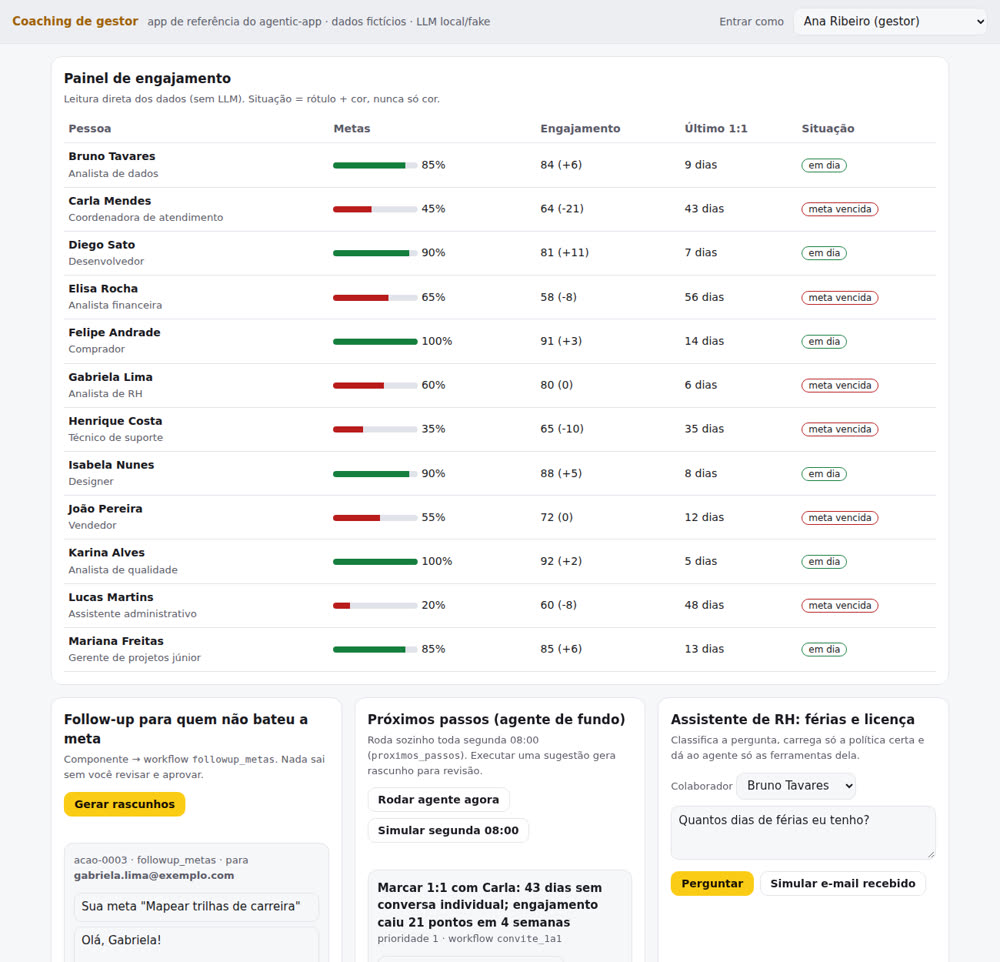
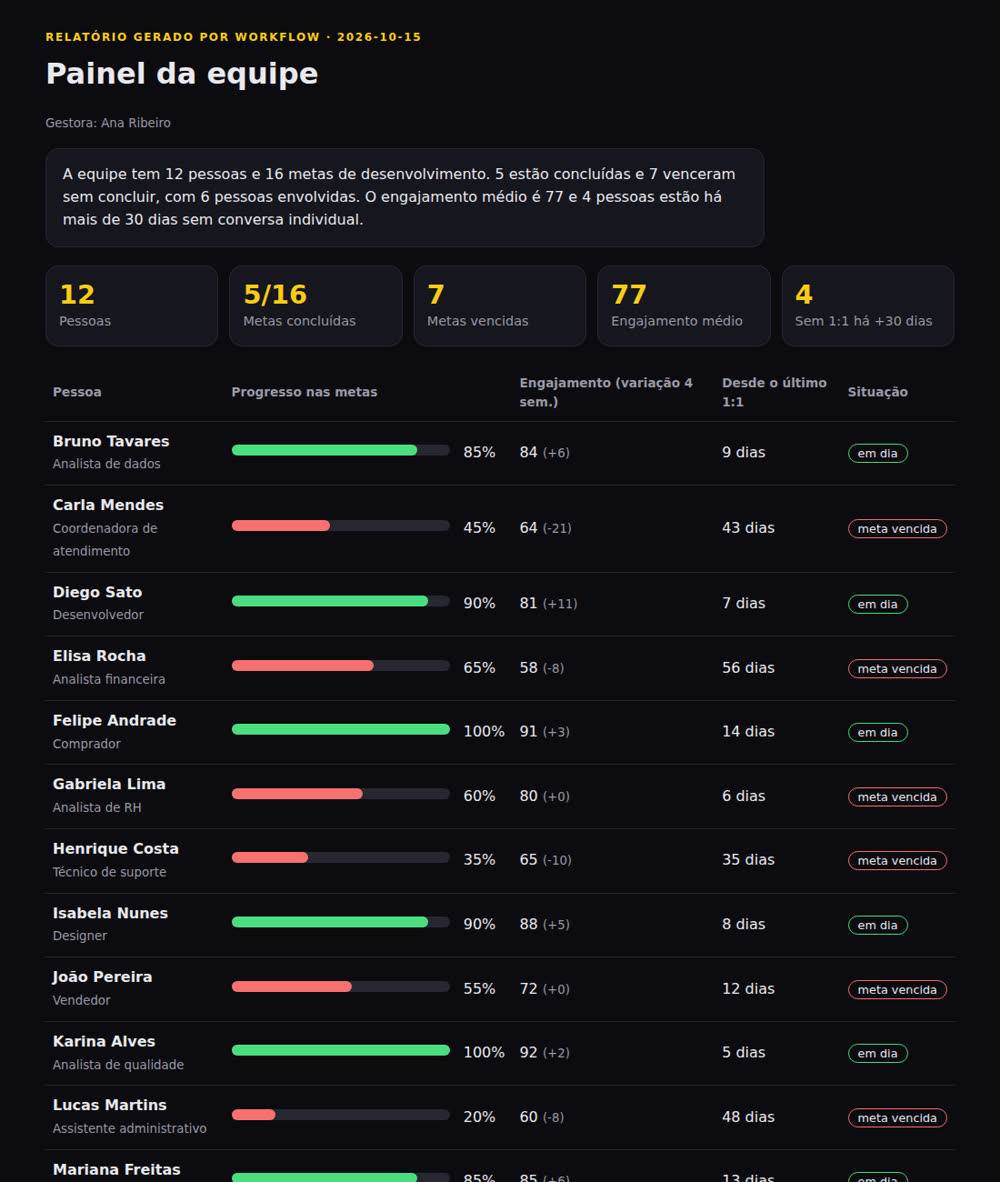
relatorio_equipe workflow: 12 people, 16 goals, 7 overdue. Also exported as PDF.| Component | Workflow | Nodes | Who runs it | Acts as |
|---|---|---|---|---|
| Goal follow-up | followup_metas | 6 | gestor, sistema | svc-coaching |
| Next steps | proximos_passos | 6 | sistema, gestor | svc-coaching |
| 1:1 invitation | convite_1a1 | 4 | gestor | svc-coaching |
| HR assistant | assistente_rh | 10 | colaborador, gestor, rh, sistema | svc-rh |
| Report | relatorio_equipe | 4 | gestor, rh, sistema | svc-coaching |
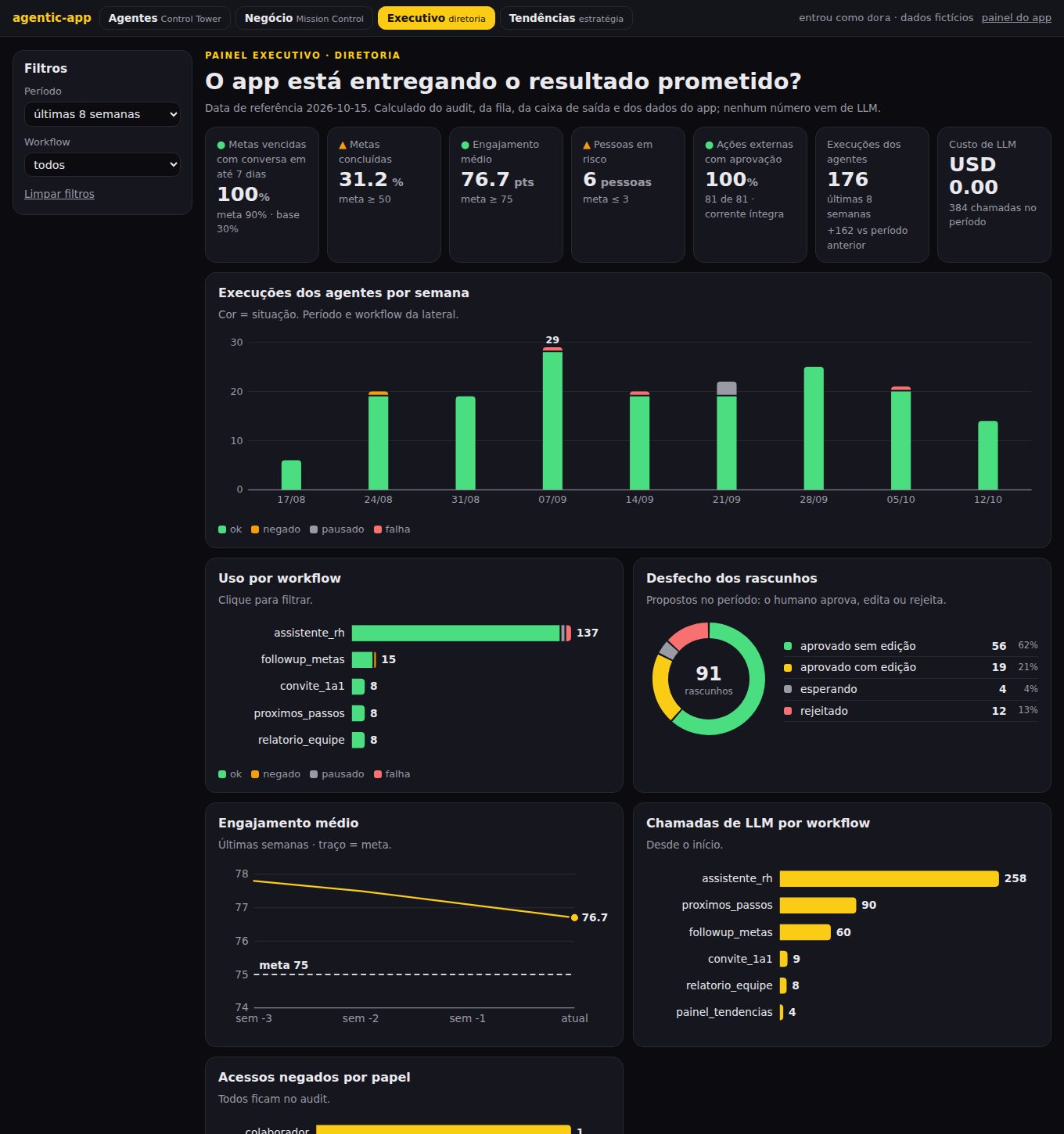
The manager panel is the working screen. The executive dashboard answers whoever sponsors the app, with numbers computed from the audit log, the approval queue, the outbox and the app data. No number comes from an LLM.
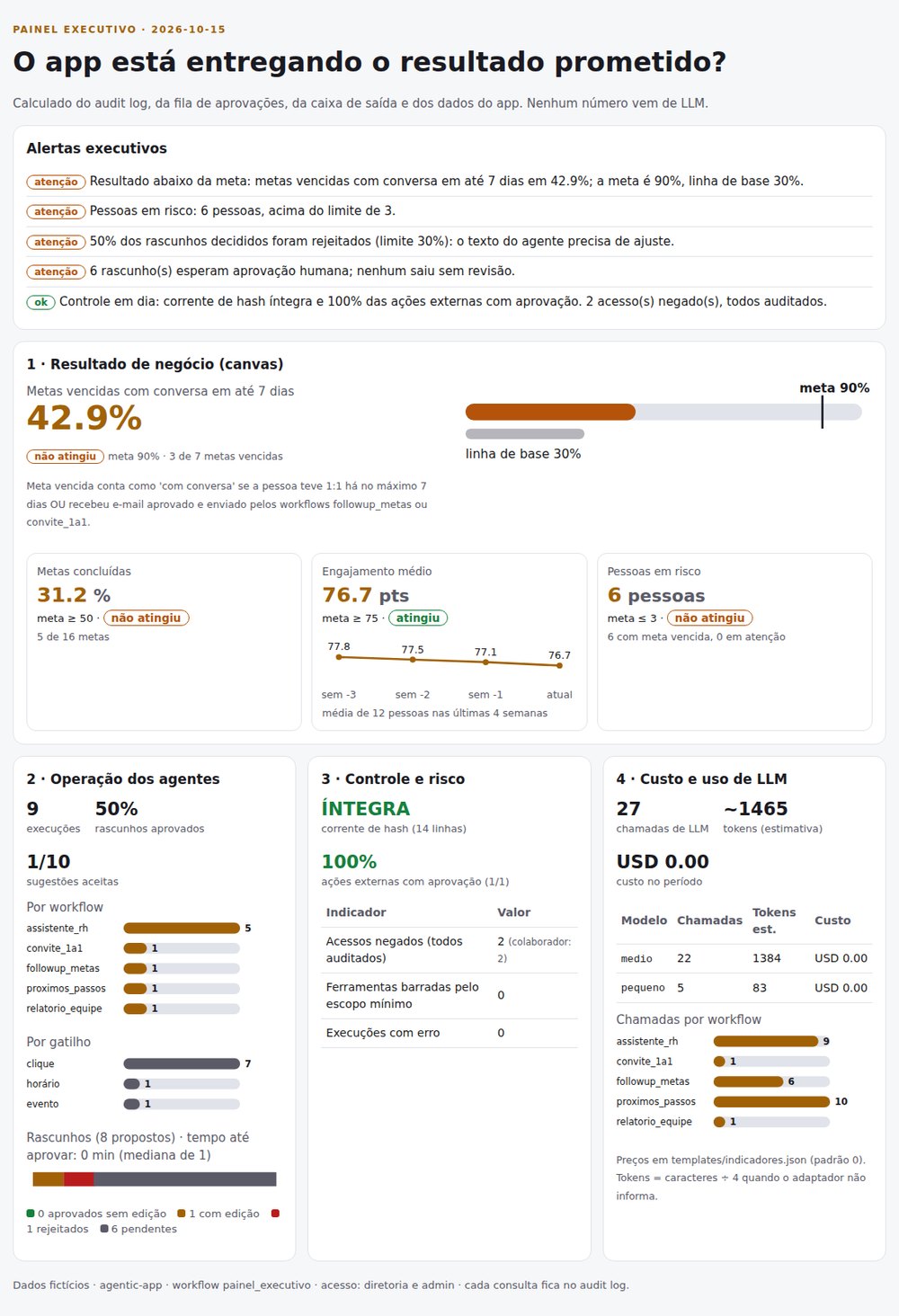
The canvas metric against target and baseline, with a "met" or "not met" status. In the demo: goals completed 31.2%, average engagement 76.7 and 6 people at risk.
Runs per workflow and per trigger (click 7, schedule 1, event 1), drafts approved, edited and rejected, time to approve and background-agent suggestions accepted (1 of 10).
Access denied per role, tools blocked by least scope, hash chain intact or broken (with the line) and the % of external actions with approval, which must be 100%.
Calls per workflow and per model (FakeLLM counts the same), estimated tokens and cost from the templates/indicadores.json table, which ships at zero.
3 to 5 short sentences built by code, ordered critical → attention → ok. A broken chain or an unapproved email goes to the top.
The dashboard is the painel_executivo workflow, with a read-only identity. Employee and manager get 403, and the attempt becomes a workflow.negado line in the audit.
python3 -m agentic_app.demo   # section 10: executive summary
python3 -m agentic_app.serve
# http://127.0.0.1:8765/executivo?usuario=dora
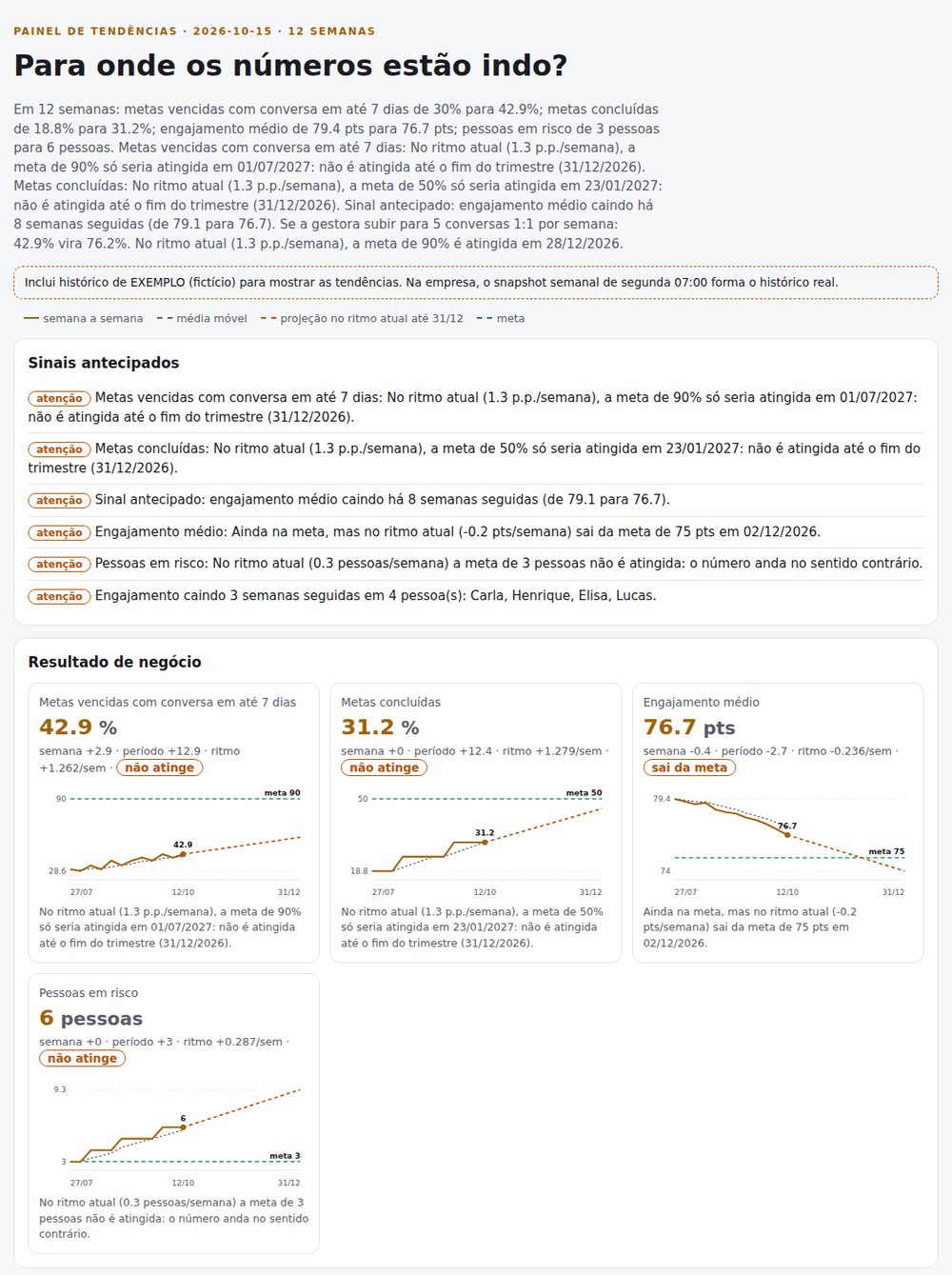
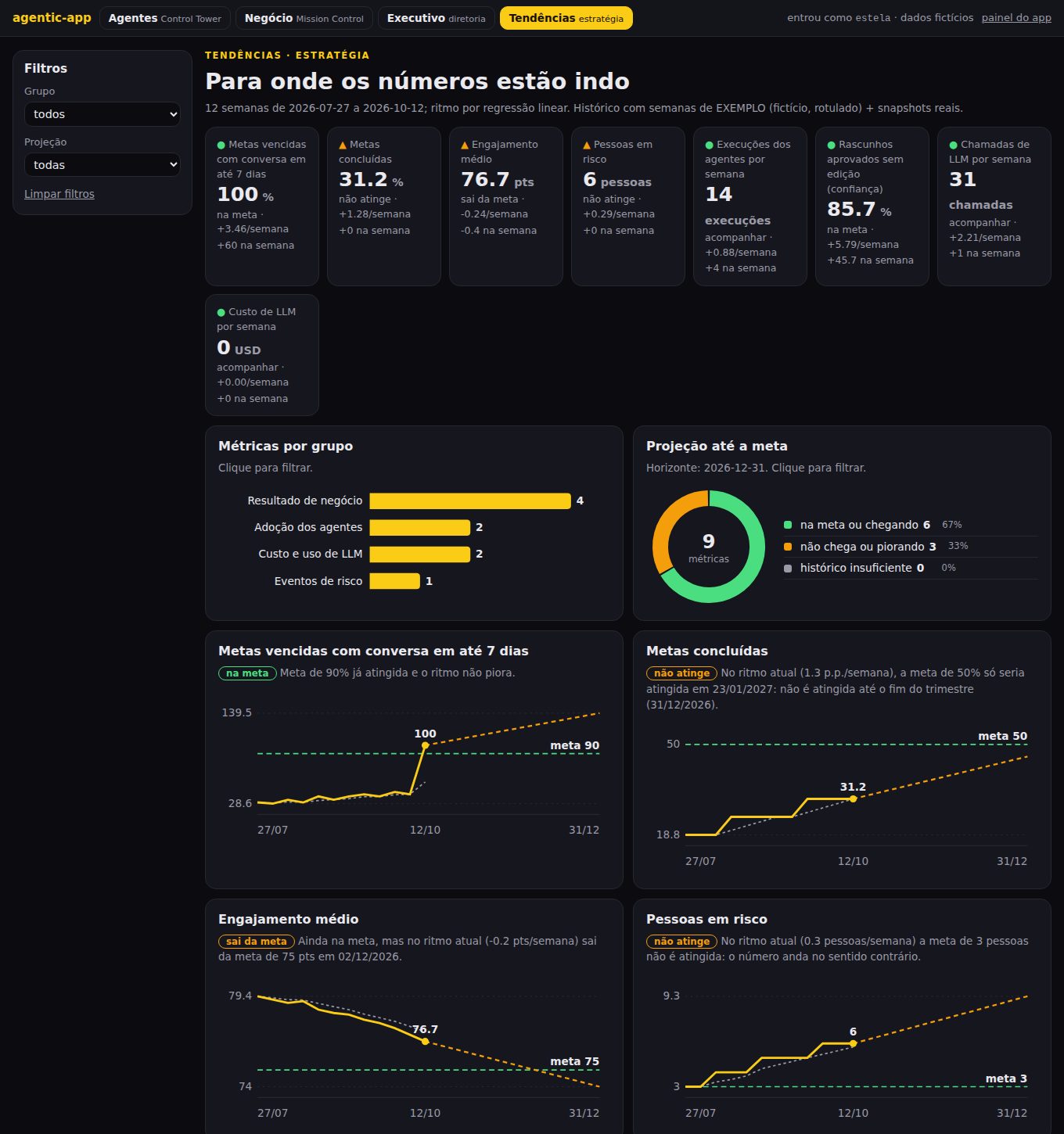
The executive dashboard shows whether the app delivers now. The trends dashboard uses the weekly history to give each number's pace, when the target is reached (or that it is not reached this quarter) and what is getting worse before it becomes a problem.
Simple linear regression over the weeks: "at the current pace, the target is reached on DD/MM" or "not reached by the end of the quarter". A target already met but worsening shows the date it is lost.
Three weeks in a row in the bad direction become an alert. In the demo: average engagement falling for 8 weeks and 4 people with 3 drops in a row (Carla, Henrique, Elisa, Lucas).
An explicit rule in code: each extra one-on-one per week covers one person with an overdue goal. With 5 a week, 42.9% becomes 76.2% and the 90% target arrives on 28/12/2026.
The snapshot_indicadores workflow writes the week's snapshot every Monday 07:00 to saida/historico.jsonl. With fewer than 4 weeks, the dashboard says "not enough history".
The painel_tendencias workflow with a read-only identity. The LLM only stitches the narrative from sentences already computed; swapping the LLM changes no number.
python3 -m agentic_app.demo   # section 11: snapshot + trends
# http://127.0.0.1:8765/tendencias?usuario=estela
The executive and trends dashboards are for people who decide. The Command Center is for people who watch live and act on the spot. Two tabs: Agents (Agent Control Tower) and Business (Mission Control).
Traffic light per workflow (ok, attention, failure, paused), last run, next scheduled run, approval queue by age with a 24 h SLA, failures and denied access, audit chain and latest events.
Pause (the trigger stays in the audit and does not run; other scheduled ones keep going), resume, run now, re-run and escalate a stuck approval. Only the operacao role and admin. Operations never approves or sends.
The canvas metric against its target and how many conversations are missing (demo: 42.9%, 4 missing). Decision queue: who is at risk, where each case stands and the next action, with buttons to trigger the agent, approve or reject.
A button you cannot use shows up disabled with the reason, and the server checks again. Every action and every denial goes to the audit. Re-run only redoes what does not require storing the person's input.
python3 -m agentic_app.demo   # section 12: pause, escalate, dashboard
# http://127.0.0.1:8765/comando?usuario=otavio
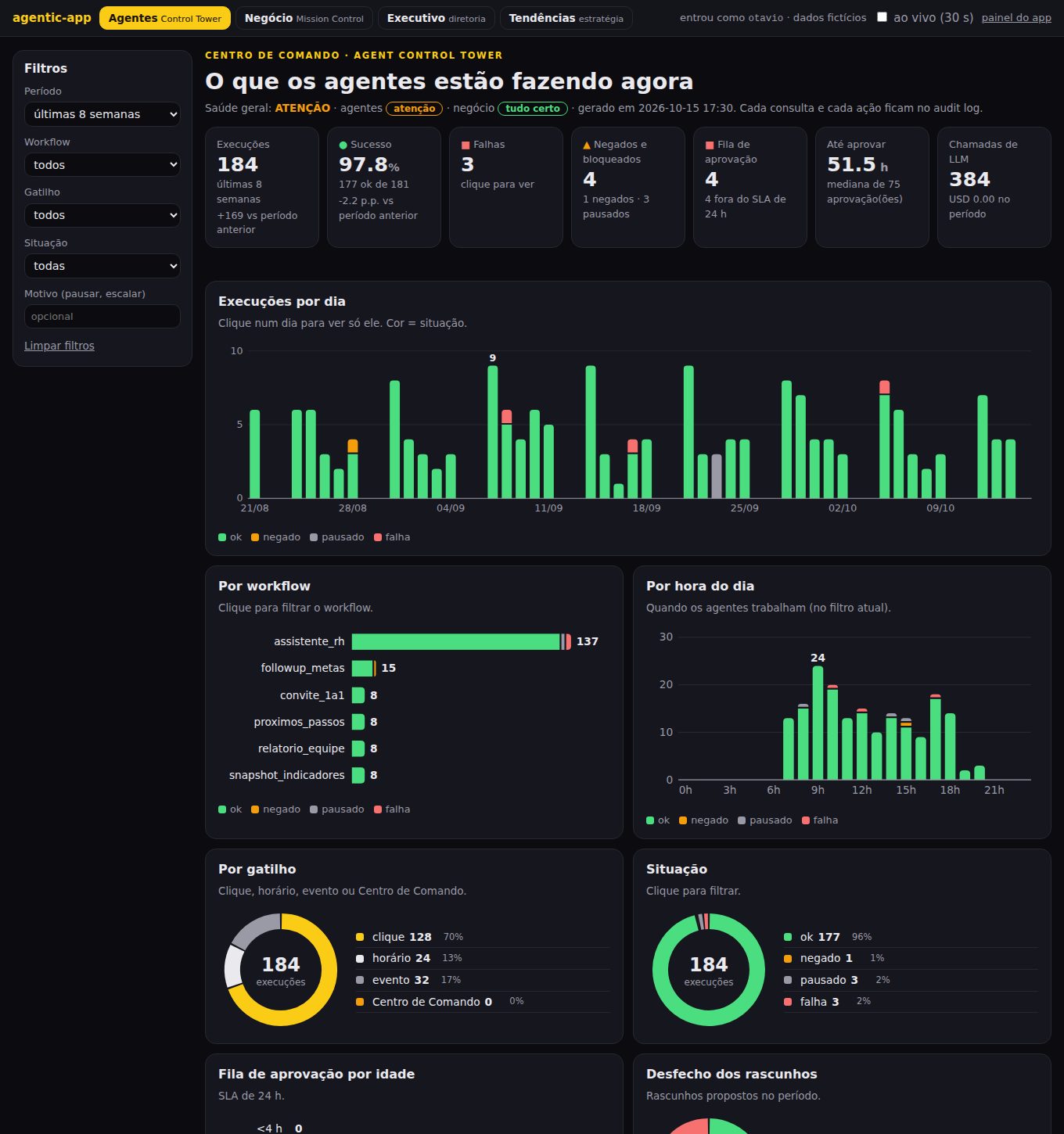
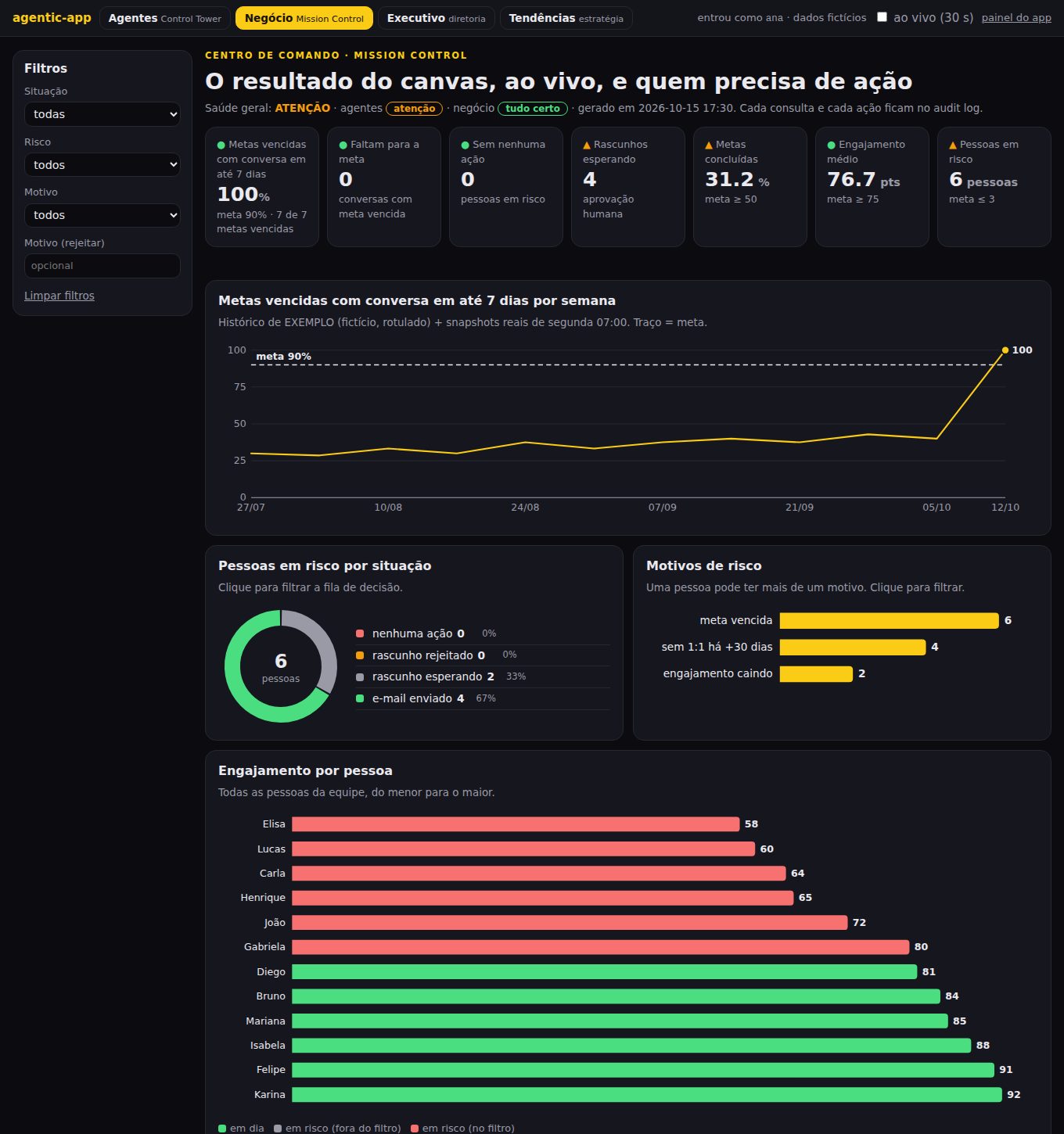
Agents, Business, Executive and Trends now use the BI dashboard layout: big numbers on top, filters on the side, charts in the middle and, below, the detail with actions. Clicking a chart filters the rest of the page.
A bar at the top leads to the four dashboards. Each keeps its own role: whoever cannot see it gets a 403 and the attempt goes to the audit.
A bar, day, slice or card becomes a filter (?workflow=…&situacao=falha). Active filters show as chips; click again to remove. The link can be saved and shared.
Columns, bars, donuts and lines drawn in Python, no library or CDN. Hover tooltips, a legend whenever there are two or more series, status color always with a label.
python3 -m agentic_app.simular runs the real engine with a simulated clock (fictitious, always the same) so the charts have something to show.
python3 -m agentic_app.simular
python3 -m agentic_app.serve
The explainer videos will show up here.
agentic-app does not replace the other INEMA kits. It sits on top of them.
The company's agent in files: identity, skills, rules and measurement. It answers who the agent is and how it works here.
How agents discover, connect to and use the tools you already have. It answers how the agent reaches the tools.
The application the business person uses: screen, fixed workflow, policy as code, approval and audit. It answers what outcome the company gets.
Version 1.0.0 is the complete core with one reference app. Then came the executive dashboard (1.1.0), the trends dashboard (1.2.0), the Command Center (1.3.0) and the shared BI layout across the four dashboards (1.4.0).