Claude Code · Fable 5.2 · read-only
Audit your Claude for Fable 5.2
A prompt that worked with the previous model may get in the way now. Find outdated lines in 5 seconds, with a report and charts.

A prompt that worked with the previous model may get in the way now. Find outdated lines in 5 seconds, with a report and charts.
audite-seu-claude is a small Python program that reads your Claude Code configuration (the CLAUDE.md file, skills, memories, plugins, and scripts) and flags instructions written for earlier models that now get in Claude Fable 5.2’s way. It is for people who use Claude Code every day and are switching models. It provides a report with charts and a list of suggestions; you choose what to approve, and your own Claude makes only those changes. All you need is Python 3: it uses no internet and does not change your configuration (it only saves the report where you tell it to).
Nei explains what Anthropic published about Fable 5.2, why the old prompt may get in the way now, and how the kit finds those lines.
Anthropic published 10 points to watch for in Fable 5.2. It follows instructions literally, so old rules can have a different effect. This toolkit turns those 10 points into automated checks.
Requests for reasoning in the text (may trigger a refusal), “think less,” token budgets, instructions to always delegate, “never” without a reason, rigid style, outdated effort settings.
Charts by point and file, plus the weight of text included in every session: CLAUDE.md, the memory index, and skill descriptions. It also flags duplicate skills and old memories.
Select suggestions and generate correcoes.md. It becomes the change request: one item at a time, with a copy of the original. Security rules are never deleted.
The program only reads. You decide what changes; your Claude edits, and only what you approved.
Source: Prompting Claude Fable 5.2 (read on 11/11/2026). The figures come from Anthropic’s own tests.
The API default is high. Use medium for everyday work; xhigh and max only where you have measured a benefit. “Answer without thinking” does not reduce thinking: lower the effort setting. Checks: fixed max, xhigh as default, settings copied from an old model, Fable 5.2 set to low/medium.
On long tasks, it sometimes stops before finishing, especially at low and medium. The official text cut sessions abandoned midway in half, with +~30% more tokens. Checks: whether your CLAUDE.md contains this text (in blocos/terminar-tarefa.md). In Claude Code with Fable 5.2, this text is already enabled by default.
State the action (“yes, run the migration on the test database”) instead of saying “continue.” Approval rules should name the actions. Checks: approval for “any action” and claude -p "continue" in a script.
“This code is yours” makes it reorganize the code: ~1.5x more tokens and changes no one asked for. Use it only when you want that, and review the diff. Checks: the phrase, as a heads-up.
It works silently through long sequences. The official text makes it speak before the first tool call, with +~20% more tokens. Checks: whether you have this text (blocos/avisar-progresso.md). In Claude Code with Fable 5.2, the silence reminder is already enabled by default.
If the prompt says to delegate, it delegates a lot. Review these lines first. Checks: “always use subagents,” “agent army,” “delegate everything.”
Notes and memories accumulate “never” rules, and it follows them all. Remove those that have lost their reason; add scope and a reason to the others; list what does NOT need approval. Checks: “never” without a reason, “never try again,” absolute orders in all caps, old memories.
Remove: token budgets in prompts, “think less,” “treat the previous answer as final” (it stops pointing out its own mistakes), and rigid style rules. Checks: all four.
Ask it to write for someone who did not see the work: lead with the main point, without invented terms. Checks: whether you have this text (blocos/relatorio-claro.md).
Asking it to write out its reasoning in the response can trigger the reasoning_extraction filter and stop the skill. Checks: “show your reasoning step by step,” “chain of thought” — high severity.
Setting skills and context length aside, these are the prompt changes that most affect the result, from greatest to least. A prompt written for the model that "interpreted" instructions now produces a different result.
An old prompt with "explain step by step how you thought" may return a refusal (refusal) instead of an answer. This is the only point that breaks production. Change: remove the phrase; to see the reasoning, use the API's reasoning summary.
The default is high, which costs more. "Answer directly, without thinking too much" does not reduce the effort. Change: choose the level for each task (low for simple tasks, medium for everyday tasks, high for long tasks) and measure. Don't copy the previous model's setting.
More often with low and medium. In automation, a task is abandoned without any error. Change: paste in the "finish the job" text: solve common obstacles on its own, stop only when genuinely blocked, and say what's missing.
Years of "never do X" and "always ask for approval": it follows everything and becomes timid. Change: give each rule a reason and scope, and spell out what does not require approval.
It spreads the work across several agents. Change: "when the task is independent and can run in parallel."
"Yes, run the migration on the test database" works better than "go ahead."
It combines repeated code and changes things you didn't ask for, using ~50% more tokens. Use it when you want to restructure, and review the diff.
To follow along, ask: "before you start, tell me in one line what you're going to do."
"Write for someone who didn't follow along, with the main point first."
No. The changes above follow Anthropic's best practices for Claude models in general: rules with reasons, clearly stated actions, and requests to finish the work also help Opus. It guesses intent better, so the improvement is smaller with Opus. Effort is configured per model in settings.json (modelSettings), so raising Fable 5.2's effort doesn't affect Opus. The only effect: the "finish the job" text may make Opus work and spend a little more on long tasks. Safety rules (API, credit, deletion, publishing) stay the same for both.
No packages to install, no internet, no API key. Works on Linux, macOS, and WSL.
Standard library only.
python3 --versionThe auditor runs without it; to apply fixes, you use your Claude.
claude --versionThis is the order Anthropic recommends: adjust effort first, then clean up instructions, then measure.
One folder, one main file.
git clone https://github.com/inematds/audite-seu-claude.git ~/audite-seu-claude
The Claude Code /effort command changes the effort level (how much the model thinks). Use it before a large task. For agents running claude -p, pass --effort high.
/effort high
From inside the project folder. --home also reads your ~/.claude (global CLAUDE.md, skills, memories, plugins).
cd ~/meu-projeto
python3 ~/audite-seu-claude/varrer.py . --home --html relatorio.html --saida-json relatorio.json
# in the terminal: total findings, by point and severity
Each suggestion has an ID (A001, A002…). Filter by layer — Fable 5.2 (lines that change the model’s behavior) or volume (context weight, duplicate or unused skills, old memories) — or by severity. Click generate correcoes.md: your browser downloads the file, and the text appears on screen. Move the file to the project folder. Or generate it right there in the terminal using the IDs:
python3 ~/audite-seu-claude/varrer.py --correcoes A001,A004,A007 --de relatorio.json --saida correcoes.md
With correcoes.md in the project folder (you can also use the path: “apply ~/Downloads/correcoes.md”). The file header already explains how: one item at a time, a copy of the original in .audite-backup/, protected rules are never deleted, and plugin files are not edited. This counts as approval only for these edits.
# in Claude Code, in the project folder
apply correcoes.md
Applied findings disappear. Then run your longest task and see where it stops, goes quiet, or delegates too much. For each symptom, paste in the right block from blocos/, one at a time.
python3 ~/audite-seu-claude/varrer.py . --home
cat ~/audite-seu-claude/blocos/terminar-tarefa.md # if it stops midway
Also run Claude Code's official auditor (version 2.1.283 or newer). It finds things this kit doesn't look for: referenced files or commands that no longer exist, and rules that contradict each other across files. This kit covers what it doesn't read: memories, plugin text, prompts inside scripts and bots, the effort level in settings.json, and skill weight. Use both.
# in Claude Code
/doctor prompt-audit
The skill performs steps 3 to 6 through Claude Code. --uso 30 reads your session logs (~/.claude/projects/*.jsonl, local) and flags skills you have not used in 30 days. --estrito fails CI if there is a high-severity finding.
cp -r ~/audite-seu-claude/skill/audite-seu-claude ~/.claude/skills/
python3 ~/audite-seu-claude/varrer.py . --home --uso 30
python3 ~/audite-seu-claude/varrer.py . --estrito  # exits with 1 if there is a "high" finding
Generated from tests/fixtures/sujo, a project deliberately created with one line of each type (24 findings). Open the interactive report (in Portuguese) and try the button to generate correcoes.md.
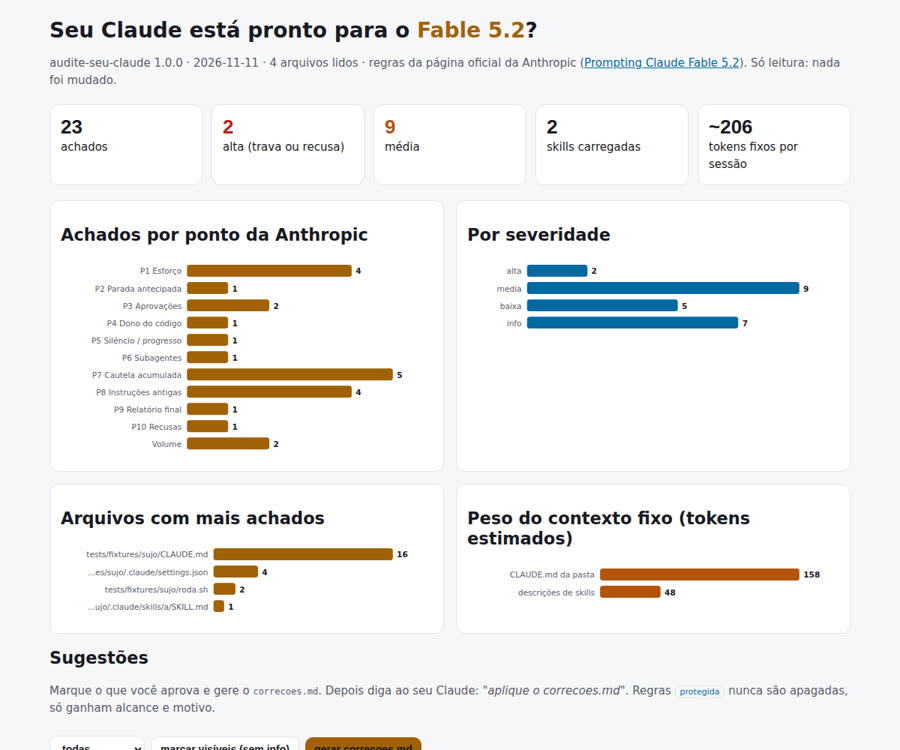
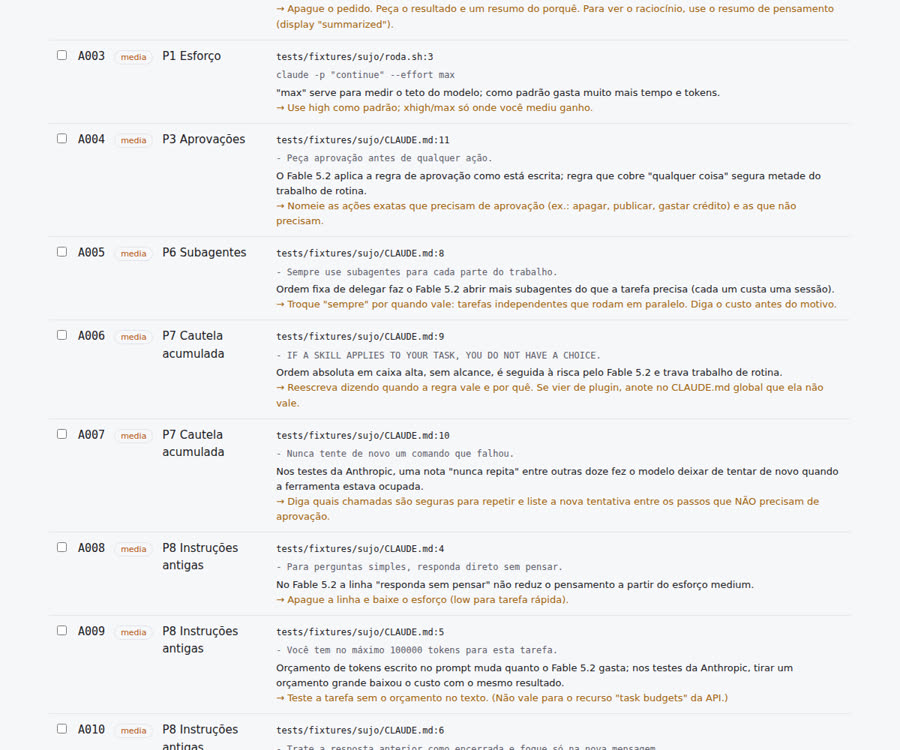
On a production machine with 148 loaded skills, the first audit took 4 seconds and found: a plugin hook that says to write “terse, in fragments” (point 8), a plugin skill with “if there is a 1% chance, you are required to” (point 7), nine orders to always delegate (point 6), and Fable 5.2 configured to medium (point 1).
Anthropic itself says that not every old instruction needs to go. Test each change on a real task of yours.
~/.claude/skills, with an INDICE.md (name, purpose, search terms). A line in the global CLAUDE.md tells Claude to look there when you ask for a skill that isn’t loaded. Check first whether another skill, script, or timer calls it. On the author’s machine: 148 → 107 loaded skills and 13.7k → 9.6k description tokens per session. Step-by-step instructions: blocos/biblioteca-skills.md.terminar-tarefa.md or avisar-progresso.md: they're for those who call the model through the API or their own program.