PTENES
Practical kit · Copilot + Agents for Business

What you take to the Monday

Canvas, prompts, agent instructions, workflows, integration and governance checklists, metric sheets, and a three-phase plan—ready to copy and use with Copilot, Copilot Studio, Power Automate, and Power BI. Plus two more tools for people building INEMA v5 courses.

Office desk with a checklist notebook, a laptop showing an approval flow, and an indicator dashboard
What it is

Work templates + verification for courses

Grew out of the course Copilot + Agents for Business (INEMA.CLUB PRO, 9 lessons). The course teaches; the kit provides what you can copy. The tools are what proved useful from producing the course itself.

📋 Template kit (10 files)

Markdown, in Portuguese, no code. Automation canvas with agents, everyday prompts, data prompts, agent instructions, flow anatomy, the four-choice rule, seven governance checks, indicator card, three-phase plan, the five steps.

🔎 check-v5.py

Lesson-by-lesson checker for the formato-curso v5 format: estimated vs. stated time, jargon sentinels, figure coverage, gate counts, recap ↔ card deduplication, emoji, and double exclamation marks. Python 3 only, no dependencies.

🧪 browser-test.cjs

Headless engine test (Playwright): router, timing, figures on mobile, quiz, practice, progress, panels, theme, persistence, and landing page. Ends with ERROS: nenhum or point out what failed.

How it works

One process at a time, in this order

The suggested order for a company’s first agent project. Each step has a kit file; the prompts (day-to-day and data) are included from day one.

10 · five steps→ 01 · canvas→ 04 · agent→ 05 · workflow→ 06 · integration→ 08 · metric→ 07 · governance→ 09 · 3-phase plan
1

Design

Place the work on the five steps and fill in the nine-field canvas with real names.

2

Build

Agent in Copilot Studio (instructions + knowledge), workflow in Power Automate (approval, logging, failure alert), integration through the best option.

3

Measure

Three indicators with a target, owner, and automatic source; Copilot explains the variance; the alert notifies the manager.

4

Publish with governance

Seven checks before moving beyond the draft, and a three-phase plan with a definition of done.

The kit

The ten files

Copy the block, replace what’s between < >. The examples (occupational safety technician, purchasing analyst, HR manager, finance coordinator) are fictional.

10 · The five steps

User → augmented → workflow designer → agent builder → automator. The Person → Agent → Systems mental model and the filter for the first three tasks.

01 · Agent automation canvas

Nine fields on one page, a filled-in example (payment reconciliation), and the agent / flow / screen / indicator breakdown.

02 · Everyday prompts

Search across sources, long email → decided / pending / who hasn’t responded, meeting → decisions, owners, and deadlines, document and presentation.

03 · Data that explains

Excel, Analyst, and Researcher: “what changed and why,” a testable hypothesis across files, research inside + outside, the three two-minute checks.

04 · Agent instructions

Template for role · scope · rules · tone in Copilot Studio, a six-step creation checklist, and weekly maintenance.

05 · Flows in Power Automate

Approval, expiring document, and incident called up by the agent—always with logging and a failure alert.

06 · Four choices and a screen checklist

Connector → workflow → screen automation → Computer Use; end-to-end vendor registration; case with answer key.

07 · Governance and risk list

Seven checks before publishing, where a person is required, an argument for leadership, and a mini-case on excessive sharing.

08 · Indicators

Indicator card, a request for Copilot to explain a deviation, a minimum dashboard in five steps, a database by area, questions a manager should be able to ask.

09 · Three-phase plan and roadmap

Prototype → execution → scale with a clear definition of done, the four labs, department-specific cases, and the company roadmap in nine phases.

Prerequisites

Almost nothing

The kit is text: it only requires Copilot enabled by your company. The tools require Python 3 and, to test the engine, Node with Playwright.

For the kit

Microsoft 365 Copilot on your work account. Copilot Studio and Power Automate for templates 04 and 05 (if you don’t have access, the templates become the specification IT will need).

# nothing to install
git clone https://github.com/inematds/copilot-agentes-kit

For check-v5.py

Standard Python 3. No extra packages.

python3 --version  # 3.8 or higher

For browser-test.cjs

Node 18+ and Playwright with Chromium (or Playwright already installed somewhere else, via PLAYWRIGHT_DIR).

npm i -D playwright
npx playwright install chromium
User guide · step by step

From clone to your first project

Steps 1 to 4 are for those who will use the kit at work. Steps 5 to 7 are for those who create INEMA v5 courses.

1

Clone (or download the zip) and open the folder kit/

Ten Markdown files. Read 10 first (five minutes) to place your work on the five steps.

git clone https://github.com/inematds/copilot-agentes-kit
cd copilot-agentes-kit/kit && ls  # 01 … 10
2

Use the prompts in your company's Copilot today

Open 02-prompts-copilot-dia-a-dia.md, copy the meeting block, replace what’s between < > and paste it into Copilot in Teams. A rule that applies to all of them: a subject with a proper name + time period + what you want to see at the end.

Use a reunião <nome e data>. Faça, nesta ordem:
1. Resumo em até 10 linhas.  2. Decisões, sem "talvez".
3. Para cada decisão: responsável (um nome), tarefa e prazo.
4. Pendências sem responsável.  5. Mensagem de acompanhamento cobrando com prazo.
3

Fill in the canvas for a real process

01-canvas-automacao-com-agentes.md: nine fields, twelve minutes, real names. Mark decisions that go through the risk checklist (file 07) with ✱. “I don’t know yet” is fine in the Integration field—the answer comes later in file 06.

CANVAS — <nome do processo>
Objetivo · Entradas · Conhecimento · Decisões (✱ humanas) · Ações
Integração · Validação · Indicadores
4

Build, measure, and publish with governance

Draft agent using the template in file 04 (test with three questions, one outside the scope). Approval workflow using file 05 (log + failure alert). Three metrics using file 08. Before publishing, complete the seven checks in file 07. Present it using the three-phase plan in file 09.

# suggested order
10 → 01 → 04 → 05 → 06 → 08 → 07 → 09
5

Check a v5 course, lesson by lesson

Write each lesson in a file (parts/NN-aula.html) and run the checker when you finish each one. It prints the estimated time, the jargon sentinel with context, the gate counts, and the recap ↔ cards anti-duplication check. Only then concatenate.

python3 tools/check-v5.py parts/01-aula.html
#   words=1880 quiz=1 practice~10min → estimated 20min | data-time=20
#   steps=5 figs=5 … manifest=1 MISSING=0
#   DUPLICATION ≥6: …   ← if it appears, rewrite the card
cat parts/*.html > curso.html
6

Prove the engine is running

Opens curso.html e landing.html in a headless Chromium browser, dismisses the onboarding, navigates, clicks the quiz and practice, opens the panels, switches the theme, reloads, and tests on mobile. Takes screenshots in the specified folder.

node tools/browser-test.cjs /caminho/do/curso shots
# … statcards: 0/9 lessons completed ~203min remaining
# … mobile body scrollWidth ok: true
# ERRORS: none
# Playwright somewhere else? PLAYWRIGHT_DIR=/x/node_modules/playwright node tools/browser-test.cjs …
7

Publish the course

Cover via the skill capa-inema, index.html with a redirect to the landing page, .nojekyll, push, and GitHub Pages. Catalog via the skill atualiza-portal.

node ~/.claude/skills/capa-inema/assets/gerar-capa.cjs --repo . --title "Título" --cat "Categoria"
git push && gh api -X POST repos/inematds/<repo>/pages -f 'source[branch]=main' -f 'source[path]=/'
Examples

The course the kit verified

Both tools ran on the original course: nine lessons, 100% manifest compliance, zero console errors.

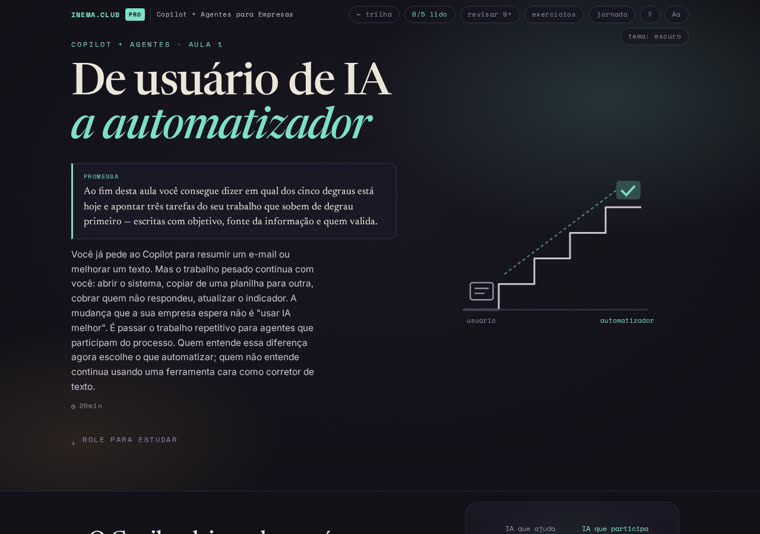
Opening of lesson 1 of the Copilot + Agents for Business course: promise, time, and illustration of the five-step ladder
Lesson 1 of the original course: verifiable promise, 20-minute duration rendered by the engine (the same duration estimated by check-v5), and the metaphor of the five steps.
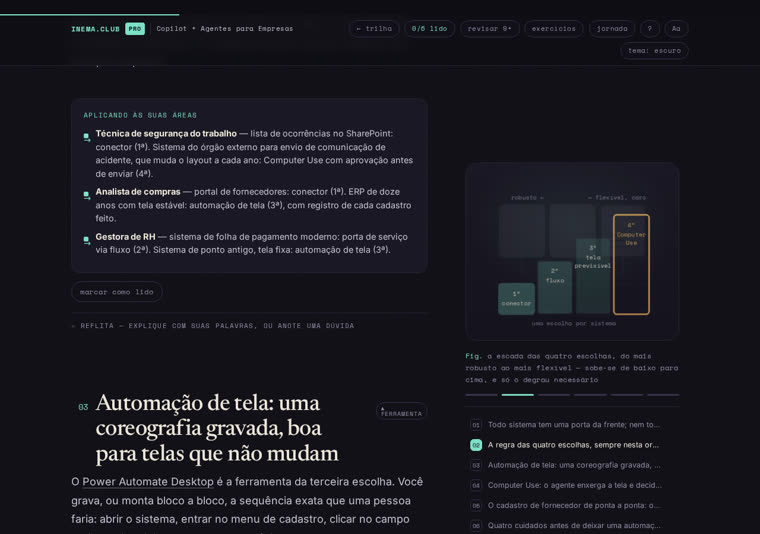
The Applying This to Your Areas chart from lesson 7 and the four-choice staircase figure
Lesson 7: the chart with three professions and the ladder of four choices—the same content as kit file 06, in the course version.
Roadmap

What’s here and what’s coming

Version 1 is what's in the repo today. The next phases depend on real-world use.

v1
Kit of ten templates + two toolsPublished in Sep/2026 alongside the source course. Microsoft tools snapshot: Sep/2026.
next
Course module tracksThe original training program has 8 modules and 50–58 h; the current course covers everything in 9 lessons. Each module can become its own track, and the kit can add any missing templates.
next
check-v5 inside the revisar-curso skillThe verifier is automatically called during v5 course audits instead of being run manually.
idea
Kit in PDF and WordFor anyone who prefers to print the canvas and checklists or paste the templates into a company document.