The first lessons prepare the character, production, and routine.
Then you complete 21 days, publishing one editorial post each day.
At the end, add one transparent offer post: 22 posts total.
If the offer is not ready, publish a clearly labeled study.
To complete the challenge, you need real files and posts as well as records.
Filling in the calendar does not complete the challenge.
Set aside 28–42 hours of work across preparation and the 21 days, plus time spent waiting in tool queues.
The course does not guarantee followers, customers, or income.
Artur distinguishes an illustrated scene from a photographed event.
Completed brief · lesson example
1Identity: Lia Lume, adult and fictional
2Role: ideas for creative spaces
3Deliverable: 21 editorial posts and one offer post
Use this sheet as a reference. Replace the example with your own project.
3Check the decision against its use
Define an original adult character, her role, and her virtual nature.
Artur uses the worksheet to check: deliverable: 21 editorial posts and one offer post.
Teaching illustration created in Codex: Lia Lume is a fictional adult character shown in a stylized illustration. The image presents the visual identity for this teaching example.
Test yourself
Which profile description is suitable for Lia Lume?
If you got stuck here, that is normalIf the topic depends on real experience, use your own clearly identified experience or choose an illustrative idea you can support.
Practice now 0/3
Define an original character and be transparent
Set aside 10 minutes for this segment. Production, publishing, and tracking take additional time. You are ready when the worksheet defines the identity, role, limits, and scope of the challenge.
Use your own or authorized references. Identify illustrative images and keep the originals. AI features may require an account or plan; check before generating.
Project: Lia Lume or your character
Lesson: Define an original character and be transparent
Identity: Lia Lume, adult and fictional — <your decision>
Role: ideas for creative spaces — <your decision>
Deliverable: 21 editorial posts and one offer post — <your decision>
Evidence or file:
Next action:
Pending item:
After completing these steps, you can write the identity and limits of your virtual character.
Lesson cheat sheet
Define an original character and be transparent
Identity: Lia Lume, adult and fictional
Role: ideas for creative spaces
Deliverable: 21 editorial posts and one offer post
Your next step
You now have criteria for writing the identity and limits of your virtual character.
Save this lesson’s work in the project folder. You will use it in the next step.
Next step: Separate AI disclosure from advertising disclosure
Supplemental material · Module 1Production notes and safeguards for continuing after the short practice.
A virtual character is an acknowledged creation
Experiment at your own pace
Apply the decision to your profile. Keep the previous version and record what changed.
What to observe
Lia Lume is a fictional adult character; Sofia and Artur are fictional readers. The images are Codex illustrations and do not prove real-world execution or commercial results.
The challenge has preparation and execution
Experiment at your own pace
Review the example and write an alternative you can produce with the resources available.
What to observe
Features, names, and metrics vary by account, region, and version. Check the official documentation before publishing.
The 2026 CONAR guide advises clearly identifying commercial content and keeping its presentation truthful.
Payment or a referral commission must be handled transparently.
An advertising disclosure should be easy to notice without opening hidden text.
For a study with no sponsor, write: fictional offer study, no commercial partnership.
For a real relationship, describe it accurately and use the disclosures required by the network.
The CONAR guide does not create a new universal requirement to label all AI.
Our editorial rule and platform rules are separate layers.
Artur checks what a reader can understand without opening more text.
Completed brief · lesson example
1AI: virtual character created with AI
2Study: fictional offer with no commercial partnership
3Real relationship: advertising and relationship disclosed
Use this sheet as a reference. Replace the example with your own project.
3Check the decision against its use
Disclose the virtual character and, separately, the existing commercial relationship.
Artur uses the worksheet to check: real relationship: advertising and relationship disclosed.
Teaching illustration created in Codex: The textless card is a metaphor for disclosure. The readable notices are written in the lesson worksheet.
Test yourself
A post features an AI character and a paid referral commission. What needs to be clear?
If you got stuck here, that is normalIf there is no partnership, do not invent a sponsor. A clearly labeled study can demonstrate your skills.
Practice now 0/3
Separate AI disclosure from advertising disclosure
Set aside 10 minutes for this segment. Production, publishing, and tracking take additional time. You are ready when the two templates distinguish synthetic origin from commercial status.
Use your own or authorized references. Identify illustrative images and keep the originals. AI features may require an account or plan; check before generating.
Project: Lia Lume or your character
Lesson: Separate AI disclosure from advertising disclosure
AI: virtual character created with AI — <your decision>
Study: fictional offer with no commercial partnership — <your decision>
Real relationship: advertising and relationship disclosed — <your decision>
Evidence or file:
Next action:
Pending item:
After completing these steps, you can prepare two clear disclosures for different situations.
Lesson cheat sheet
Separate AI disclosure from advertising disclosure
AI: virtual character created with AI
Study: fictional offer with no commercial partnership
Real relationship: advertising and relationship disclosed
Your next step
You now have criteria for preparing two clear disclosures for different situations.
Save this lesson’s work in the project folder. You will use it in the next step.
Next step: Check references, rights, and personal data
Supplemental material · Module 1Production notes and safeguards for continuing after the short practice.
In this challenge, always disclose the virtual nature
Experiment at your own pace
Apply the decision to your profile. Keep the previous version and record what changed.
What to observe
Lia Lume is a fictional adult character; Sofia and Artur are fictional readers. The images are Codex illustrations and do not prove real-world execution or commercial results.
Advertising needs its own disclosure
Experiment at your own pace
Review the example and write an alternative you can produce with the resources available.
What to observe
Features, names, and metrics vary by account, region, and version. Check the official documentation before publishing.
Comments and messages are not raw material you can use for any purpose.
Record only what you need to track the project.
Do not put contacts’ data into a generator unless necessary.
For a list of interested people, explain the purpose and choose a process that follows applicable rules.
This course provides an open resource that can be read without signing up.
It does not collect contacts or send messages.
For this practice, fill out a materials sheet and identify any pending permissions.
ANPD provides guidance on purpose and necessity; check the source and adapt it to the real case.
Artur keeps track of the source of every image he uses.
Completed brief · lesson example
1Materials: original, authorized, or under a compatible license
2Record: source, date, use, and limits
3Data: only what is needed, for a clear purpose
Use this sheet as a reference. Replace the example with your own project.
3Check the decision against its use
Using an original identity and materials with verified sources and permissions.
Artur uses the worksheet to check: data: only what is needed, for a clear purpose.
Teaching illustration created in Codex: The folder illustrates choosing materials you own. It does not represent a license or permission from a third party.
Test yourself
You do not know whether you can use a voice found in a video. What should you do?
If you got stuck here, that is normalIf a license is unclear, find another reference you can use confidently. The challenge does not require copying a person.
Practice now 0/3
Check references, rights, and personal data
Set aside 10 minutes for this segment. Production, publishing, and tracking take additional time. You are ready when the sheet lists permitted materials and any pending items before you use references.
Use your own or authorized references. Identify illustrative images and keep the originals. AI features may require an account or plan; check before generating.
Project: Lia Lume or your character
Lesson: Check references, rights, and personal data
Material: original, authorized, or under a compatible license — <your decision>
Record: source, date, use, and limits — <your decision>
Data: only what is needed, for a clear purpose — <your decision>
Evidence or file:
Next action:
Pending item:
After completing these steps, you can create a materials source sheet before generating anything.
Lesson cheat sheet
Check references, rights, and personal data
Materials: original, authorized, or under a compatible license
Record: source, date, use, and limits
Data: only what is needed, for a clear purpose
Your next step
You now have criteria for creating a materials source sheet before generating anything.
Save this lesson’s work in the project folder. You will use it in the next step.
Next step: Study seven references without assembling a copy
Supplemental material · Module 1Production notes and safeguards for continuing after the short practice.
Choose materials you are allowed to use
Experiment at your own pace
Apply the decision to your profile. Keep the previous version and record what changed.
What to observe
Lia Lume is a fictional adult character; Sofia and Artur are fictional readers. The images are Codex illustrations and do not prove real-world execution or commercial results.
A profile may also receive people’s data
Experiment at your own pace
Review the example and write an alternative you can produce with the resources available.
What to observe
Features, names, and metrics vary by account, region, and version. Check the official documentation before publishing.
2Pay concrete attention to your audience’s culture
Avoid treating a group as if everyone shared one taste or behavior.
Define an observable use case.
In Lia Lume’s example, adults who create at small desks.
This choice guides the objects, language, and limits of the ideas presented.
Research in a 30–45-minute block before the short practice.
Then fill out the seven-reference worksheet.
If the research is incomplete, record what is missing.
The ten minutes are for organizing decisions, not pretending all the research is done.
Artur observes the lighting without copying the person in the image.
Completed brief · lesson example
1Research: seven references with creators and URLs
2Observation: one purpose for each reference
3Decision: your own adaptation for a use case
Use this sheet as a reference. Replace the example with your own project.
3Check the decision against its use
Study seven visual functions and record your own choices for a defined audience.
Artur uses the worksheet to check: decision: your own adaptation for a use case.
Teaching illustration created in Codex: Color, texture, and object cards illustrate reference functions. They are not real research into seven creators.
Test yourself
A reference has interesting lighting and a recognizable character. What should you study?
If you got stuck here, that is normalIf two references serve the same purpose, replace one. The goal is to broaden useful decisions, not collect images.
Practice now 0/3
Study seven references without assembling a copy
Set aside 10 minutes for this segment. Production, publishing, and tracking take additional time. You are ready when the worksheet contains seven references and identified decisions of your own.
Use your own or authorized references. Identify illustrative images and keep the originals. AI features may require an account or plan; check before generating.
Project: Lia Lume or your character
Lesson: Study seven references without assembling a copy
Research: seven references with creator and URL — <your decision>
Observation: one purpose for each reference — <your decision>
Decision: your own adaptation for a use case — <your decision>
Evidence or file:
Next action:
Pending item:
After completing these steps, you can organize seven references with observations and one decision of your own.
Lesson cheat sheet
Study seven references without assembling a copy
Research: seven references with creators and URLs
Observation: one purpose for each reference
Decision: your own adaptation for a use case
Your next step
You now have criteria for organizing seven references with observations and one decision of your own.
Save this lesson’s work in the project folder. You will use it in the next step.
Next step: Give the character a clear role
Supplemental material · Module 2Production notes and safeguards for continuing after the short practice.
Research distinct visual functions
Experiment at your own pace
Apply the decision to your profile. Keep the previous version and record what changed.
What to observe
Lia Lume is a fictional adult character; Sofia and Artur are fictional readers. The images are Codex illustrations and do not prove real-world execution or commercial results.
Pay concrete attention to your audience’s culture
Experiment at your own pace
Review the example and write an alternative you can produce with the resources available.
What to observe
Features, names, and metrics vary by account, region, and version. Check the official documentation before publishing.
Choose three useful traits, such as curious, direct, and thoughtful.
Turn each into behavior: ask a question, explain a decision, and acknowledge a limit.
Avoid a list of adjectives that has no effect on the script.
An editorial voice can be consistent without pretending to have a real life.
Create two ideas that fit the promise and one that would not.
Explain why.
An organized desk scene fits; a healing testimonial does not.
The practice ends with content decisions, before opening tools or creating an account.
Artur separates a visual concept from a real demonstration.
Completed brief · lesson example
1Audience: adults with small creative desks
2Benefit: illustrated organizing ideas
3Limits: no physical experience or invented credentials
Use this sheet as a reference. Replace the example with your own project.
3Check the decision against its use
Define an editorial role and limits that guide each script.
Artur uses the worksheet to check: limits: no physical experience or invented credentials.
Teaching illustration created in Codex: The small desk represents the chosen use case. The illustration does not prove that the objects work physically.
Test yourself
Which idea respects the example’s promise?
If you got stuck here, that is normalIf the promise feels too broad, choose an everyday situation. You can expand the project after you understand the first segment.
Practice now 0/3
Give the character a clear role
Set aside 10 minutes for this segment. Production, publishing, and tracking take additional time. You are ready when the worksheet helps you decide which topics belong on the profile.
Use your own or authorized references. Identify illustrative images and keep the originals. AI features may require an account or plan; check before generating.
Project: Lia Lume or your character
Lesson: Give the character a clear role
Audience: adults with small creative desks — <your decision>
Benefit: illustrated organizing ideas — <your decision>
Limits: no physical experience or invented credentials — <your decision>
Evidence or file:
Next action:
Pending item:
After completing these steps, you can write down the audience, benefit, and three content limits.
Lesson cheat sheet
Give the character a clear role
Audience: adults with small creative desks
Benefit: illustrated organizing ideas
Limits: no physical experience or invented credentials
Your next step
You now have criteria for writing down the audience, benefit, and three content limits.
Save this lesson’s work in the project folder. You will use it in the next step.
Next step: Write the visual DNA you will repeat
Supplemental material · Module 2Production notes and safeguards for continuing after the short practice.
The promise needs to fit in one sentence
Experiment at your own pace
Apply the decision to your profile. Keep the previous version and record what changed.
What to observe
Lia Lume is a fictional adult character; Sofia and Artur are fictional readers. The images are Codex illustrations and do not prove real-world execution or commercial results.
Personality comes through in language choices
Experiment at your own pace
Review the example and write an alternative you can produce with the resources available.
What to observe
Features, names, and metrics vary by account, region, and version. Check the official documentation before publishing.
Use the character sheet as the fixed part of the prompt, then add the scene.
Example: keep the character from the reference with the defined traits; show her holding a notebook in soft light.
Ask for one simple action and check the result.
The text alone does not guarantee consistency.
For this practice, write the character sheet and two scene prompts.
You do not have to generate the image until the next lesson.
Save this version so you can compare it with the images.
If you change the visual DNA later, record the change and review any pieces that depend on it.
Artur uses the reference to compare proportions across scenes.
Completed brief · lesson example
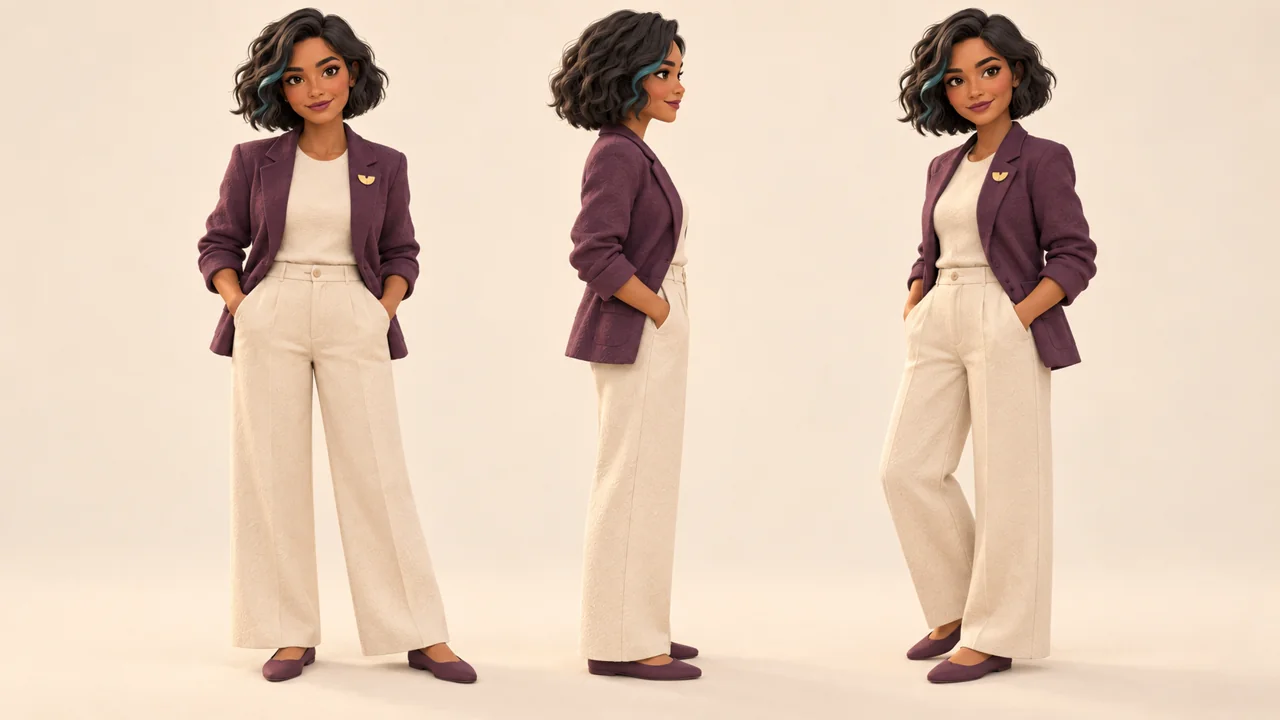
1Fixed: face, hair, clothing, brooch, and style
2Variable: pose, object, and coherent setting
3Record: character sheet and two scene prompts
Use this sheet as a reference. Replace the example with your own project.
3Check the decision against its use
Keep observable traits fixed and vary only selected parts of the scene.
Artur uses the worksheet to check: record: character sheet and two scene prompts.
Teaching illustration created in Codex: The views illustrate a character sheet. Compare the hair, clothing, and brooch; a generated sheet also needs review.
Test yourself
Which change should be treated as a change to the example’s visual DNA?
If you got stuck here, that is normalIf the character sheet is long, keep the most recognizable traits. Consistency starts with clear choices and a visual check.
Practice now 0/3
Write the visual DNA you will repeat
Set aside 10 minutes for this segment. Production, publishing, and tracking take additional time. You are ready when the sheet distinguishes fixed identity from planned variations.
Use your own or authorized references. Identify illustrative images and keep the originals. AI features may require an account or plan; check before generating.
Project: Lia Lume or your character
Lesson: Write the visual DNA you will repeat
Fixed: face, hair, clothing, brooch, and style — <your decision>
Variables: pose, object, and coherent setting — <your decision>
Record: character sheet and two scene prompts — <your decision>
Evidence or file:
Next action:
Pending item:
After completing these steps, you can create an identity sheet with fixed and variable traits.
Lesson cheat sheet
Write the visual DNA you will repeat
Fixed: face, hair, clothing, brooch, and style
Variable: pose, object, and coherent setting
Record: character sheet and two scene prompts
Your next step
You now have criteria for creating an identity sheet with fixed and variable traits.
Save this lesson’s work in the project folder. You will use it in the next step.
Next step: Generate and approve the character’s base image
Supplemental material · Module 2Production notes and safeguards for continuing after the short practice.
The character sheet separates identity from scene
Experiment at your own pace
Apply the decision to your profile. Keep the previous version and record what changed.
What to observe
Lia Lume is a fictional adult character; Sofia and Artur are fictional readers. The images are Codex illustrations and do not prove real-world execution or commercial results.
The master prompt is a starting point
Experiment at your own pace
Review the example and write an alternative you can produce with the resources available.
What to observe
Features, names, and metrics vary by account, region, and version. Check the official documentation before publishing.
Save the base image and the prompt you used in a project folder.
Label the approved version.
Also keep a rejected version if it helps explain the criteria.
Do not replace the reference without recording the change; future scenes depend on it.
This lesson requires actual image generation.
The ten minutes cover the prompt and first review; queues and corrections may extend the time.
If the tool is unavailable or you run out of credits, leave this step pending.
A written character sheet does not replace the image file.
Artur checks hands and proportions in addition to lighting.
Completed brief · lesson example
1Input: identity sheet and simple background
2Review: five traits, hands, and proportions
3Output: approved base image and saved prompt
Use this sheet as a reference. Replace the example with your own project.
3Check the decision against its use
Save an approved reference after comparing it with the defined traits.
Artur uses the worksheet to check: output: approved base image and saved prompt.
Teaching illustration created in Codex: The reference pose shows the adult character full-body. Check the hands, clothing, and identity before using a similar image.
Test yourself
The face looks right, but the brooch changed shape. What should you do?
If you got stuck here, that is normalIf you cannot generate it now, leave the lesson pending. You can review the character sheet, but the reference does not exist until you create the file.
Practice now 0/3
Generate and approve the character’s base image
Set aside 10 minutes for this segment. Production, publishing, and tracking take additional time. You are ready when the base image exists, has been checked, and is saved with its prompt.
Use your own or authorized references. Identify illustrative images and keep the originals. AI features may require an account or plan; check before generating.
Project: Lia Lume or your character
Lesson: Generate and approve the character’s base image
Input: identity sheet and simple background — <your decision>
Review: five traits, hands, and proportions — <your decision>
Output: approved base image and saved prompt — <your decision>
Evidence or file:
Next action:
Pending item:
After completing these steps, you can save a real base image and check the five fixed traits.
Lesson cheat sheet
Generate and approve the character’s base image
Input: identity sheet and simple background
Review: five traits, hands, and proportions
Output: approved base image and saved prompt
Your next step
You now have criteria for saving a real base image and checking the five fixed traits.
Save this lesson’s work in the project folder. You will use it in the next step.
Next step: Create three scenes while keeping the same identity
Supplementary material · module 3Production notes and care tips for returning after the short practice.
The first image becomes your reference
Experiment at your own pace
Apply the decision to your profile. Keep the previous version and record what changed.
What to observe
Lia Lume is a fictional adult character; Sofia and Artur are fictional readers. The images are Codex illustrations and do not prove real-world execution or commercial results.
Keep the approved file safe
Experiment at your own pace
Review the example and write an alternative you can produce with the resources available.
What to observe
Features, names, and metrics vary by account, region, and version. Check the official documentation before publishing.
Create three images: holding a notebook, organizing papers, and standing by a bookshelf.
Keep the reference and the identity details.
Compare each result with the base image.
If the hair, brooch, or proportions change unintentionally, correct them before considering the series ready.
Save the three approved files and record the tool, prompt, and version.
This practice requires real images; a generation plan alone does not complete the step.
Character preparation, queues, and corrections take additional time.
The screens may change; use the official guide if the process in your account is different.
Artur compares each scene with the same reference.
Completed brief · lesson example
1Approach: one tool with a reference or character feature
2Scenes: notebook, papers, and bookshelf
3Output: three approved files and a generation record
Use this sheet as a reference. Replace the example with your own project.
3Check the decision against its use
Use an approved identity and check that the same traits appear in all three scenes.
Artur uses the worksheet to check: output: three approved files and a generation record.
Teaching illustration created in Codex: The three scenes are examples generated for this material. They do not prove that a student created their own series.
Test yourself
You created the character in the service, but haven't generated any scenes yet. What's missing?
If you got stuck here, that’s normalIf a tool won’t accept your style, try another approach with a reference you already know. The standard is still three reviewed files.
Practice now 0/3
Create three scenes while keeping the same identity
Set aside 10 minutes for this segment. Production, publishing, and tracking take additional time. Done when three real scenes have been saved and compared with the approved identity.
Use your own or authorized references. Identify illustrative images and keep the originals. AI features may require an account or plan; check before generating.
Project: Lia Lume or your character
Lesson: Create three scenes while keeping the same identity
Approach: one tool with a reference or character feature — <your decision>
Scenes: notebook, papers, and bookshelf — <your decision>
Output: three approved files and generation record — <your decision>
Evidence or file:
Next action:
Pending item:
By completing these steps, you can generate and save three real scenes using the approved base image.
Lesson cheat sheet
Create three scenes while keeping the same identity
Approach: a tool with reference or character support
Scenes: notebook, papers, and bookshelf
Deliverable: three approved files and a generation record
Your next step
You now have criteria for generating and saving three real scenes using the approved base image.
Save this lesson’s work in the project folder. You will use it in the next step.
Next: Animate a simple gesture using an authorized reference
Supplementary material · module 3Production notes and care tips for returning after the short practice.
Choose a reference-based approach
Experiment at your own pace
Apply the decision to your profile. Keep the previous version and record what changed.
What to observe
Lia Lume is a fictional adult character; Sofia and Artur are fictional readers. The images are Codex illustrations and do not prove real-world execution or commercial results.
Change one scene while keeping the character’s features
Experiment at your own pace
Review the example and write an alternative you can produce with the resources available.
What to observe
Features, names, and metrics vary by account, region, and version. Check the official documentation before publishing.
Use the full-body base image from lesson 7 and a compatible reference.
Generate one version, save the video, and open it outside the service.
Check the face, hands, brooch, clothing, and end of the motion.
Record the timestamp of a defect or the criteria that passed review.
Production requires an actual file, not just a prompt.
Ten minutes cover preparation and an initial review; recording, queues, and revisions are extra.
If you don't have an authorized reference or access to the mode, leave this step pending.
To learn more, revisit the Kling course in this series.
Artur reviews the full file, not just the first frame.
Completed brief · lesson example
1Motion: short gesture, steady camera, and permission
2Inputs: motion video and character image
3Deliverable: saved video reviewed for face, hands, and clothing
Use this sheet as a reference. Replace the example with your own project.
3Check the decision against its use
Use an authorized gesture, generate the video, and check the character’s identity in motion.
Artur uses the worksheet to check: deliverable: saved video reviewed for face, hands, and clothing.
Teaching illustration created in Codex: The camera on a tripod illustrates motion preparation. The still image does not show an animation that was actually generated.
Test yourself
The hand passes through the face during the animation. How should you record this step?
If you got stuck here, that’s normalIf the motion is difficult, simplify the action and keep the framing. Don’t hide a defect with effects or cuts without checking the result.
Practice now 0/3
Animate a simple gesture using an authorized reference
Set aside 10 minutes for this segment. Production, publishing, and tracking take additional time. Done when a real video has been generated, saved, and reviewed; any problems remain pending.
Use your own or authorized references. Identify illustrative images and keep the originals. AI features may require an account or plan; check before generating.
Project: Lia Lume or your character
Lesson: Animate a simple gesture with an authorized reference
Motion: short gesture, steady camera, and permission — <your decision>
Inputs: motion video and character image — <your decision>
Output: saved video reviewed for face, hands, and clothing — <your decision>
Evidence or file:
Next action:
Pending item:
By completing these steps, you can generate and review a short video of the character in motion.
Lesson cheat sheet
Animate a simple gesture using an authorized reference
Motion: short gesture, steady camera, and permission
Inputs: motion video and character image
Deliverable: saved video reviewed for face, hands, and clothing
Your next step
You now have criteria for generating and reviewing a short video of the character in motion.
Save this lesson’s work in the project folder. You will use it in the next step.
Next: Set up an account for a single character
Supplementary material · module 3Production notes and care tips for returning after the short practice.
The motion reference needs to be clear
Experiment at your own pace
Apply the decision to your profile. Keep the previous version and record what changed.
What to observe
Lia Lume is a fictional adult character; Sofia and Artur are fictional readers. The images are Codex illustrations and do not prove real-world execution or commercial results.
The test ends with a review of the file
Experiment at your own pace
Review the example and write an alternative you can produce with the resources available.
What to observe
Features, names, and metrics vary by account, region, and version. Check the official documentation before publishing.
Sign in to the account and review its recovery options.
Check for a second sign-in verification step, when available.
Review the network’s rules for AI and advertising.
When possible, open the profile as a visitor and check that the presentation and image are legible.
Don't share your password with this course planner.
The exercise requires an accessible account and a profile set up for your project.
If you can't create or use an account now, leave this step pending.
This material did not create an account for you.
The challenge begins only after this preparation and the initial pieces are ready.
Artur keeps access details out of the course worksheets.
Completed brief · lesson example
1Account: one character and one promise
2Profile: portrait, description, and clear human operation
3Access: recovery and security checked
Use this sheet as a reference. Replace the example with your own project.
3Check the decision against its use
Use a consistent, accessible profile with a transparent presentation.
Artur uses the worksheet to check: access: recovery and security checked.
Teaching illustration created in Codex: The portrait and device represent profile setup. The illustration is not a screenshot of a created account.
Test yourself
The profile is only sketched in a document. Is the account set up?
If you got stuck here, that’s normalIf your preferred name is taken, choose another original one. Don’t imitate an existing account to benefit from someone else’s recognition.
Practice now 0/3
Set up an account for a single character
Set aside 10 minutes for this segment. Production, publishing, and tracking take additional time. Done when the account is accessible and the profile clearly presents the character.
Use your own or authorized references. Identify illustrative images and keep the originals. AI features may require an account or plan; check before generating.
Project: Lia Lume or your character
Lesson: Prepare one account for one character
Account: one character and one promise — <your decision>
Profile: portrait, description, and clear human operation — <your decision>
Access: recovery and security checked — <your decision>
Evidence or file:
Next action:
Pending item:
By completing these steps, you can set up a profile, presentation, and secure access on your chosen network.
Lesson cheat sheet
Set up an account for a single character
Account: one character and one promise
Profile: portrait, description, and clear human operation
Access: recovery and security checked
Your next step
You now have criteria for setting up a profile, presentation, and secure access on your chosen network.
Save this lesson’s work in the project folder. You will use it in the next step.
Next: Research formats and questions from your audience
Supplementary material · module 4Production notes and care tips for returning after the short practice.
The account needs to fit the project
Experiment at your own pace
Apply the decision to your profile. Keep the previous version and record what changed.
What to observe
Lia Lume is a fictional adult character; Sofia and Artur are fictional readers. The images are Codex illustrations and do not prove real-world execution or commercial results.
Review the profile before starting the 21 days
Experiment at your own pace
Review the example and write an alternative you can produce with the resources available.
What to observe
Features, names, and metrics vary by account, region, and version. Check the official documentation before publishing.
Choose three possible structures: compare two options, present a sequence of steps, or show the behind-the-scenes of a decision.
The same topic can fit different formats.
To start, prefer structures you can produce and review.
Complex effects are not a requirement for the challenge.
For the exercise, organize your research in a worksheet with the source, observation, and your own idea.
Record three questions and one format for each.
If you haven’t researched yet, do that before the short organizing exercise.
Don’t enter audience figures you haven’t checked.
Artur chooses structures he can produce clearly.
Completed brief · lesson example
1Research: 30–45 minutes with sources recorded
2Questions: three observable needs
3Format: comparison, steps, or behind the scenes
Use this sheet as a reference. Replace the example with your own project.
3Check the decision against its use
Research questions and structures, then create a relevant response of your own.
Artur uses the worksheet to check: format: comparison, steps, or behind the scenes.
Teaching illustration created in Codex: Lia studies references on paper. The scene illustrates research; it contains no real network metrics.
Test yourself
A reference has many views. What can you conclude from that alone?
If you got stuck here, that’s normalIf your research opens up too many topics, return to the character’s promise. Three well-chosen questions are enough to start the series.
Practice now 0/3
Research formats and questions from your audience
Set aside 10 minutes for this segment. Production, publishing, and tracking take additional time. Done when the worksheet contains real research, three questions, and three original structures.
Use your own or authorized references. Identify illustrative images and keep the originals. AI features may require an account or plan; check before generating.
Project: Lia Lume or your character
Lesson: Research formats and your audience’s questions
Research: 30–45 minutes with sources recorded — <your decision>
Questions: three observable needs — <your decision>
Format: comparison, steps, or behind the scenes — <your decision>
Evidence or file:
Next action:
Pending item:
By completing these steps, you can record three questions and three formats based on real research.
Lesson cheat sheet
Research formats and questions from your audience
Research: 30–45 minutes with sources recorded
Questions: three observable needs
Format: comparison, steps, or behind the scenes
Your next step
You now have criteria for recording three questions and three formats based on real research.
Save this lesson’s work in the project folder. You will use it in the next step.
Next: Organize three pillars and seven initial ideas
Supplementary material · module 4Production notes and care tips for returning after the short practice.
A research session needs a limit
Experiment at your own pace
Apply the decision to your profile. Keep the previous version and record what changed.
What to observe
Lia Lume is a fictional adult character; Sofia and Artur are fictional readers. The images are Codex illustrations and do not prove real-world execution or commercial results.
The format organizes the response
Experiment at your own pace
Review the example and write an alternative you can produce with the resources available.
What to observe
Features, names, and metrics vary by account, region, and version. Check the official documentation before publishing.
Before day 1, produce and review at least three editorial pieces using what you learned.
They can be images or carousels; include video in the series once it has been approved.
This creates room to fix problems instead of rushing to publish flawed material.
In this lesson, the short exercise organizes seven ideas and the buffer plan.
Real production happens during preparation for execution.
Record the files you already have and any pending work.
You don't need to generate 21 complex videos: simple, useful formats count too when they are published and reviewed.
Artur sets aside time for corrections before starting the sequence.
Completed brief · lesson example
1Pillars: three categories tied to the promise
2Week: seven ideas with a format and purpose
3Buffer: three real pieces before day 1
Use this sheet as a reference. Replace the example with your own project.
3Check the decision against its use
Distribute seven ideas across three pillars and prepare a reviewed buffer.
Artur uses the worksheet to check: buffer: three real pieces before day 1.
Teaching illustration created in Codex: Three groups of materials illustrate content categories. The ideas and real situations go in the planner.
Test yourself
You wrote seven topics but haven't produced the files yet. How should you record this?
If you got stuck here, that’s normalIf you can’t fit the buffer into your week, postpone the challenge. The calendar should match your actual production capacity.
Practice now 0/3
Organize three pillars and seven initial ideas
Set aside 10 minutes for this segment. Production, publishing, and tracking take additional time. Done when the week is planned and the buffer files or pending work are identified.
Use your own or authorized references. Identify illustrative images and keep the originals. AI features may require an account or plan; check before generating.
Project: Lia Lume or your character
Lesson: Organize three pillars and your first seven ideas
Pillars: three categories tied to the promise — <your decision>
Week: seven ideas with a format and purpose — <your decision>
Reserve: three real pieces before day 1 — <your decision>
Evidence or file:
Next action:
Pending item:
By completing these steps, you can prepare a week of coherent topics before the challenge.
Lesson cheat sheet
Organize three pillars and seven initial ideas
Pillars: three categories tied to the promise
Week: seven ideas with a format and purpose
Buffer: three real pieces before day 1
Your next step
You now have criteria for preparing a week of coherent topics before the challenge.
Save this lesson’s work in the project folder. You will use it in the next step.
Next: Repeat a structure and test one variation
Supplementary material · module 4Production notes and care tips for returning after the short practice.
Pillars are recurring categories
Experiment at your own pace
Apply the decision to your profile. Keep the previous version and record what changed.
What to observe
Lia Lume is a fictional adult character; Sofia and Artur are fictional readers. The images are Codex illustrations and do not prove real-world execution or commercial results.
Prepare a small content buffer
Experiment at your own pace
Review the example and write an alternative you can produce with the resources available.
What to observe
Features, names, and metrics vary by account, region, and version. Check the official documentation before publishing.
Record the format, duration, date, and observation interval.
Compare metrics from the same platform using equivalent definitions.
Don't conclude that a phrase caused success just because one piece received more views.
Use the record to choose one small next step.
For this exercise, write two versions and state the planned difference.
You don't need to publish both now.
Execution will happen as part of the calendar.
If a fair comparison isn't possible later, record that limitation.
The goal is to learn how to formulate a test, without promising a viral formula.
Artur records what cannot be concluded from the comparison.
Completed brief · lesson example
1Structure: question, comparison, and conclusion
2Variation: a different opening
3Record: hypothesis and observation conditions
Use this sheet as a reference. Replace the example with your own project.
3Check the decision against its use
Plan one observable difference and record the limits of the comparison.
Artur uses the worksheet to check: record: hypothesis and observation conditions.
Teaching illustration created in Codex: The layouts illustrate a visual comparison. They do not represent an audience test or distribution result.
Test yourself
The versions changed the topic, duration, and format. What can you say about the opening?
If you got stuck here, that’s normalIf the test gets complicated, compare clarity before reach. You can evaluate two versions based on the promise they actually deliver.
Practice now 0/3
Repeat a structure and test one variation
Set aside 10 minutes for this segment. Production, publishing, and tracking take additional time. Done when two versions are written and the planned difference is identified.
Use your own or authorized references. Identify illustrative images and keep the originals. AI features may require an account or plan; check before generating.
Project: Lia Lume or your character
Lesson: Repeat a structure and test one variation
Structure: question, comparison, and conclusion — <your decision>
Variation: a different opening — <your decision>
Record: hypothesis and observation conditions — <your decision>
Evidence or file:
Next action:
Pending item:
By completing these steps, you can write two versions of content with one planned difference.
Lesson cheat sheet
Repeat a structure and test one variation
Structure: question, comparison, and conclusion
Variation: a different opening
Record: hypothesis and observation conditions
Your next step
You now have criteria for writing two versions of content with one planned difference.
Save this lesson’s work in the project folder. You will use it in the next step.
Next: Build a carousel that delivers one idea
Extra material · module 5Production and care steps to resume after the short exercise.
A repeatable format doesn’t mean copied content
Experiment at your own pace
Apply the decision to your profile. Keep the previous version and record what changed.
What to observe
Lia Lume is a fictional adult character; Sofia and Artur are fictional readers. The images are Codex illustrations and do not prove real-world execution or commercial results.
The comparison needs documented conditions
Experiment at your own pace
Review the example and write an alternative you can produce with the resources available.
What to observe
Features, names, and metrics vary by account, region, and version. Check the official documentation before publishing.
Build it in an editor you know, such as the one introduced in the Figma course.
Export all four pages in the same format and check their order.
Open them on a phone without zooming in to read.
Fix cropping, contrast, and information that depends on a missing page.
The exercise requires four real pages, not just a script.
The ten minutes cover the review after production.
Layout, generation, and corrections take additional time.
The carousel can go into the buffer and later count as an editorial post once published.
Artur reviews the sequence on a phone without zooming in.
Completed brief · lesson example
1Structure: question, option, criterion, and invitation
2Production: four pages in the same format
3Review: order, readability, and identification
Use this sheet as a reference. Replace the example with your own project.
3Check the decision against its use
Create a short sequence that answers the question and acknowledges its limits.
Artur uses the worksheet to check: review: order, readability, and identification.
Teaching illustration created in Codex: The cards illustrate a visual sequence. The student’s final carousel needs readable text and identification, as outlined in the script.
Test yourself
You finished the script but didn’t export the pages. Is the piece ready?
If you got stuck here, that’s normalIf the text is hard to read, shorten it and increase the font size. Don’t compensate for a confusing page with an even longer caption.
Practice now 0/3
Build a carousel that delivers one idea
Set aside 10 minutes for this segment. Production, publishing, and tracking take additional time. Done when four real pages are saved, readable, and in the right order.
Use your own or authorized references. Identify illustrative images and keep the originals. AI features may require an account or plan; check before generating.
Project: Lia Lume or your character
Lesson: Build a carousel that delivers one idea
Structure: question, option, criterion, and invitation — <your decision>
Production: four pages in the same format — <your decision>
Review: order, readability, and disclosure — <your decision>
Evidence or file:
Next action:
Pending item:
By completing these steps, you can produce four readable pages with an opening, explanation, and ending.
Lesson cheat sheet
Build a carousel that delivers one idea
Structure: question, option, criterion, and invitation
Production: four pages in the same format
Review: order, readability, and identification
Your next step
You now have criteria for producing four readable pages with an opening, explanation, and ending.
Save this lesson’s work in the project folder. You will use it in the next step.
Next: Review identity, promise, and retention
Extra material · module 5Production and care steps to resume after the short exercise.
Each page has a purpose
Experiment at your own pace
Apply the decision to your profile. Keep the previous version and record what changed.
What to observe
Lia Lume is a fictional adult character; Sofia and Artur are fictional readers. The images are Codex illustrations and do not prove real-world execution or commercial results.
The deliverable is four files that open
Experiment at your own pace
Review the example and write an alternative you can produce with the resources available.
What to observe
Features, names, and metrics vary by account, region, and version. Check the official documentation before publishing.
Record where the problem is and what action to take.
If the brooch changed unintentionally, correct the identity.
If the opening promises three ideas but delivers only one, adjust the promise or the content.
If everything is appropriate, record the criteria it meets.
Save the reviewed version and its worksheet.
A piece that is still pending isn’t ready for the buffer.
You can ask someone to review it with context, but don’t invent an outside evaluation.
The exercise ends with a truthful status and a verifiable decision.
Artur separates technical review from metrics that will exist only later.
Completed brief · lesson example
1Review: identity and fulfilled promise
2Pacing: readability and continuity checked
3Status: approved, revise, or redo
Use this sheet as a reference. Replace the example with your own project.
3Check the decision against its use
Review quality now and leave audience metrics for the execution phase.
Artur uses the worksheet to check: status: approved, revise, or redo.
Teaching illustration created in Codex: The different brooch is a deliberate example of a mismatch. Compare it with the approved reference; don’t mistake the image for an audience test.
Test yourself
Lia’s brooch unintentionally turned into a red square. What should you do?
If you got stuck here, that’s normalIf you can’t find a defect, don’t invent one. Record which criteria the piece meets and keep it approved for publishing.
Practice now 0/3
Review identity, promise, and retention
Set aside 10 minutes for this segment. Production, publishing, and tracking take additional time. Done when the piece has a recorded review and a truthful status for entering the buffer.
Use your own or authorized references. Identify illustrative images and keep the originals. AI features may require an account or plan; check before generating.
Project: Lia Lume or your character
Lesson: Review identity, promise, and retention
Review: identity and fulfilled promise — <your decision>
Pacing: readability and continuity checked — <your decision>
Status: approved, revise, or redo — <your decision>
Evidence or file:
Next action:
Pending item:
By completing these steps, you can record a review of a real piece before adding it to the buffer.
Lesson cheat sheet
Review identity, promise, and retention
Review: identity and fulfilled promise
Pacing: readability and continuity checked
Status: approved, revise, or redo
Your next step
You now have criteria for recording a review of a real piece before adding it to the buffer.
Save this lesson’s work in the project folder. You will use it in the next step.
Next: Prepare three offer paths without assuming results
Extra material · module 5Production and care steps to resume after the short exercise.
Start the review with what was promised
Experiment at your own pace
Apply the decision to your profile. Keep the previous version and record what changed.
What to observe
Lia Lume is a fictional adult character; Sofia and Artur are fictional readers. The images are Codex illustrations and do not prove real-world execution or commercial results.
A correction needs a reason
Experiment at your own pace
Review the example and write an alternative you can produce with the resources available.
What to observe
Features, names, and metrics vary by account, region, and version. Check the official documentation before publishing.
Choose a main path and describe the deliverable, audience, limits, and next step.
Before making a real offer, check production, pricing, permissions, and applicable terms.
Use the Monetization course to structure a budget and proposal.
Don’t advertise a service you can’t deliver yet.
Prepare three possibility worksheets and choose one for the final post.
The post can be a clearly labeled fictional offer study.
It shows how to communicate without charging or pretending there is a partnership.
You don’t need to sell, earn a commission, or gain a client to complete the challenge.
Artur identifies when the offer is only a study.
Completed brief · lesson example
1Service: deliverables and review defined
2Product: existing original material
3Referral: authorized program with commission disclosed
Use this sheet as a reference. Replace the example with your own project.
3Check the decision against its use
Choose an offer that fits your capacity, rights, and real usefulness.
Artur uses the worksheet to check: referral: authorized program with commission disclosed.
Teaching illustration created in Codex: The folders represent offer options. They do not indicate existing contracts, sales, or affiliate programs.
Test yourself
You don’t belong to an affiliate program. Can you advertise a commission as if one already existed?
If you got stuck here, that’s normalIf the offer isn’t ready, choose the teaching study. Transparency lets you practice without creating a commitment you can’t fulfill.
Practice now 0/3
Prepare three offer paths without assuming results
Set aside 10 minutes for this segment. Production, publishing, and tracking take additional time. Done when you have three worksheets and one choice with clear limits and pending work.
Use your own or authorized references. Identify illustrative images and keep the originals. AI features may require an account or plan; check before generating.
Project: Lia Lume or your character
Lesson: Prepare three offer paths without claiming results in advance
Service: deliverable and revisions defined — <your decision>
Product: existing material you own — <your decision>
Referral: authorized program and commission disclosed — <your decision>
Evidence or file:
Next action:
Pending item:
By completing these steps, you can describe three possible offers and choose one to explore.
Lesson cheat sheet
Prepare three offer paths without assuming results
Service: deliverables and review defined
Product: existing original material
Referral: authorized program with commission disclosed
Your next step
You now have criteria for describing three possible offers and choosing one to explore.
Save this lesson’s work in the project folder. You will use it in the next step.
Next: Create a useful invitation and an open resource
Extra material · module 6Production and care steps to resume after the short exercise.
Three paths require different work
Experiment at your own pace
Apply the decision to your profile. Keep the previous version and record what changed.
What to observe
Lia Lume is a fictional adult character; Sofia and Artur are fictional readers. The images are Codex illustrations and do not prove real-world execution or commercial results.
An offer must wait until you have real capacity
Experiment at your own pace
Review the example and write an alternative you can produce with the resources available.
What to observe
Features, names, and metrics vary by account, region, and version. Check the official documentation before publishing.
Write a clear action: open the worksheet and choose one possible change for your desk.
For business inquiries, identify who will respond and what will be discussed.
If you decide to collect data outside this course, plan the purpose, access, and applicable rules before creating a form.
For the exercise, open the provided worksheet, try it out, and write a fitting invitation.
Adapt it into your own version if needed.
The course resource works without a name, email, or message.
No sign-up or external submission is required to complete the lesson.
Artur opens the worksheet without providing personal data.
Completed brief · lesson example
1Content: one useful, clearly identified idea
2Resource: an open worksheet that works
3Invitation: a clear next step without pressure or required data
Use this sheet as a reference. Replace the example with your own project.
3Check the decision against its use
Offer accessible material and a clear, optional next step.
Artur uses the worksheet to check: invitation: a clear next step without pressure or required data.
Teaching illustration created in Codex: The sheet represents a simple resource. The readable content is on the open support page, with no sign-up form.
Test yourself
The worksheet is open and collects no data. Which invitation describes it accurately?
If you got stuck here, that’s normalIf the resource doesn’t support the promise, simplify it or remove the invitation. A useful post can exist without collecting contact details.
Practice now 0/3
Create a useful invitation and an open resource
Set aside 10 minutes for this segment. Production, publishing, and tracking take additional time. Done when the resource has been tested and the invitation matches what’s available.
Use your own or authorized references. Identify illustrative images and keep the originals. AI features may require an account or plan; check before generating.
Project: Lia Lume or your character
Lesson: Create a useful invitation and a free resource
Content: one useful, disclosed idea — <your decision>
Resource: a free worksheet that really works — <your decision>
Invitation: clear action without pressure or required data collection — <your decision>
Evidence or file:
Next action:
Pending item:
By completing these steps, you can put together content, a resource, and a next step without requiring data collection.
Lesson cheat sheet
Create a useful invitation and an open resource
Content: one useful, clearly identified idea
Resource: an open worksheet that works
Invitation: a clear next step without pressure or required data
Your next step
You now have criteria for putting together content, a resource, and a next step without requiring data collection.
Save this lesson’s work in the project folder. You will use it in the next step.
Next: Choose five signals and record what’s missing
Extra material · module 6Production and care steps to resume after the short exercise.
The path needs to be easy to understand
Experiment at your own pace
Apply the decision to your profile. Keep the previous version and record what changed.
What to observe
Lia Lume is a fictional adult character; Sofia and Artur are fictional readers. The images are Codex illustrations and do not prove real-world execution or commercial results.
An invitation doesn’t need to create pressure
Experiment at your own pace
Review the example and write an alternative you can produce with the resources available.
What to observe
Features, names, and metrics vary by account, region, and version. Check the official documentation before publishing.
Choose an initial check, such as 48 hours after publishing, and reviews on days 7, 14, and 21.
These are working intervals, not reach rules.
Record the date and time since publication.
Missing data isn’t zero; use unavailable.
For the exercise, fill in definitions and fields without making up results.
During execution, record real data or note that it is missing.
The workbook includes a fictional rate example with an explicit denominator.
A higher rate doesn’t prove causation or financial return.
Artur makes missing data visible instead of inventing precision.
Completed brief · lesson example
1Signals: exposure, watch time, usefulness, interest, and outcome
2Check: date and time since publication
3Missing: unavailable or not applicable
Use this sheet as a reference. Replace the example with your own project.
3Check the decision against its use
Honestly record definitions, dates, and missing data.
Artur uses the worksheet to check: missing: unavailable or not applicable.
Teaching illustration created in Codex: The objects are a metaphor for groups of metrics. They do not represent data from a real campaign.
Test yourself
The dashboard doesn’t show watch time. What should you record?
If you got stuck here, that’s normalIf only two metrics are available, record those two. The five-group structure helps identify gaps without filling them in artificially.
Practice now 0/3
Choose five signals and record what’s missing
Set aside 10 minutes for this segment. Production, publishing, and tracking take additional time. Done when the sheet defines five groups and doesn’t confuse missing data with a result.
Use your own or authorized references. Identify illustrative images and keep the originals. AI features may require an account or plan; check before generating.
Project: Lia Lume or your character
Lesson: Choose five signals and record what is missing
Signals: exposure, watch time, usefulness, interest, and outcome — <your decision>
Check-in: date and time since publishing — <your decision>
Missing data: unavailable or not applicable — <your decision>
Evidence or file:
Next action:
Pending item:
By completing these steps, you can prepare an observation sheet with definitions and intervals.
Lesson cheat sheet
Choose five signals and record what’s missing
Signals: exposure, watch time, usefulness, interest, and outcome
Check: date and time since publication
Missing: unavailable or not applicable
Your next step
You now have criteria for preparing an observation sheet with definitions and intervals.
Save this lesson’s work in the project folder. You will use it in the next step.
Next: Prepare the 21-day calendar
Extra material · module 6Production and care steps to resume after the short exercise.
Each signal answers a question
Experiment at your own pace
Apply the decision to your profile. Keep the previous version and record what changed.
What to observe
Lia Lume is a fictional adult character; Sofia and Artur are fictional readers. The images are Codex illustrations and do not prove real-world execution or commercial results.
Compare compatible periods and denominators
Experiment at your own pace
Review the example and write an alternative you can produce with the resources available.
What to observe
Features, names, and metrics vary by account, region, and version. Check the official documentation before publishing.
When you publish, record the URL, date, and checks.
The dashboard summarizes your records; it does not check the social network on its own.
Export a copy of your records to preserve your work and import it later.
Use the Export copy button and keep the file without editing it.
Filling in the plan fits the short practice; preparing the reserve takes additional time.
Set a workable daily routine and leave room for corrections.
If you are not ready, adjust the start date.
Do not start a fictional countdown just because you finished reading the preparation lessons.
Artur exports the records so he does not rely only on the browser.
Completed brief · lesson example
1Preparation: account, identity, and files reviewed
2Calendar: 21 editorial posts plus one additional offer
3Copy: local export before relying on saved records
Use this sheet as a reference. Replace the example with your own project.
3Check the decision against its use
Check the reserve and record real statuses in the tracker.
Artur uses the worksheet to check: copy: local export before relying on saved records.
Teaching illustration created in Codex: Grid cards represent planning. The editable tracker contains the 21 records and keeps the offer separate.
Test yourself
The tracker shows a topic for every day. Does that prove the work was done?
If you got stuck here, that is normalIf the calendar feels overwhelming, simplify the formats before you start. A useful, reviewed image may be better than a complex video that still has defects.
Practice now 0/3
Prepare the 21-day calendar
Set aside 10 minutes for this segment. Production, publishing, and tracking take additional time. You are ready when the calendar is saved and preparation is checked or still marked pending.
Use your own or authorized references. Identify illustrative images and keep the originals. AI features may require an account or plan; check before generating.
Project: Lia Lume or your character
Lesson: Prepare the 21-day calendar
Preparation: account, identity, and files reviewed — <your decision>
Calendar: 21 editorial posts plus one additional offer — <your decision>
Copy: local export before relying on saved records — <your decision>
Evidence or file:
Next action:
Pending item:
After completing these steps, you can fill in the tracker and check preparation before day 1.
Lesson cheat sheet
Prepare the 21-day calendar
Preparation: account, identity, and files reviewed
Calendar: 21 editorial posts plus one additional offer
Copy: local export before relying on saved records
Your next step
You now have criteria for filling in the tracker and checking preparation before day 1.
Save this lesson’s work in the project folder. You will use it in the next step.
Next step: Review on days 7, 14, and 21
Supplementary material · module 7Production and tips for resuming after the short practice.
The calendar starts after preparation
Experiment at your own pace
Apply the decision to your profile. Keep the previous version and record what changed.
What to observe
Lia Lume is a fictional adult character; Sofia and Artur are fictional readers. The images are Codex illustrations and do not prove real-world execution or commercial results.
The tracker works in this browser
Experiment at your own pace
Review the example and write an alternative you can produce with the resources available.
What to observe
Features, names, and metrics vary by account, region, and version. Check the official documentation before publishing.
You can shorten the text, improve an opening, or change the order of production steps.
Record why and what will stay the same.
Avoid redesigning the entire identity because of one isolated post.
A short week offers clues, not a universal conclusion about the audience.
In this practice, schedule all three reviews and prepare your questions.
They become complete only on the actual dates, after you check the evidence.
The tracker has dedicated weekly fields.
Marking the lesson as read does not mean the three weeks have passed.
Artur records what he still does not know about the signals he observed.
Completed brief · lesson example
1Week 1: clarity and identity
2Week 2: format and production capacity
3Week 3: signals, limits, and the next decision
Use this sheet as a reference. Replace the example with your own project.
3Check the decision against its use
Schedule check-ins and record real observations when each week ends.
Artur uses the worksheet to check: week 3: signals, limits, and the next decision.
Teaching illustration created in Codex: Three groups of cards illustrate the review waves. None proves that a week of execution took place.
Test yourself
You are on day 3. How should you record the day 14 review?
If you got stuck here, that is normalIf there is a delay, record the actual dates. An honest account of the process is more useful than a calendar that only looks perfect.
Practice now 0/3
Review on days 7, 14, and 21
Set aside 10 minutes for this segment. Production, publishing, and tracking take additional time. You are ready when the reviews are scheduled, with questions and real statuses.
Use your own or authorized references. Identify illustrative images and keep the originals. AI features may require an account or plan; check before generating.
Project: Lia Lume or your character
Lesson: Review on days 7, 14, and 21
Week 1: clarity and identity — <your decision>
Week 2: format and production capacity — <your decision>
Week 3: signals, limits, and the next decision — <your decision>
Evidence or file:
Next action:
Pending item:
After completing these steps, you can set three weekly reviews with evidence, limits, and a next decision.
Lesson cheat sheet
Review on days 7, 14, and 21
Week 1: clarity and identity
Week 2: format and production capacity
Week 3: signals, limits, and the next decision
Your next step
You now have criteria for setting three weekly reviews with evidence, limits, and a next decision.
Save this lesson’s work in the project folder. You will use it in the next step.
Next step: Use a short production and review routine
Supplementary material · module 7Production and tips for resuming after the short practice.
Each week has one main question
Experiment at your own pace
Apply the decision to your profile. Keep the previous version and record what changed.
What to observe
Lia Lume is a fictional adult character; Sofia and Artur are fictional readers. The images are Codex illustrations and do not prove real-world execution or commercial results.
One change per review prevents confusion
Experiment at your own pace
Review the example and write an alternative you can produce with the resources available.
What to observe
Features, names, and metrics vary by account, region, and version. Check the official documentation before publishing.
Note active work minutes and anything still pending.
Generation queues and waiting for metrics are different parts of the process.
If one piece fails, use another reviewed item from the reserve.
Do not publish a known defect just to fill the day.
For this practice, apply the routine to one real piece from the reserve; you do not need to publish it now.
Record your current status and next action.
The routine supports the 21 days, but it does not do the work automatically.
The tracker is not connected to your accounts.
Artur records active time without confusing waiting with completed work.
Completed brief · lesson example
1Steps: topic, script, materials, assembly, review, and recordkeeping
2Worksheet: version, sources, disclosure, and call to action
3Time: active work, queues, and waiting tracked separately
Use this sheet as a reference. Replace the example with your own project.
3Check the decision against its use
Following a routine that ends with review and an accurate record.
Artur uses the worksheet to check: time: active work, queues, and waiting tracked separately.
Teaching illustration created in Codex: The page illustrates a process review. The readable worksheet in the notebook contains the steps you need to check.
Test yourself
Generation is complete, but the caption and rights have not been checked. What is the status?
If you got stuck here, that is normalIf the routine has too many steps, group the work. Keep the essential checks for message, quality, rights, and disclosures.
Practice now 0/3
Use a short production and review routine
Set aside 10 minutes for this segment. Production, publishing, and tracking take additional time. You are ready when the piece has a worksheet, status, and next step recorded.
Use your own or authorized references. Identify illustrative images and keep the originals. AI features may require an account or plan; check before generating.
Project: Lia Lume or your character
Lesson: Use a short production and review routine
Steps: topic, script, materials, assembly, review, and recordkeeping — <your decision>
Worksheet: version, sources, disclosure, and invitation — <your decision>
Time: active work tracked separately from queues and waiting — <your decision>
Evidence or file:
Next action:
Pending item:
After completing these steps, you can record a repeatable process for one post.
Lesson cheat sheet
Use a short production and review routine
Steps: topic, script, materials, assembly, review, and recordkeeping
Worksheet: version, sources, disclosure, and call to action
Time: active work, queues, and waiting tracked separately
Your next step
You now have criteria for recording a repeatable process for one post.
Save this lesson’s work in the project folder. You will use it in the next step.
Next step: Publish the 21 editorial posts
Supplementary material · module 7Production and tips for resuming after the short practice.
The routine has six simple decisions
Experiment at your own pace
Apply the decision to your profile. Keep the previous version and record what changed.
What to observe
Lia Lume is a fictional adult character; Sofia and Artur are fictional readers. The images are Codex illustrations and do not prove real-world execution or commercial results.
The daily record separates work from waiting
Experiment at your own pace
Review the example and write an alternative you can produce with the resources available.
What to observe
Features, names, and metrics vary by account, region, and version. Check the official documentation before publishing.
Do not change dates to make the sequence look continuous.
You can continue and finish the pieces later, making clear that the calendar was extended.
Twenty-one pieces alone do not prove a daily sequence spanning 21 days.
This lesson tracks execution over time.
The ten minutes are for checking and recording each post after production.
This step remains in progress until all 21 posts exist.
The course does not publish for you or require invented metrics to mark a day complete.
Artur keeps the actual dates even when the plan changes.
Completed brief · lesson example
1Editorial: one piece per day for 21 days
2Check: URL, date, disclosure, and file
3Limit: gaps and calendar extensions recorded
Use this sheet as a reference. Replace the example with your own project.
3Check the decision against its use
Check real posts and clearly record delays or gaps.
Artur uses the worksheet to check: limit: gaps and calendar extensions recorded.
Teaching illustration created in Codex: The portfolio illustrates how to organize a series. It does not prove 21 posts or that 21 days have passed.
Test yourself
You published two pieces on the same day to make up for a gap. How should you report it?
If you got stuck here, that is normalIf you cannot continue on a given day, record why and resume later. Honest tracking is more valuable than pretending the sequence was perfect.
Practice now 0/3
Publish the 21 editorial posts
Set aside 10 minutes for this segment. Production, publishing, and tracking take additional time. You are ready when all 21 editorial posts exist and the record describes the actual calendar.
Use your own or authorized references. Identify illustrative images and keep the originals. AI features may require an account or plan; check before generating.
Project: Lia Lume or your character
Lesson: Publish the 21 editorial posts
Editorial: one piece per day for 21 days — <your decision>
Check: URL, date, disclosure, and file — <your decision>
Limit: gaps and calendar extensions recorded — <your decision>
Evidence or file:
Next action:
Pending item:
After completing these steps, you can publish and record 21 pieces on actual days, with a daily review.
Lesson cheat sheet
Publish the 21 editorial posts
Editorial: one piece per day for 21 days
Check: URL, date, disclosure, and file
Limit: gaps and calendar extensions recorded
Your next step
You now have criteria for publishing and recording 21 pieces on actual days, with a daily review.
Save this lesson’s work in the project folder. You will use it in the next step.
Next step: Publish an additional offer transparently
Supplementary material · module 8Production and tips for resuming after the short practice.
Each day ends with a checked post
Experiment at your own pace
Apply the decision to your profile. Keep the previous version and record what changed.
What to observe
Lia Lume is a fictional adult character; Sofia and Artur are fictional readers. The images are Codex illustrations and do not prove real-world execution or commercial results.
The record must preserve gaps
Experiment at your own pace
Review the example and write an alternative you can produce with the resources available.
What to observe
Features, names, and metrics vary by account, region, and version. Check the official documentation before publishing.
Review the file, caption, resource or portfolio URL, and any stated terms.
Publish manually and open the piece to check it.
Record it in the tracker’s separate offer field.
It is post 22 for the project, in addition to the 21 editorial posts.
Production takes additional time; the short practice is for checking and recording the post.
You do not need to generate revenue or receive messages.
If the piece does not exist yet or the terms are undefined, leave it pending.
A clearly labeled study can complete the communication exercise.
Artur checks the final URL and disclosure of the relationship.
Completed brief · lesson example
1Offer: service, your own product, or an authorized referral
2Transparency: AI and commercial or study status
3Record: additional post, actual URL and date
Use this sheet as a reference. Replace the example with your own project.
3Check the decision against its use
Publish a viable offer or an explicit study, with clear relationships and limits.
Artur uses the worksheet to check: record: additional post, actual URL and date.
Teaching illustration created in Codex: The composition illustrates a service presentation. It does not represent a client, partnership, or sales result.
Test yourself
This offer is only an exercise, with no sponsoring brand. Which disclosure should you use?
If you got stuck here, that is normalIf you cannot fulfill a real offer yet, use the clearly labeled study. Do not turn the activity into a premature commercial commitment.
Practice now 0/3
Publish an additional offer transparently
Set aside 10 minutes for this segment. Production, publishing, and tracking take additional time. You are ready when the additional post exists, has been checked, and is clearly labeled.
Use your own or authorized references. Identify illustrative images and keep the originals. AI features may require an account or plan; check before generating.
Project: Lia Lume or your character
Lesson: Publish an additional offer transparently
Offer: service, your own product, or an authorized referral — <your decision>
Transparency: AI and commercial or study status — <your decision>
Record: additional post, actual URL and date — <your decision>
Evidence or file:
Next action:
Pending item:
After completing these steps, you can create and publish an offer post or a clearly labeled study.
Lesson cheat sheet
Publish an additional offer transparently
Offer: service, your own product, or an authorized referral
Transparency: AI and commercial or study status
Record: additional post, actual URL and date
Your next step
You now have criteria for creating and publishing an offer post or a clearly labeled study.
Save this lesson’s work in the project folder. You will use it in the next step.
Next step: Finish the challenge with evidence and a decision
Supplementary material · module 8Production and tips for resuming after the short practice.
The post is additional to the editorial series
Experiment at your own pace
Apply the decision to your profile. Keep the previous version and record what changed.
What to observe
Lia Lume is a fictional adult character; Sofia and Artur are fictional readers. The images are Codex illustrations and do not prove real-world execution or commercial results.
Check before and after publishing
Experiment at your own pace
Review the example and write an alternative you can produce with the resources available.
What to observe
Features, names, and metrics vary by account, region, and version. Check the official documentation before publishing.
2The wrap-up can recognize a partially completed challenge
If a post, file, or review is missing, mark it pending.
If there was a gap between days, report an extended calendar without erasing the work completed.
Separate the number produced, the number published, and the sequence of dates.
The browser summary helps you check your records but doesn’t certify external results.
Write three lines: what I observed, what I still don’t know, and what I’ll do next.
Choose whether to continue, reduce the frequency, change a format, or pause to fix the foundation.
A decision can be useful even without growth.
The course doesn’t promise an audience or guaranteed monetization.
Artur separates what happened from what is still scheduled.
Completed brief · lesson example
1Evidence: files, profile, and 22 posts
2Tracking: three reviews and the final check completed
3Decision: observation, limit, and next step
Use this sheet as a reference. Replace the example with your own project.
3Check the decision against its use
Review the evidence, recognize the limits, and choose a possible next step.
Artur uses the worksheet to check: decision: observation, limit, and next step.
Teaching illustration created in Codex: Lia reviews her materials in an illustrative scene. The image does not indicate growth, income, or a challenge completed by the student.
Test yourself
The posts exist, but the final check is still scheduled. How should you report this?
If you got stuck here, that’s normalIf the outcome isn’t what you expected, keep the record and choose one small change. Learning from a limitation can also guide your next project.
Practice now 0/3
Finish the challenge with evidence and a decision
Set aside 10 minutes for this segment. Production, publishing, and tracking take additional time. Done when the folder has been reviewed and the report distinguishes deliverables, calendar, and pending work.
Use your own or authorized references. Identify illustrative images and keep the originals. AI features may require an account or plan; check before generating.
Project: Lia Lume or your character
Lesson: Finish the challenge with evidence and a decision
Evidence: files, profile, and 22 posts — <your decision>
Tracking: three reviews and final check-in completed — <your decision>
Decision: observation, limit, and next step — <your decision>
Evidence or file:
Next action:
Pending item:
By completing these steps, you can review files, 22 posts, and records without making up results.
Lesson cheat sheet
Finish the challenge with evidence and a decision
Evidence: files, profile, and 22 posts
Tracking: three reviews and the final check completed
Decision: observation, limit, and next step
Your next step
You now have criteria for reviewing files, 22 posts, and records without making up results.
Save this lesson’s work in the project folder. You will use it in the next step.
Next: Apply the system to a new piece and compare it with the documented rules.
Supplementary material · module 8Production and tips for resuming after the short practice.
The final folder brings creation and execution together
Experiment at your own pace
Apply the decision to your profile. Keep the previous version and record what changed.
What to observe
Lia Lume is a fictional adult character; Sofia and Artur are fictional readers. The images are Codex illustrations and do not prove real-world execution or commercial results.
The wrap-up can recognize a partially completed challenge
Experiment at your own pace
Review the example and write an alternative you can produce with the resources available.
What to observe
Features, names, and metrics vary by account, region, and version. Check the official documentation before publishing.