Business on ChatGPT is a free kit to help you claim your business profile in the ChatGPT Business Hub (launched by OpenAI in November 2026), much like a Google Business Profile. It is for anyone with a shop, practice, office, or online business. It includes a test of what ChatGPT says about you today, a form to fill in, tips on what went wrong for us, and a ready-made prompt for an AI agent to register your business in your browser. Doing it yourself requires only a ChatGPT account, including a free account, and costs nothing. The agent option is optional and uses Claude Code, made by another company (Anthropic), and requires a paid Claude plan and a computer with Chrome.
What the profile doesn’t do: it corrects your identity (the right business, the right details, no confusion with similar names), but it doesn’t make ChatGPT recommend you. To get recommended, see Getting recommended is a separate task.
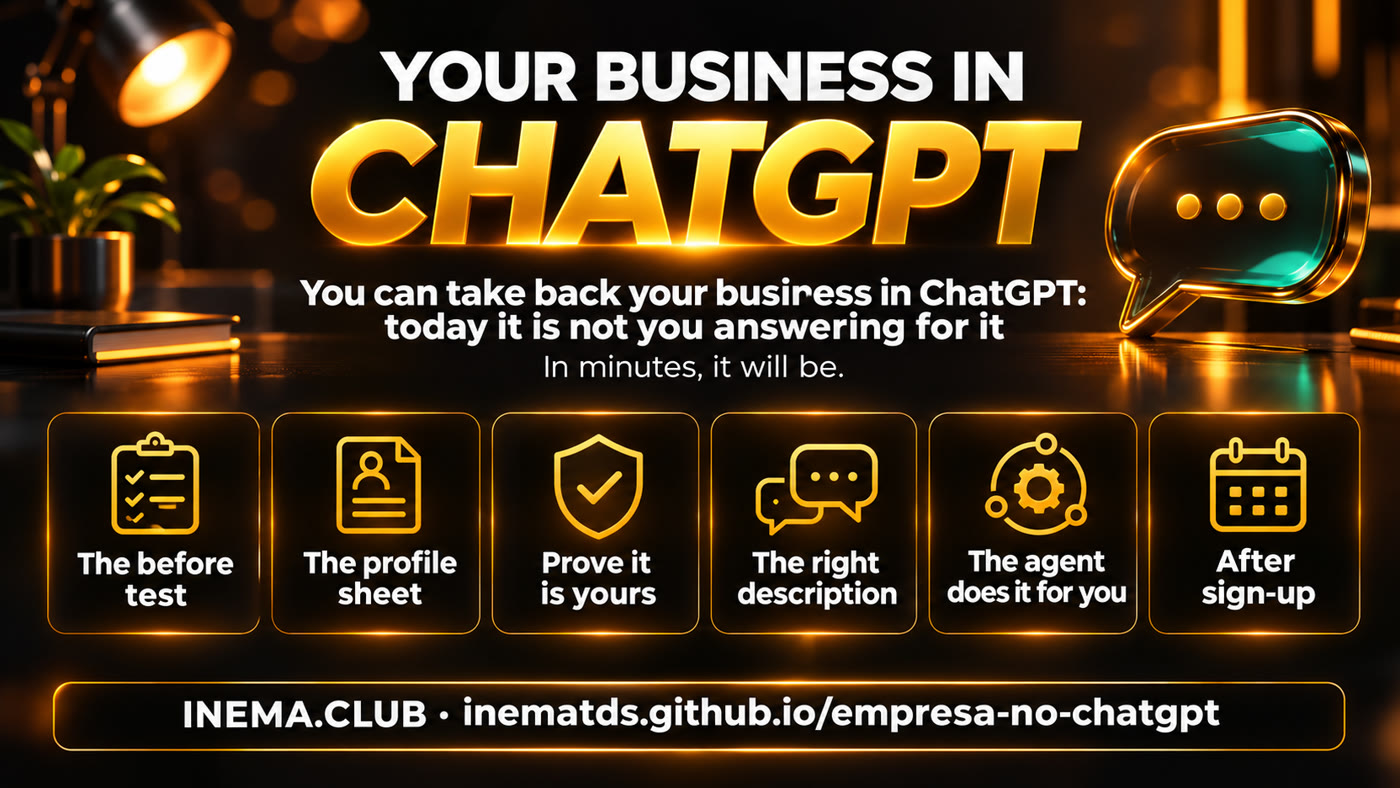
Before and after you claim your profile
😩 Without a profile
ChatGPT answers questions about you with whatever it finds: outdated hours, the wrong phone number, made-up prices. Or it shows another business with a similar name.
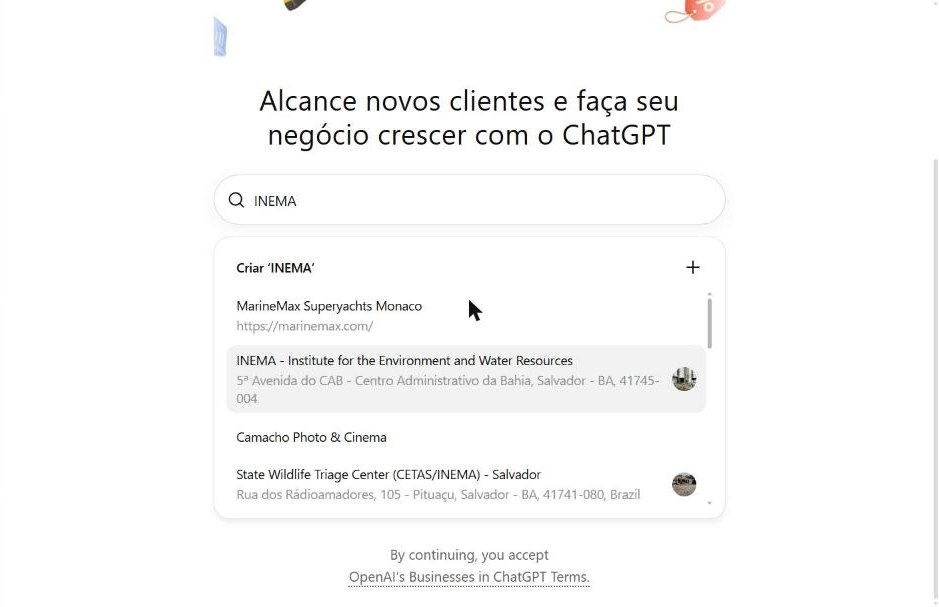
When we searched for "INEMA", it showed the Bahia environmental institute, with 6 addresses. None of them were ours.
😌 With a profile
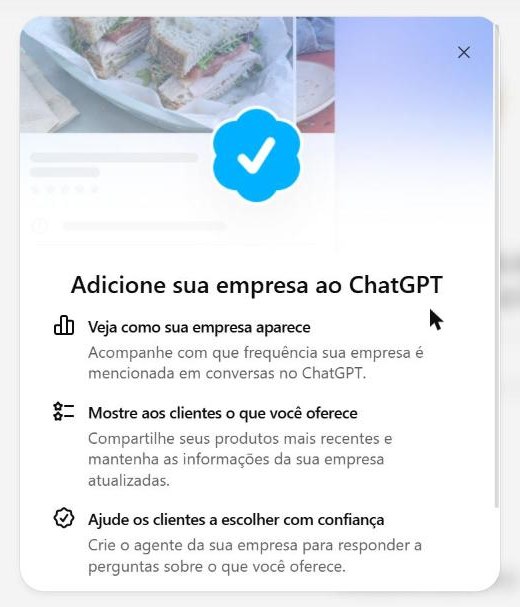
You provide your name, website, category, and a description in your own words. Your website gets verified, giving ChatGPT an official source: you.
After identity verification, OpenAI says it will show how often ChatGPT mentions your business and let you create an agent to answer customers. Our identity was approved on 11/23/2026; the numbers will appear here when the dashboard has data.
Source for the user count and feature: OpenAI, "Businesses on ChatGPT". The feature is in beta: the rules may change, and it may not be available to every business or country yet. In Brazil, as of 11/22/2026, it opened for us.
Understand it in 2 minutes
How to claim your profile, screen by screen
These are screenshots from our registration, in Portuguese, just as they appeared to us.
Find your business
Go to chatgpt.com/business-hub (or use the ChatGPT sidebar) and search for your business name. Search the short name and the full name. Found yours? Choose the one with your address. If you can't find it, click Create.
Prove the business is yours
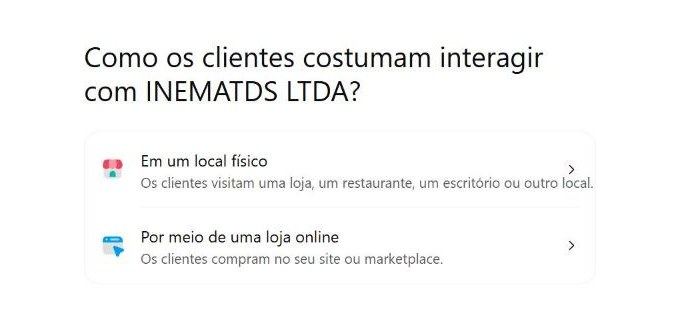
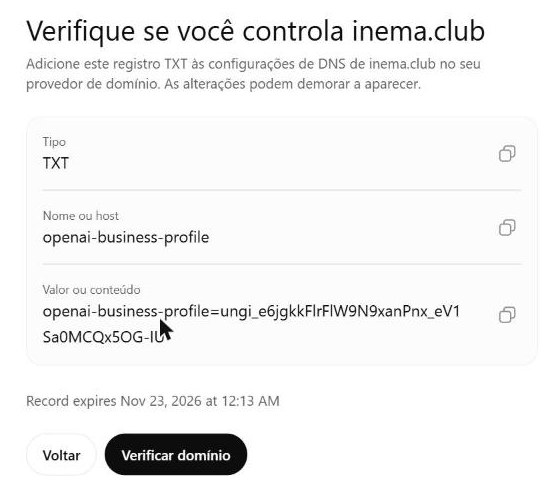
First, it asks how you serve customers. Physical location (shop, practice, office): proof is usually a code sent to your business phone. Online store: it asks for your website and a line to add to your site's DNS, the "address book" for your domain. You can find this in the control panel of the company where you bought your domain (Registro.br, Hostinger, GoDaddy, Cloudflare…): send this screenshot to whoever manages your website, and they can do it in a minute, or let the agent handle it. You may also be able to verify through your business email or Shopify store, if ChatGPT offers those options.
Tell ChatGPT who you are
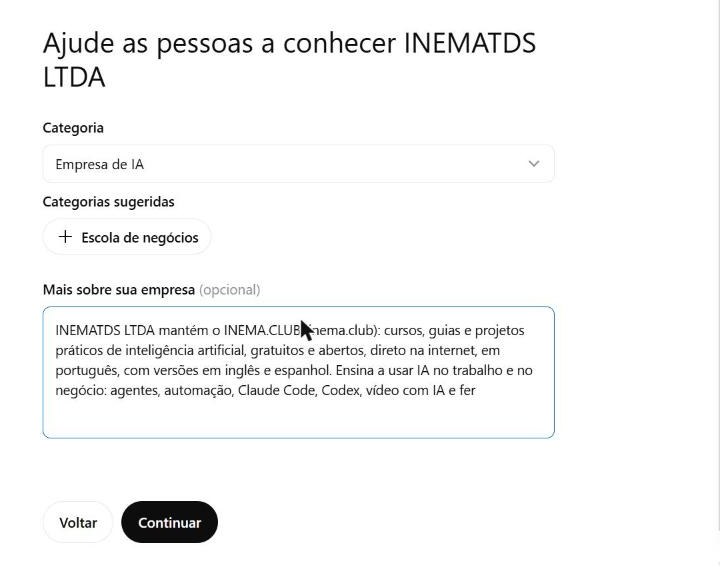
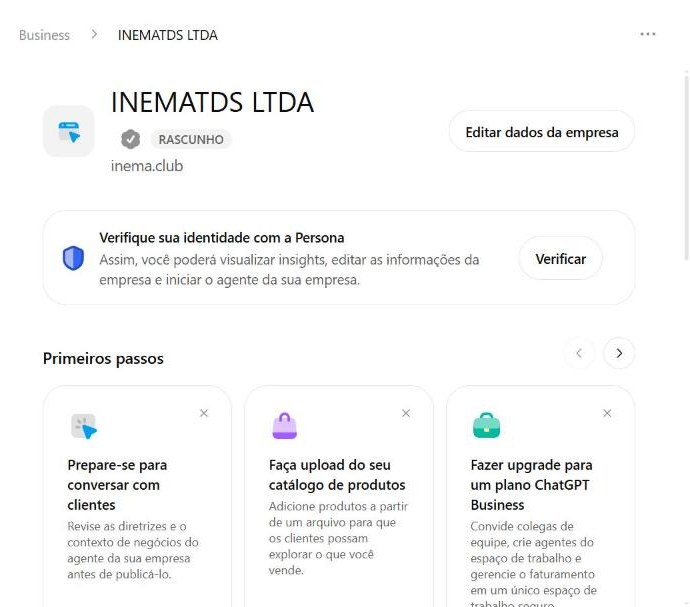
Choose a category from a list, write a description of up to 300 characters, and add delivery and returns details. Write the way you want ChatGPT to talk about your business. Then verify your identity with an ID and a selfie: without that, the profile stays a draft. Then invite your team.
An agent handled registration on its own
We did not fill out the form by hand. We asked Claude Code, an AI agent, to use our browser, where we were already logged in. It clicked, read the screens, filled everything in, and stopped only at the steps that require the owner.
- Opened the Business Hub
in Chrome, already logged in to the business account. It searched for "INEMATDS" (nothing) and "INEMA" (the Bahia institute) and showed us the problem. - Created the profile
"Create 'INEMATDS LTDA'," online store, website inema.club. - Paused and asked for approval
before changing the website's DNS. Once we said yes, it added the line, checked that it was visible online, and clicked "Verify domain" (Verify domain). It worked right away. - Filled in the rest
category "AI Company," description (shortened it when it hit the 300-character limit), delivery and returns. Then it submitted everything. - Delivered the report
screenshots of every screen and what is still missing: identity verification, which only the owner can complete.
🤖 What the agent does
Searches, creates, fills things in, adds the DNS line (if you approve), and checks each step.
✋ Where it stops
Before changing your DNS, adding a public phone number or email, and submitting. It asks and waits.
👤 What only you can do
Phone verification code, ID, and selfie. The agent never does these for you.
What we learned by doing it ourselves
All of this happened during our registration. The full kit includes 19 tips.
🔎 Search both ways
Try the short name and full name. A namesake is the most common problem: "INEMA" brought up another business.
🏢 Use the business account
Whoever claims the profile becomes its owner. Don't use a staff member's personal account if they might leave.
✂️ 300 characters, no warning
The description gets cut off mid-word. Count the characters first. The kit includes a checker.
⏳ The DNS line expires
After about 24 hours. Add it and verify on the same day. And don't delete it afterward.
📋 Categories come from a list
Search by keyword. There is no "course" category for online courses, so we chose "AI Company."
📞 Phone and email are public
They are optional. Only add contact details where customers can reach you.
↩️ Returns in Brazil
Online purchases already come with a 7-day cooling-off period. We selected "free, 7 days."
🧩 Extensions can get in the way
A browser extension opened over the page and hijacked keystrokes. Close your extensions or use a clean window.
🪪 Without identity verification, it is a draft
Your ID and selfie unlock the dashboard, business agent, and full editing access.
Run the test, then ask the agent
You can do it yourself, for free, by following the 3 steps above (we did it on a computer). Or, if you already use an AI agent, let it handle the process as ours did.
1. See what ChatGPT says today
Ask ChatGPT what your business is, and what your website, phone number, and hours are. Write down the answers. The kit includes 8 ready-to-use questions and a before-and-after form.
2. Do it yourself or use an agent
Do it yourself: follow the 3 steps above, for free. With an agent: Claude Code is an AI assistant from Anthropic that works on your computer; with the Claude in Chrome extension, it can use your browser while you are logged in. A paid Claude plan is required. Paste the prompt below into Claude Code and replace the details inside < >.
3. Approve the steps and take your selfie
The agent pauses and asks before each sensitive step. You handle identity verification.
I want to register my business on ChatGPT (Business Hub, chatgpt.com/business-hub).
Read the kit at https://github.com/inematds/empresa-no-chatgpt (the tips and profile form).

Business details:
- name: <NAME>
- how I serve customers: <physical location or online store>
- website: <WEBSITE>   address (if physical): <ADDRESS>
- what we do: <2 or 3 sentences>

Rules:
1. Use my browser, already logged in to the BUSINESS ChatGPT account.
2. First, run the kit's test and show me what ChatGPT says today.
3. Search for the short name and the full name. Did you find my business? Choose the one with my address. If not, click "Create."
4. Write the description in 300 characters or fewer and show it to me first.
5. Stop and ask me before accepting terms, changing DNS, adding a public phone number or email, or submitting.
6. I will handle the phone code, ID, and selfie: let me know and wait.
7. At the end, show me the screenshots and tell me what is still missing.
🛠️ Are you technical?
The script that adds the DNS line (Cloudflare), the profile checker, and the tests are in the GitHub README.
We did it for INEMATDS LTDA on 11/22/2026
Before
Search for "INEMATDS": no business found.
Search for "INEMA": the Bahia environmental institute, with 6 addresses.
After
INEMATDS LTDA created as an online store, website inema.club verified, category "AI Company," with our description. Domain verified through the TXT record in DNS and owner identity approved on 11/23/2026: complete profile.
This guide is updated when we repeat the test, 7 days later, and when the dashboard shows the first numbers.
The profile corrects who you are. Getting recommended is a separate task
OpenAI’s help article says that claiming your profile does not guarantee greater visibility or give you control over ChatGPT recommendations, and that advertising does not change the answers. Anyone selling “we’ll get ChatGPT to recommend your business” based only on the profile is promising something OpenAI does not promise.
1. What AI reads about you
Recommendations come from what AI finds elsewhere: reviews, local lists and guides, and pages on your website that answer the exact questions customers ask in plain language. One page per question is worth more than a polished “about us” page.
2. Register your brand with search engines
AI systems read the internet that search engines already know about. Register and verify your website in Google Search Console and Bing Webmaster Tools, submit your sitemap, and see which pages are indexed. It’s free and it’s the foundation for everything.
3. Measure before and after
Write down the 10 questions a customer might ask ChatGPT (“what’s the best … in …?”), take screenshots of the answers, do the work, and ask the same questions again in 60 days. That’s how you show results without promising a ranking.
4. The complete method: inemaSEO
inemaSEO covers this part: SEO (Google and Bing), GEO (being cited by AI systems), AEO (pages that answer questions), and WebMCP (a website ready for AI agents), with scripts for Search Console, Bing, and IndexNow. To study it step by step: inemaSEO Foundation Training.
If you do this for clients: identity verification belongs to the owner, so don’t claim the profile using your ChatGPT account. Source: Setting up your business on ChatGPT (OpenAI).
Before you start
Do I have to pay?
Not if you do it yourself: claiming the profile is free, and we used a free ChatGPT account. Paid offers (ads, Business plan) are available but not required. Only the agent option uses a separate paid service (the Claude plan for Claude Code).
Does it work in Brazil?
It worked for us in Portuguese on 11/22/2026. It is in beta: if it is not available to you yet, the kit will be useful once it is.
Do I need to know how to code?
No. The 3 steps involve clicking and filling in a form. Whoever manages your website can handle the DNS line, or the agent can do it with your approval.
What if someone has already claimed my business?
Sources mention an option to dispute ownership and a support team for locked profiles. We did not run into this; let us know if it happens to you.
Will this put me at the top of the answers?
No. OpenAI itself says that claiming your profile does not guarantee greater visibility. The profile corrects who you are; getting recommended is a separate task, explained in Getting recommended.
Can I do this on my phone?
We did it on a computer. The Business Hub opens in a browser; adding the DNS line and using the agent require a computer. If your case only requires a phone code, the rest is just clicking and filling in a form.
Can the agent make mistakes?
Yes, which is why it pauses before each sensitive step and shows you what it is going to do. You review the description before it submits.
What about you? When you ask ChatGPT about your business, does it get it right? Free at inema.club, right on the web.