PTENES
Real Estate · AI · 360°

Everyday photos of a room become a room in 360°

Four to six regular photos of the same room, or just a text description, become a photorealistic equirectangular panorama you can rotate like a virtual tour. No 360 camera, scan, or 3D software needed.

Room reconstructed in 360° from regular photos
What it is

AI reconstruction of an entire space

The AI understands how the photos connect (the same sofa in two photos, the same window from two angles) and reconstructs the room as a single space in a 2:1 format at 4096×2048, ready for any 360° viewer.

🏠 True to the property

Preserves walls, doors, windows, furniture, and materials. Doesn't redesign or invent objects; each piece of furniture appears only once. What no photo shows is inferred conservatively.

✍️ Or just a subject

No photos? Describe the room in text. AI creates five consistent photos of the same space and then assembles the 360° panorama. Useful for concepts, previews, and content.

🔍 Checked before delivery

Exact 2:1 ratio, minimum resolution of 4096×2048, score seam edges, automatic regeneration if the seam fails, and final smoothing. Everything is included in the report.

How it works

From a batch of photos to a panorama in five steps

It's an AI reconstruction, not a measurement. It's suitable for real estate marketing, previews, virtual tours, and input for AI video. It doesn't replace a LiDAR scan.

Photos or subject→ Vision understands the room→ Conservative prompt→ 2:1 image model with references→ Checks + stitching→ PNG + 360 viewer
1

Vision

Gemini reads all the photos as a single space: walls, doors, windows, furniture, lighting, the estimated direction of each photo, and what's missing.

2

Generation

The photos are used as references for a model with native 2:1 support. The default is Flux 2 Klein via Freepik/Magnific; GPT Image 2 and Gemini via OpenRouter are alternatives.

3

Control

Corrected ratio, resampling up to 4096×2048, seam score (≤12 good, ≤30 acceptable, >30 visible), one automatic regeneration, and crossfade at the edges.

Prerequisites

Python 3.12 and two API keys

Keys are read at runtime from your environment file. Nothing is copied into the project.

Dependencies

FastAPI, Pillow, NumPy, and httpx.

# in the project folder
pip install -r requirements.txt

Keys

Freepik/Magnific for generation, Gemini for vision. OpenRouter is optional.

# ~/projetos/wifi/.env
MAGNIFIC_API_KEY=...
GEMINI_API_KEY=...
OPENROUTER_API_KEY=...  # optional

Photos

4 to 6 JPG/PNG photos of the same room from different angles. Good coverage is better than five nearly identical photos.

sala/
├── 01.jpg  # turn toward the sofa
├── 02.jpg  # turn toward the window
└── 03.jpg  # turn toward the entrance
User Guide · Step by Step

Three ways to use it: command line, web interface, or skill

They all use the same engine. The output goes to ~/projetos/output/fotos3d/<nome>/ with the PNG, analysis, prompt, and report.

1

Generate a 360° panorama from a folder of photos

Choose a folder and give it a name. The default model is Flux 2 Klein (10 Magnific credits per image).

cd ~/projetos/fotos3d
python3 -m engine.pipeline /caminho/fotos-da-sala --nome sala-302  # ~1 min
2

Or generate from a subject

Describe the room. The AI creates five consistent photos and follows the same workflow.

python3 -m engine.pipeline --assunto "sala moderna, sofá cinza em L, janela grande com vista pro jardim, piso de madeira clara" --nome demo
3

Choose a model and resolution

Switch models whenever you want more references or native 4K. The report records which one was used.

python3 -m engine.pipeline sala/ --nome sala-302 --modelo gpt-image-2 --size 4K
python3 -m engine.pipeline sala/ --nome sala-302 --modelo or-gemini-pro   # via OpenRouter
4

Use the web interface

Drag in the photos (or paste the folder path), choose a model with its cost shown beside it, track progress, and rotate the result in the built-in viewer. A gallery shows everything generated so far.

uvicorn web.app:app --port 8360   # open http://127.0.0.1:8360
5

Review in the 360 viewer

Always check in the viewer, not in the flat image: duplicated furniture, repeated doors, impossible walls, lighting jumps, or breaks at the turning point. If something is wrong, regenerate or switch models.

# standalone viewer: open it in your browser and drag in the PNG
viewer/index.html
# report with aspect ratio, resolution, and stitching score
~/projetos/output/fotos3d/sala-302/relatorio.json
6

Use as a skill in Claude Code

Install once, then ask in natural language: "use the property-360 skill on the photos in folder X".

ln -s ~/projetos/fotos3d/skill/property-360 ~/.claude/skills/property-360
ModelProvidernative 2:1Test resultCost
flux-klein (default)Freepik / Magnificyes, resampled to 2048×1024true equirectangular, highly faithful10 credits
gpt-image-2Freepik / Magnificyes, up to 4K, 16 refsbest quality: correct spherical projection, good stitching~45 to 90 credits
or-gemini-proOpenRouterno (resampled from 16:9)Plausible 360°, less faithful to details~US$ 0,13
or-gemini-flashOpenRouternotends to come out wide-angle, not 360~US$ 0,04
Examples

Real room and imagined room

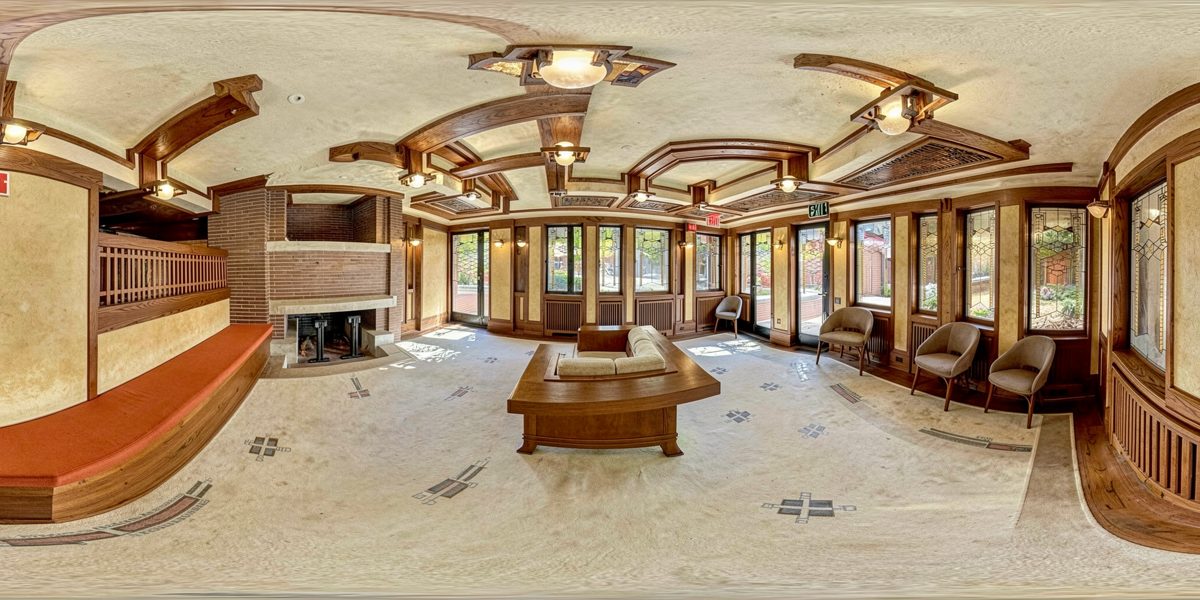
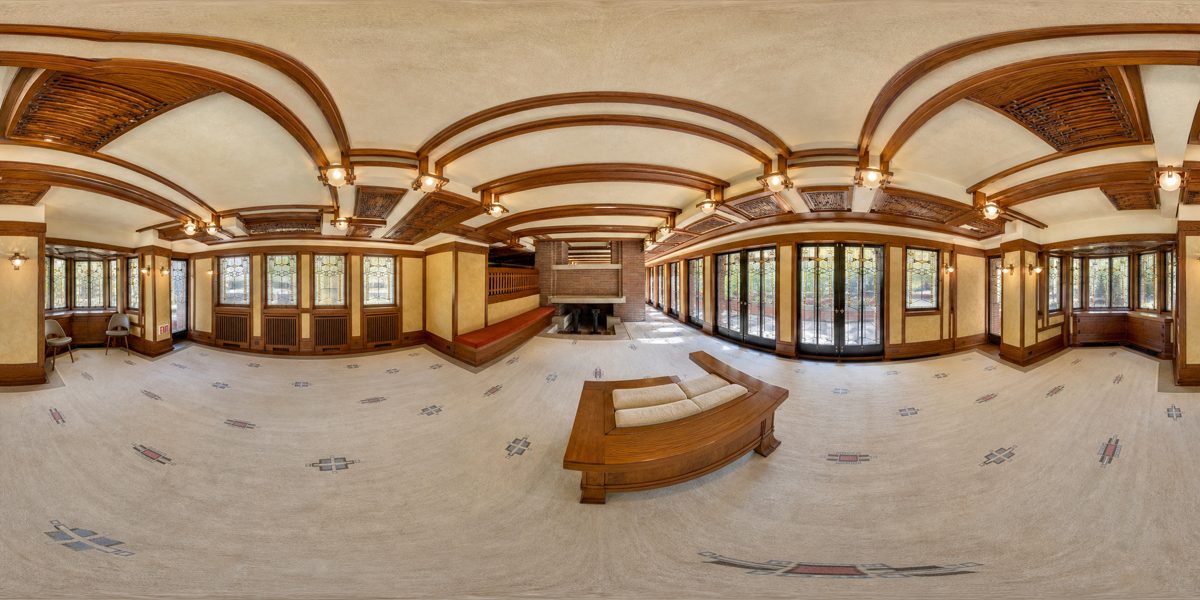
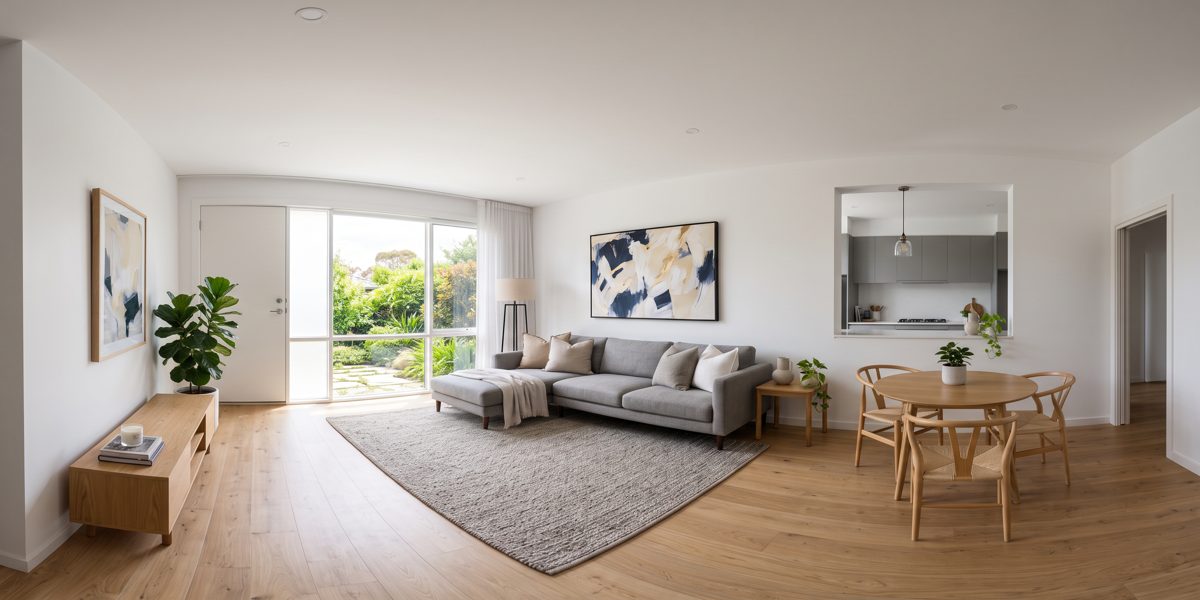
Above are the input photos. Below is the generated panorama (it looks stretched on a flat screen, but wraps around 360° in the viewer).

Six photos of the Robie House room
Input: 6 real photos of the living room at Robie House (Frank Lloyd Wright). Wikimedia Commons, photo by w_lemay, CC BY-SA 2.0.
Five photos generated per subject
Subject-based input: "modern living room, gray L-shaped sofa, large window, wood floor." Five consistent photos created by AI.
Robie House 360 panorama
Flux 2 Klein output: fireplace, red bench, stained glass, and ceiling reconstructed as a single space, 4096×2048.
Robie House 360 panorama with GPT Image 2
GPT Image 2 output: correct spherical projection (ceiling and floor curve), good seam. The quality option.
360 room panorama from a subject
Gemini Flash subject mode output: consistent with the photos, but with a narrower field of view. That's why Flux Klein is the default.
Roadmap

From one room to the whole property

Version 1.0 handles one room at a time. Future phases will connect the rooms into a tour.

v1.0 ✓
One room, from photos or a subjectComplete pipeline, checks, seam smoothing, web interface with viewer and gallery, property-360 skill.
Phase 2
Entire PropertyOne folder per room, batch generation, and a tour linking the panoramas with navigation arrows between the living room, kitchen, and bedrooms.
Phase 3
Guided correctionInpainting seams and duplicate objects directly in the viewer, and exporting to 360 video with AI.