Property listing β†’ promo video

Your listing becomes a film

Paste the listing link. imovelfilme picks the best photos, gives each one a professional photographer look, furnishes the empty rooms and delivers the finished property video, with price, area and animated highlights.
Your listing becomes a film: from the listing link to the property film
In short

imovelfilme is a free tool that turns a property listing into a short promo video. It is for agents, real estate agencies or owners who want to post the property on social media without hiring a photographer or an editor. You give it the link; it reads the data in the listing, improves the photos, creates furnished versions of the rooms and assembles a 30-second film with a soundtrack. It needs a computer with Python, Node.js, FFmpeg and Codex logged in to your subscription.

Watch the video

See what it does

On the left, the intro video. On the right, the film the tool delivered for a demo listing (fictional property, AI-generated photos).

imovelfilme intro Β· 42 s
Film generated for the demo listing Β· 29 s
What it is

Three jobs that become one command

What used to take a photographer, a decorator and a video editor.

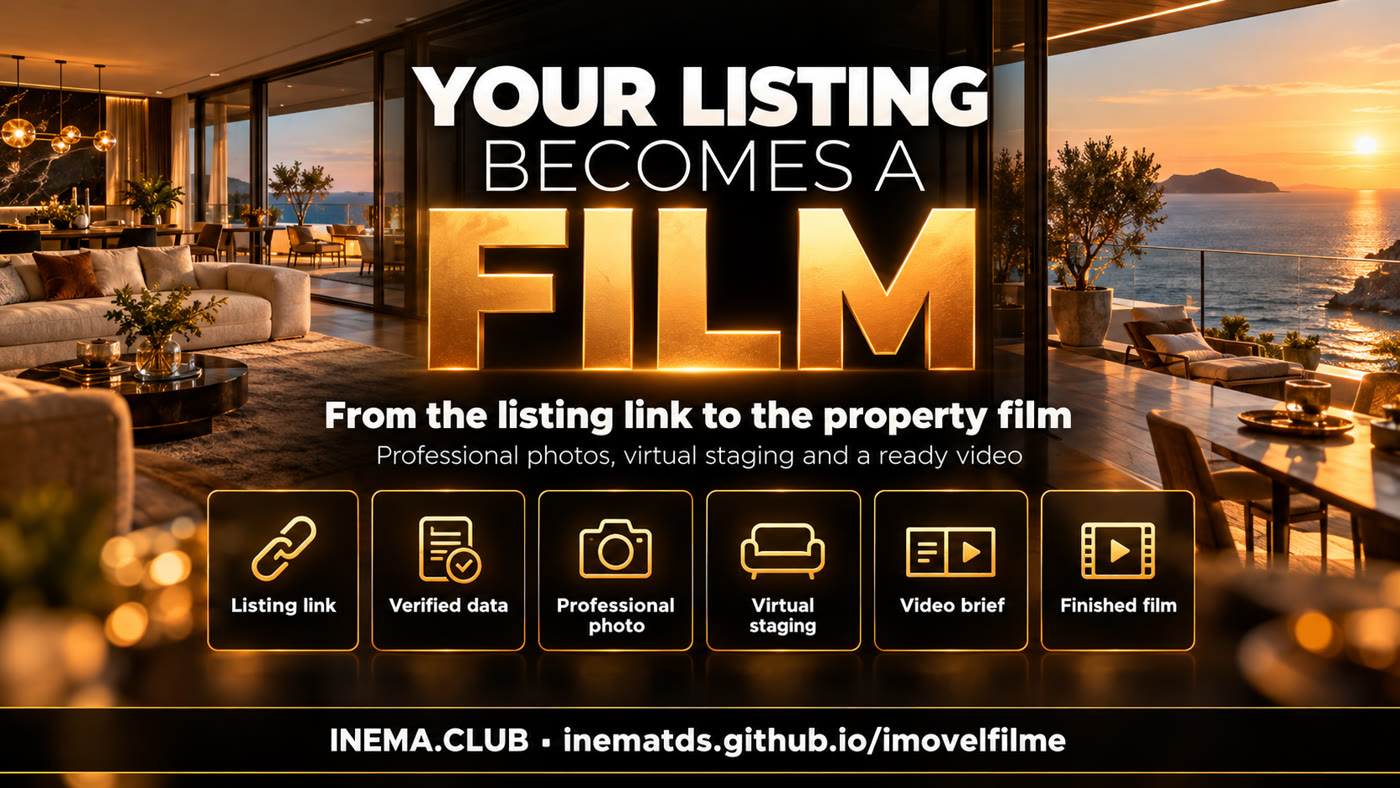
The six steps: listing link, verified data, professional photo, virtual staging, video brief, finished film

πŸ“· Professional photo

Each listing photo gets balanced light, straight lines and sharpness. The home stays the same: walls, windows and view do not change.

πŸ›‹οΈ Virtual staging

Empty living rooms, kitchens and bedrooms get furniture in the style you choose. The video states at the end that virtual staging was used.

🎬 Finished film

Name, location, price, bedrooms and area appear as animated text, with before and after of the rooms and a soundtrack at the right level.

How it works

From link to MP4 in six steps

Each step writes its files to a property folder. You can stop, review and continue.

Listing link→ Verified data→ Up to 10 photos→ Professional photo→ Virtual staging→ Brief→ MP4 film

1. Read the listing

Reads the page structured data (JSON-LD, og:, markup) and the text. Each field records where it came from. Anything not in the listing is left out.

2. Photos

Picks up to 10 photos, one per room before repeating (facade, living room, kitchen, master suite, bathroom, balcony). Codex edits each one through your subscription and the color is neutralized.

3. Film

The brief selects 4 to 8 strong facts. The video is built in HTML and animation (HyperFrames) and rendered to MP4; the soundtrack is mixed at βˆ’14 LUFS.

Prerequisites

What must be installed

Everything runs on your computer. No API key.

Python 3.10+ and Pillow

Reads the listing, organizes the photos and fixes the color.

python3 -m pip install pillow

Node.js 22+ and FFmpeg

Render the video (HyperFrames) and mix the soundtrack.

npm i
npx playwright install chromium

Codex CLI logged in

Makes the professional photo and the virtual staging with the image generation of your subscription.

npm i -g @openai/codex
codex login
User guide Β· step by step

Make the film of your property

Use photos you are allowed to publish: your own, your agency's or with the owner's permission.

1

Download the project

Clone the repository and install the video dependencies.

git clone https://github.com/inematds/imovelfilme
cd imovelfilme && npm i
python3 -m unittest discover -s tests   # 9 tests, no network and no AI
2

Read the listing

Pass the link (or a saved .html of the listing) and a folder for the property. Check what it found in imovel/anuncio.json: each field carries its source in _fontes.

python3 imovelfilme.py extrair "https://seusite.com.br/imoveis/apto-1202" --projeto ~/imoveis/apto1202
# listing: Residencial ... Β· 6 photos of 6 found
3

Choose the style and generate the photos

See the ready-made styles or write your own. The step is resumable: if a photo fails, run it again and only that one is redone.

python3 imovelfilme.py estilos
python3 imovelfilme.py fotos --projeto ~/imoveis/apto1202 --estilo praia-contemporaneo
# fotos/profissional/ e fotos/decorada/
4

Review the brief

The brief lists what will appear as text in the video. Edit imovel/brief.json if you want to remove or change a fact.

python3 imovelfilme.py brief --projeto ~/imoveis/apto1202
cat ~/imoveis/apto1202/imovel/brief.md
5

Render the film

Use music you are allowed to use (the repository ships two original tracks in assets/trilhas/). For Reels and Shorts, ask for --formato 9x16.

python3 imovelfilme.py video --projeto ~/imoveis/apto1202 --trilha assets/trilhas/elegante.mp3
# video: ~/imoveis/apto1202/output/filme-16x9.mp4
6

Or everything at once

For those who already trust the result: the four steps in sequence.

python3 imovelfilme.py tudo "https://seusite.com.br/imoveis/apto-1202" --projeto ~/imoveis/apto1202 \
  --estilo luxo-moderno --trilha assets/trilhas/energia.mp3
7

Use it as a skill

The skill/imovelfilme folder teaches Claude Code or Codex to run the flow and check the result. Copy it to your agent's skills folder.

cp -r skill/imovelfilme ~/.claude/skills/
# then: "make the video of this property: <link>"
Examples

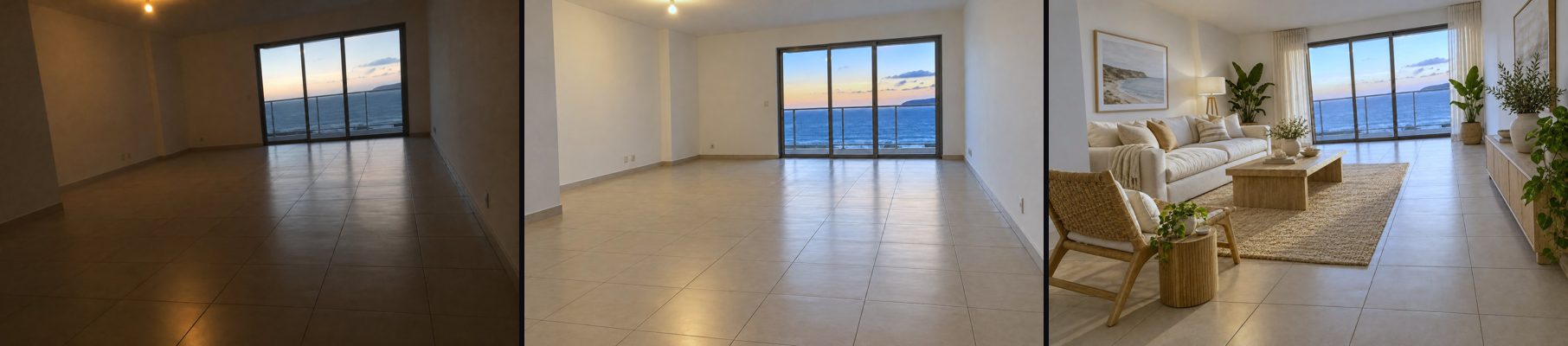
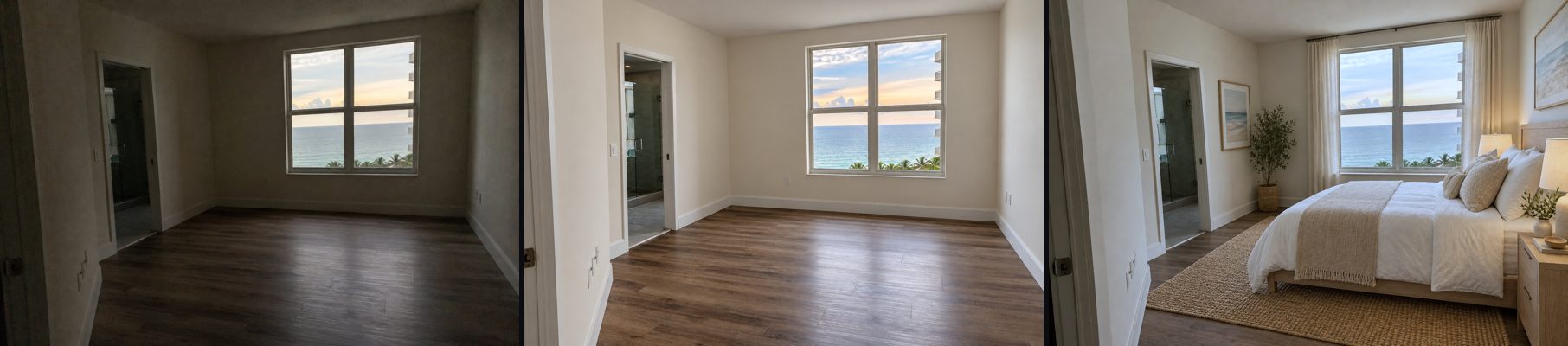
Before, professional and furnished

From left to right: phone photo, professional photo and virtual staging (beach contemporary style). Fictional listing.

Living room: phone photo, professional version and furnished version
Living room with a sea-facing window
Master suite: phone photo, professional version and furnished version
Master suite
Roadmap

What comes next

Version 1.0 covers the full path. Possible next steps:

1.0
TodayGeneric listing reader, photos via Codex, neutral color, brief, 16:9 and 9:16 film with soundtrack, skill and tests.
Next
Major portalsDedicated readers for portals that load photos by script (today: save the page and pass the .html).
Later
Narration and languagesOptional voice reading the highlights and video texts in English and Spanish.