Your work moves forward.
Your assistant learns from your review.

Organize your routine, prepare deliverables, and test improvements to your own copilot. For personal life, independent work, and small businesses.

Public demo with scripted examples. Real AI in the local version. The public demo is available in Portuguese, English, and Spanish.

RSI Copiloto — INEMA project cover

An assistant with its own workspace.

RSI Copiloto is a single-user system inspired by the idea of Jarvis and Hermes: it gathers context, prepares work, and tracks improvements. The cycle improves instructions and processes; it does not retrain the model.

Individual

Weekly planning, studying, and organizing decisions. Separate what you know from what you still need to find out.

Independent professional

Proposals, follow-ups, and delivery checklists. Record preferences and terms to reuse context.

Small business

Customer service drafts, meetings turned into actions, and procedures for recurring work.

From a request to an improvement you can verify.

The work does not end with the response. Record what needed correcting, propose an instruction change, and compare before adopting it.

Run→Review→Record feedback→Propose→Compare→Promote or roll back

AI produces structured text. Turning next steps into tasks, saving a deliverable as memory, and promoting a version are explicit operator actions.

Missions and LOOP-R: two connected cycles.

You define the mission. The AI proposes one to five steps. Review the plan and click “Aprovar plano e executar primeira etapa” (approve the plan and run the first step). The result appears inside the mission for your review.

Click “Aprovar e executar próxima etapa” (approve and run the next step) to continue using the approved result and your feedback. “Corrigir esta etapa” revises the current work. You can pause, reload and resume. Saving to memory is optional: mission history is already preserved.

A step requiring sending, external research, code execution or another integration is shown as a manual action. The system states that it has not performed it and waits for you to record the actual result before continuing.

Execute → Measure → Critique → Propose → Test → Validate → Promote → Repeat

After completion, view your average rating and revision count. Click “Iniciar LOOP-R desta missão” (start this mission’s LOOP-R). The AI receives this evidence, critiques failures and proposes a candidate instruction. In the lab, compare both versions, read the answers, record your assessment and only then promote.

New missions use the promoted instruction. Missions already started retain their original version. This is supervised improvement of instructions and procedures, without training model weights. The three general tests check structure; they do not prove better quality or financial results.

The public demo uses programmed examples. The full workflow operates; use the local version to generate actual mission content with AI.

Choose how to get started.

The public app lets you try the workflow. The local version adds real AI, SQLite, and daily routine execution while the server is running.

Browser demo

No account or key required. Data stays in your browser; responses follow a clearly identified fixed script. Clearing storage deletes your data. Export a backup to keep it.

Open demo

Local AI assistant

Python 3.11 or later, Git, and an OpenRouter credential. No additional Python libraries. The server only accepts connections from this computer.

git clone https://github.com/inematds/rsi-copiloto.git
cd rsi-copiloto
python3 -m rsi.server

Open http://127.0.0.1:8765/app/.

Credential and configuration

Load the key at runtime: OPENROUTER_API_KEY in the environment, or RSI_ENV_FILE pointing to an existing file outside the repository. The server also checks ~/projetos/openpcbotv2/.env and ~/projetos/wifi/.env. Never put the key in the public app.

RSI_ENV_FILE="$HOME/.config/minhas-credenciais.env" python3 -m rsi.server
# The specified file must contain OPENROUTER_API_KEY.
# To adjust the model and daily limit:
RSI_MODEL=openai/gpt-5.4-nano RSI_DAILY_CALLS=30 python3 -m rsi.server

Default model: openai/gpt-5.4-nano via OpenRouter. Up to 2,400 output tokens per call. Default limit: 50 attempts per UTC day, including failures. This limits calls, not spending. The dashboard displays tokens and cost when reported by the provider.

One-off outputs and supporting features.

Start with a small request you know how to review. These steps work in both the demo and the local version.

1

Choose your workspace

Select Individual (Pessoa física), Independent professional (Profissional independente), or Small business (Pequena empresa). Each workspace has its own tasks, deliverables, and memories. The active instruction is shared across all three.

2

Save useful context

Under Knowledge (Conhecimento), record a policy, preference, or procedure. Example: “Our proposal includes two revision rounds; pricing depends on scope approval.” Check Share (Compartilhar) only if it applies to all three workspaces.

3

Request your first deliverable

Use one of the nine routines or write your own request. The AI version retrieves up to five memories through word matching, without sending the entire history.

Prepare a proposal for 8 posts for a shop.
We have 10 business days after receiving the materials.
Pricing is still undefined. Use our revision policy.
I need scope, deliverables, terms, and next steps.
4

Review before use

Check the deliverable, gaps, and cited memories. Copy or download the text. The system prepares drafts: it does not send messages or make commitments to clients.

5

Turn it into action

Click Add next steps to tasks (Adicionar próximos passos às tarefas). Add deadlines to new manual tasks and export dated open tasks to an .ics file. Exporting does not automatically sync your calendar.

6

Give specific feedback

Rate the result from 1 to 5 and describe an observable correction: “it should have asked about the deadline before suggesting a date.” This review becomes part of the next improvement request.

The RSI improvement lab.

Under RSI Evolution (Evolução RSI), describe what you want to improve. AI proposes a candidate instruction using the current version and up to eight recent reviews from the selected workspace. Evaluation examples are not included in that call.

Side-by-side comparison

Comparison makes six calls: current and candidate instructions on the same three cases, without real memories. Responses and the structural scoring criteria are visible. The demo uses fixed examples; it does not measure actual gains.

Supervised promotion

The candidate must pass without structural regression. You read the cases, record your assessment, and confirm promotion. The change applies to all three workspaces. Previous versions can be restored.

The scoring criteria check text length, next steps, and explicit gaps. They do not measure truth, usefulness, customer satisfaction, or financial results. Three fixed examples are an initial test, subject to overfitting, not statistical proof of improvement. An equal score does not demonstrate progress.

How it fits into daily life.

These are usage scenarios, not proven customer outcomes.

Personal
Sunday: plan a manageable weekProvide your free time and commitments. Review the plan, turn it into tasks, and record anything unrealistic. Then test an instruction that asks about availability before scheduling activities.
Freelancer
Monday: prepare a proposalRecord terms and scope. Generate a draft, review it, and record gaps. Compare an instruction that spells out exclusions and dependencies before reusing it.
Business
Every day: improve customer serviceSave confirmed policies. Prepare responses without inventing deadlines. Review before sending manually. Turn recurring corrections into an improvement hypothesis.
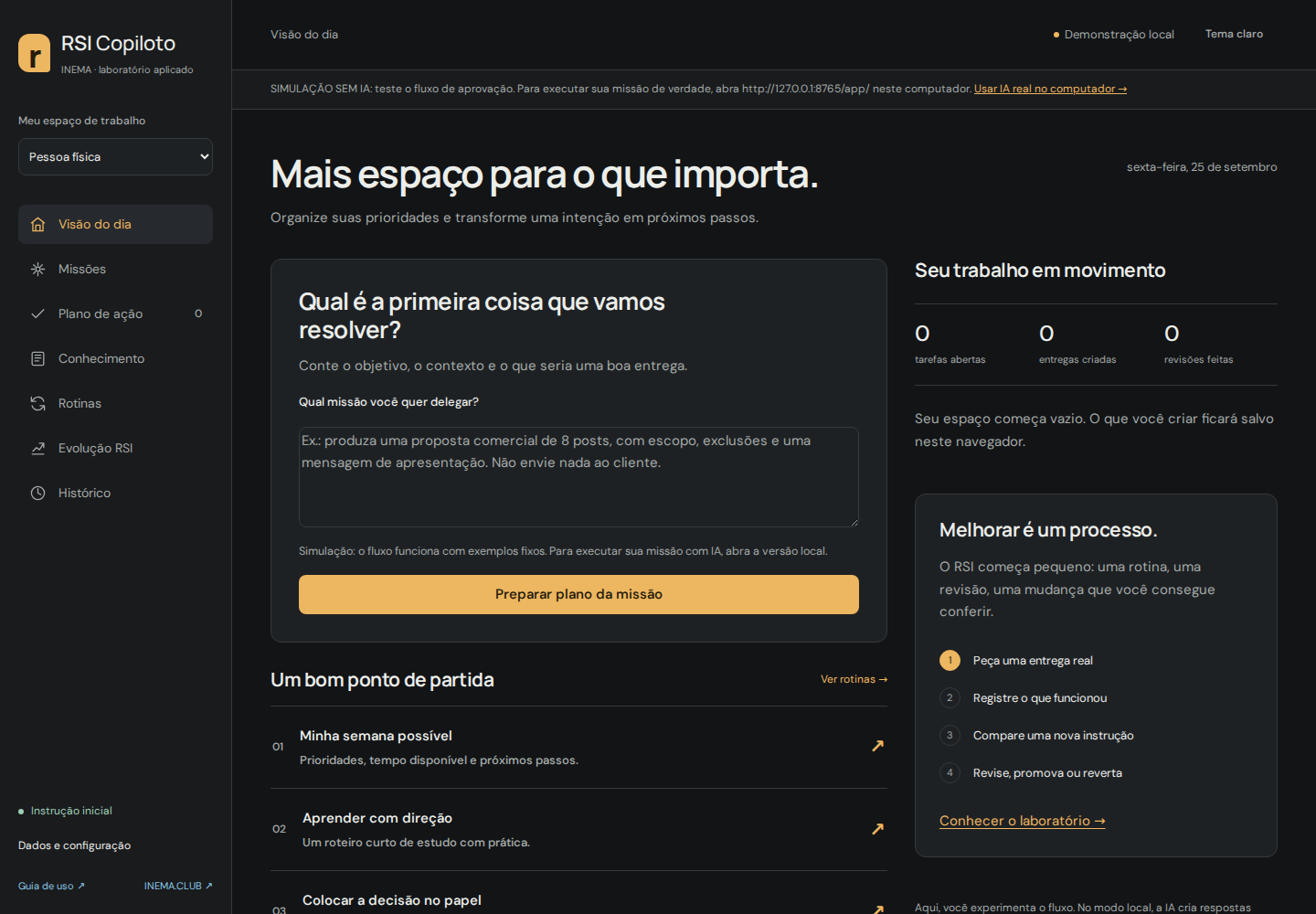
Actual RSI Copiloto screen in Portuguese: daily overview, routines, and improvement cycle
Portuguese interface. The screenshot shows the empty demo before adding any data.

Clear operations, data handling, and limits.

Memory
You decide what to saveContext is retrieved through words, without embeddings. Sharing between profiles is optional. The request, profile, instruction, and selected memories are sent to OpenRouter in local mode. Do not store passwords.
Routines
Optional daily recurrenceEnable “every 24h” (a cada 24h) in the local version. The first run will be the following day. The server must keep running; missed runs are not accumulated while it is off. A failure pauses the routine. Only drafts are produced.
Backup
Export and restoreJSON backups contain all three workspaces and their data. In local mode, SQLite is stored at ~/.local/share/rsi-copiloto/state.sqlite3. Back up before restoring. Imported routines stay paused, and imported evaluations do not authorize promotion.
Scope
One operator per installationThere is no multiuser authentication, team dashboard, or connection to WhatsApp, email, ERP, or payments. The activity log is local and is not tamper-proof. For shared use, implement isolation and permissions before exposing the server.

What is available and what comes next.

v1.1.0
Operational assistant + LOOP-RApp, nine routines, memory, tasks, feedback, candidates, A/B comparison, promotion, rollback, local recurrence, history, and exports. Reproducible tests in the repository.
Next
Authorized integrationsCalendar, email, and ERP adapters; permissions per operation; authentication and organizations. Planned, not yet implemented.
Research
More representative evaluationsBusiness-specific datasets, fresh held-out cases, blind review, and metrics for usefulness and rework. Conceptual research continues in the original RSI project.

Read the RSI research (in Portuguese) → · Implementation plan (in Portuguese) →

python3 -m unittest discover -s tests -v
# Optional real AI test: up to 8 paid calls with fictional data.
python3 -m scripts.smoke_live

Integration contract checked against the official OpenRouter documentation. Model and pricing checked in the official catalog on September 25, 2026. The app records the reported cost per call without promising a fixed price.