PTENES
macOS · Linux · WSL · Claude Code & Codex

Shift gears, the model changes

Model and Effort Panel

Model & Effort Panel Model and Effort Panel

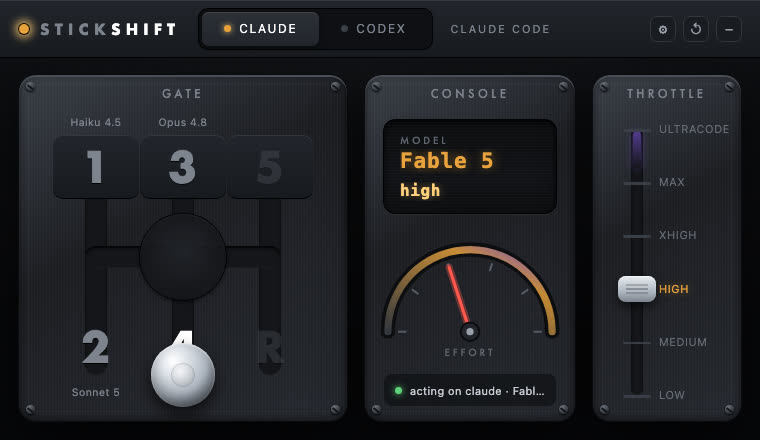
StickShift is a macOS menu-bar panel with a real H-pattern shifter: pull the lever to switch the Claude Code or Codex model in the terminal pane you're viewing, and drag the throttle to change the effort. Everything is verified before it acts — otherwise it refuses with a reason and never types blindly.

StickShift panel: H-pattern gate, LCD console, and effort shifter
What it is

A real gearbox for your coding agent

No editing config by hand or memorizing commands: StickShift reads the pane through the macOS Accessibility API, proves that a local agent is idle, and types exactly what you would type — /model, /effort, or the Codex picker's keys.

🔒 Truly fail-closed

Never edits a config file, never calls a provider API, never uses terminal automation. It only types after proving the pane is idle, the correct local process is running, and the binary is signed and qualified — any failed check results in a refusal with a reason code.

🎛️ A dashboard for each provider

Claude face (throttle up to ULTRACODE) and Codex face (throttle up to ULTRA), with each provider’s exact labels and global shortcuts (Cmd+Shift+1..5, Cmd+Shift+R) that shift gears without even opening the panel.

🖥️ App + CLI

bin/shift does a dry run by default (doesn't type anything); --commit actually executes. shift doctor diagnoses permissions, config, and focused pane assignment with a single command.

How it works

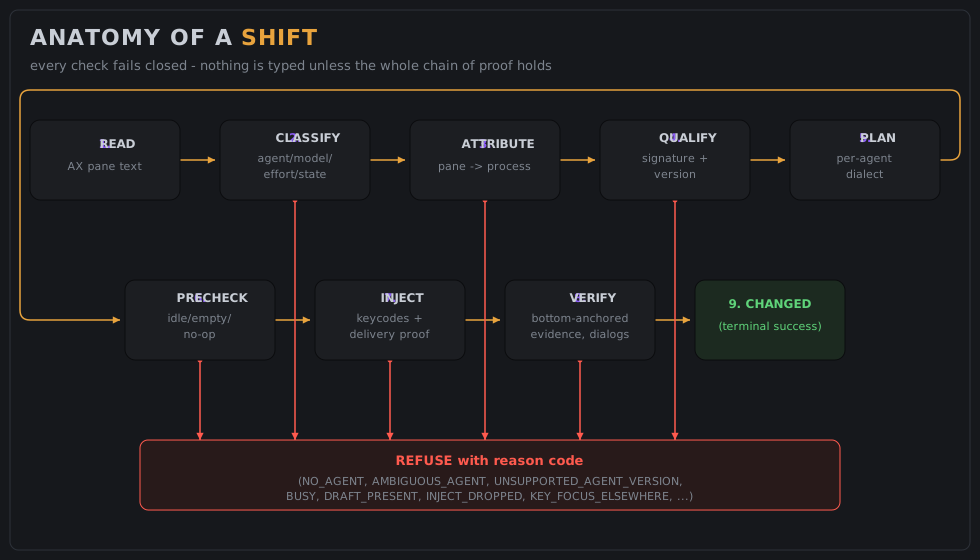
Anatomy of a switch

Between shifting gears and the toast CHANGED, the engine runs through a chain of checks — any failed link aborts the switch and returns a reason code instead of a keystroke.

1. Read→ 2. Classify→ 3. Attribute→ 4. Qualify→ 5. Plan→ 6. Precheck→ 7. Inject→ 8. Watch/Verify→ 9. Report

Read + classify

The focused pane is read via the Accessibility API; a pure classifier extracts the agent, model, effort, cwd, and whether it's idle/busy/has a dialog open, with the composer proven empty.

Attribute + qualify

The pane is linked to a local process (tty → foreground group → cwd), and the attributed binary's signature, team, and version are checked against the manifest.

Inject + verify

Types using keycodes resolved from the current layout, proves delivery by occurrence delta before any Enter, and only reports success with a verdict anchored at the end of the pane.

Prerequisites

Before you install

The automatic path (setup.sh) covers almost everything; this is what needs to exist on the machine first.

macOS + Xcode CLT

Needs the clang to compile.

# install the command line tools if missing
xcode-select --install

Supported terminal

Warp is the end-to-end verified default. Terminal.app has passed the two toughest tests; other terminals qualify in 4 steps.

# qualify a new terminal
./scripts/qualify-terminal.sh "iTerm"

Accessibility

StickShift requests permission on its own at first launch — just grant it in System Settings when the dialog appears.

# confirm what's granted
./bin/shift doctor
User guide · step by step

Install and shift into your first gear

The script is idempotent: you can run it again without worry if something fails halfway through.

1

Clone and run setup

Checks prerequisites, creates a stable signing identity, builds, runs the full test suite, installs in ~/Applications/StickShift.app and opens the app.

git clone https://github.com/inematds/stickshift && cd stickshift  # clone the repo
./scripts/setup.sh  # idempotent, installs everything
2

Grant Accessibility access and reopen the app once

Enable StickShift in System Settings → Privacy & Security → Accessibility. Then quit and reopen the app (right-click the gear in the menu bar → Quit → reopen) — the permission only sticks to the process after relaunch; this is support issue #1.

3

Focus a pane with Claude Code or Codex and shift gears

Click the terminal pane running the agent, drag the lever to a gate (or trigger it from the CLI from other pane — the CLI refuses its own pane as SELF_TARGET).

./bin/shift 4          # dry run: shows the plan, types nothing
./bin/shift 4 --commit # run for real
4

Check the log

CHANGED means it worked; any other code is an explained refusal — every attempt is logged with its reason, never with the pane contents.

tail -5 ~/.stickshift/log
5

Or skip the reading: let the agent install it

Point Claude Code, Codex, or any coding agent to this repo and say "set up StickShift on this Mac". O AGENTS.md The repo’s complete operational playbook covers installation, adapting to a terminal and agent version, and debugging refusals by reason code.

🧩 Any model

New model without recompiling

The published version only knew about Opus 4.8, Fable 5, and the gpt-5.x family. On the branch catalogo-modelos, models become data: a single catalog says which models exist, how each appears on screen, and which efforts it supports. The standard gears already include Opus 5.5 and the GPT-6 family.

⚠️ Not yet compiled or tested on a Mac

The code was written on a Linux server, without Apple's compiler. Model names came from the installed programs (Claude Code 2.1.282 and Codex 0.156.1) and were verified on the actual screen via tmux on Linux, which is the same interface as macOS. During this check, two Codex changes came up, already fixed on the branch: the footer shows "GPT-6-Astra" with capitalization, and Max/Ultra are now in a submenu called "More reasoning…". Things to check on the Mac: the list of placeholder texts in the Codex field is still from version 0.144.1 (if it refuses with DRAFT_PRESENT, just extract it again) and Claude's model is read from a status line 📂 pasta · Modelo, which appears to come from a custom statusline. Before using it, on a Mac: git checkout catalogo-modelos, make test, make matrix, stickshift doctor e stickshift status in a pane with each agent. Only after that does the branch enter the main.

GearClaude CodeCodex
1Haiku 4.5gpt-6-luna · medium
2Sonnet 5gpt-6-sol · medium
3Opus 5.5 · mediumgpt-6-astra · medium
4Opus 5.5 · highgpt-6-astra · high
5Opus 5.5 · xhighgpt-6-astra · xhigh
ROpus 5.5 · lowgpt-6-sol · low
ULTRAOpus 5.5 · ultracodegpt-6-astra · ultra

The ladder follows the reasoning effort reference: medium as the everyday gear, high when you need more reasoning, and xhigh for the hard case. max stays outside the standard gears, but is still available through the accelerator or remapping.

1 · Teach the new model

No ~/.stickshift/config.toml, one line per model:

claude_model.opus = "Opus 5.6"
codex_model.gpt-7-nova = "low medium high xhigh max"
gear.3.claude = "opus medium"

In Claude, the key is the argument to /model and the value is the status line name. In Codex, the key is the name in the selector, and the value is the list of reasoning efforts the model accepts.

2 · Check before switching

stickshift status in a pane with the new model needs to show the same name. Then, stickshift 3 without --commit prints the plan without typing anything; only then use --commit.

Name comparison allows decoration ("Opus 5.5 (1M context)" counts as Opus 5.5), but never confuses versions: "Opus 5" is not "Opus 5.5". In Codex, each model only accepts its own efforts; requesting ultra on luna is rejected.
🐧 Linux and Windows (WSL)

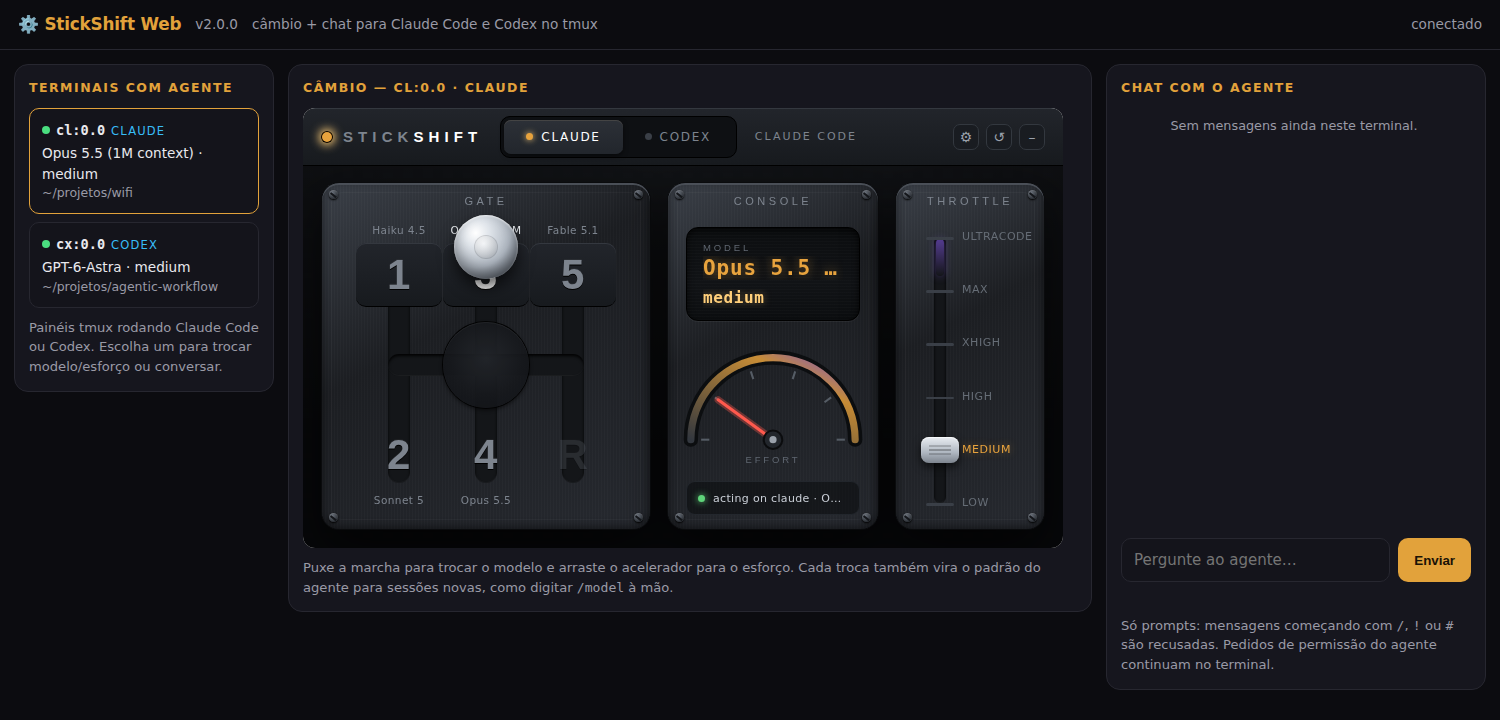
StickShift v2: web panel + chat on Linux

On Linux, and on Windows via WSL, StickShift v2 asks the terminal itself (tmux) to read the screen and type, without macOS Accessibility or a native app. It switches Claude Code and Codex models and effort from the command line or through a web panel with the same model, and has a level 1 chat that sends prompts to the agent in the selected pane. Uses only Python 3, with nothing to install. Live-validated on 24/09/2026 with Claude Code 2.1.282 and Codex 0.156.1.

StickShift v2 web panel: terminals with an agent on the left, shifter in the center, and chat on the right

1 · Install and list

Clone the repository and put the launcher on your PATH. The list shows the tmux panes running Claude Code or Codex and each one's status.

ln -s "$PWD/v2/bin/stickshift2" \
  ~/.local/bin/stickshift2
stickshift2 list

2 · Switch from the command line

Without --commit, it's just a simulation and shows the plan. With --commit, types it and confirms via the agent's own message.

stickshift2 shift 4 --pane %3
stickshift2 shift 4 --pane %3 --commit
stickshift2 keys   # tmux shortcuts

3 · Open the web panel

Opens in 127.0.0.1 with one token. On the left are the terminals; in the center, the model; on the right, the chat with the agent.

stickshift2 web
# open the printed address with ?t=…

🔒 Guarantees

The agent is identified by the process that runs in the pane, not by the text. It only types when the agent is idle and the field is empty; Claude's gray suggestion doesn't count as a draft. The change is confirmed by the agent's message ("Set model to …", "Model changed to …"). The web panel requires a token on every call, checks Host e Origin and logs everything in ~/.stickshift/v2.log.

💬 Level 1 chat

Prompts only: messages beginning with /, ! or # are refused, as are line breaks. System tasks go through the agent and its permissions. If the agent asks for permission, the chat notifies you and the decision stays in the terminal; approving through chat is v3.

⚠️ Good to know

Each switch also becomes the agent’s default for new sessions, how to type /model manually. opus e opus[1m] are different models (200K and 1M context); the gears use opus[1m]. O Native Windows (WezTerm backend) is phase 5 of the plan and doesn't exist yet. For now, on Windows, use WSL with tmux. v2 code and README → · plan →

Examples

The diagrams used by the project itself

Directly from docs/: the anatomy of a switch and the source code map, as they accompany the README.

Pipeline diagram: Read → Classify → Attribute → Qualify → Plan → Precheck → Inject → Watch/Verify → Report
Anatomy of a switch — the 9 steps between shifting gears and the CHANGED toast.
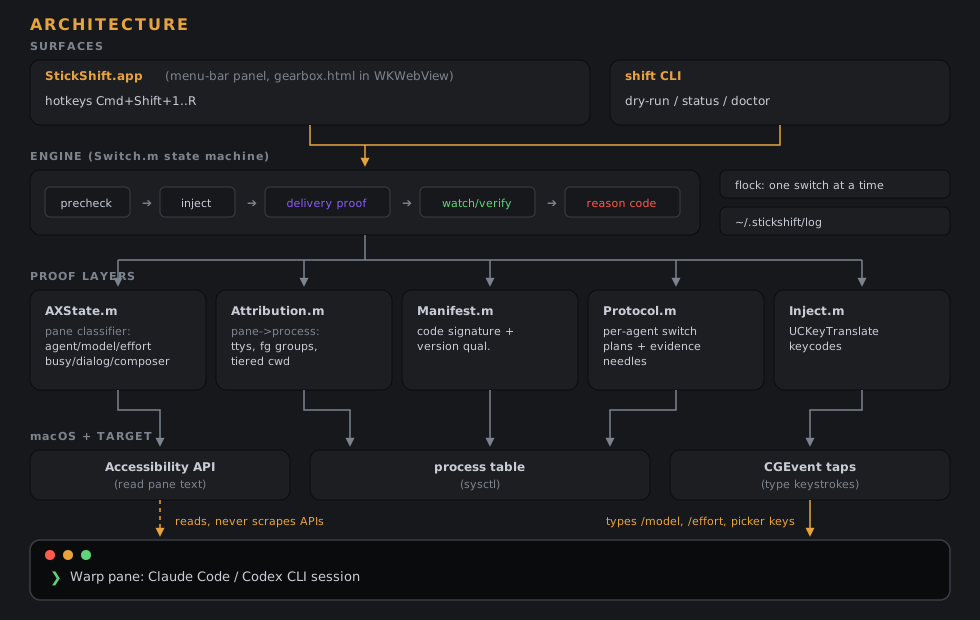
StickShift source code architecture diagram
Architecture map — engine in src/core, app shell in src/app, CLI in src/cli.
Roadmap

Where it is and where it's going

As documented in the README today.

Today
Warp verified end to endTerminal.app with verified read + injection; iTerm2 not yet qualified. Only Warp is enabled by default.
Next
More terminals + stronger pane identityQualify iTerm2 and others via scripts/qualify-terminal.sh; reduce the ambiguity that currently depends on window title + geometry + cwd.
Distribution
Developer ID + notarizationThe self-signed identity solves the local TCC treadmill; distributing beyond your own machine requires a paid Developer ID.
Models
Model catalog (branch catalogo-modelos)Opus 5.5 and GPT-6 in the standard gears, new model through the config.toml; still needs to be compiled and tested on a Mac before merging.
v2 ✓
Linux and WSL with web panel + level 1 chat (done)Core written in Python, tmux, web panel with token and chat, validated live on 24/09/2026. Phase 5 remains: WezTerm for native Windows.
v3
Chat with permissionsApprove or deny the agent’s permission requests through chat. Off by default, only in recognized dialogs, with a log of who approved what.