⚪ See the Node: The Thing
A graph is a data structure — an organized way to store information — and it consists of just two things. The first is the at the. A node is a thing: a person, a step in your process, a ticket, a document, an AI agent. If you can point to something and say “this here,” it can be a node.
🆕 New here? Three words before you continue
- Data structure: just a way to store information so you can search it and perform calculations on it. A shopping list is a data structure.
- AI agent: an AI model (the kind that runs behind ChatGPT or Claude) that, in addition to writing text, does things on its own: searches the web, runs code, edits a file.
- Node: a thing from your world, represented as a point in the diagram. In code, you’ll see it written as
nornode.
What to look at: four nodes and zero lines. Notice that nothing here tells you anything interesting — it's just a bunch of stuff. A graph only starts to matter when you connect things. That's what we do in the next topic.
✓ Good nodes
- ✓“Review the text”—a unit of work with a beginning and an end
- ✓“Customer activated”—a state you can verify
- ✓“Research agent”—a role with clear responsibility
✗ Bad nodes
- ✗“Build the product”—too big; the graph doesn’t help you at all
- ✗“Press Enter”—too small; you drown in detail
- ✗“Marketing stuff”—vague; nobody knows whether it’s done
Key concepts
A node is a thing, not an action
You can point and name
Label, owner, cost, state
Neither huge nor microscopic
➖ Connect with edges: the relationship
The second (and final) piece is the edge — in English edge, written as
e in algorithms. An edge is the relationship between two nodes. If the node is a noun,
the edge is a verb: “depends on,” “becomes,” “knows,” “delivers the result to.”
💡 The value lies in the edges
A classic mistake for beginners is to carefully design the nodes and treat the edges as decoration. In practice, it’s the opposite: the nodes are usually obvious (everyone knows how to list the steps), and the difficulty — and the value — lies in saying how one thing leads to another.
- •A digital product by itself doesn’t reach anyone. The edge to the consumer (ad, referral, affiliate) is the hard part.
- •In an agent graph, the edge is where the decision lives: “if approved, continue; if rejected, go back.”
- •An edge can also have type — “details,” “contradicts,” “blocks”—and now you have a graph with typed edges.
What to look at: compare it with the previous diagram — they’re the same four nodes. The only thing that changed was the three labeled lines. And that alone lets you answer questions the list couldn’t: “who produced this document?”, “what does the agent depend on to work?”.
Key concepts
An edge is a relationship, not a thing
The relationship may have a name
“If X, go to Y”
Without edges, it’s just a list
➡️ Add direction: a one-way street
An edge can work in both directions or just one. When it has an arrow, the graph is directed (directed): it went from A to B and doesn’t return along that edge. Friendship is undirected (if I’m your friend, you’re mine). But “the researcher hands it off to the writer” is directed — the reverse doesn’t make sense.
Undirected: the relationship is symmetric
Social network, teammates, “runs on the same server.”
If A relates to B, B relates to A. You draw a line without an arrow and that's it.
Directed: the relationship has a direction
Workflow, dependencies, module imports, result delivery.
The arrow is what gives it order to the system. Every agent workflow is directed.
Want to go back? That’s another edge
The case “the reviewer rejected it, send it back to the writer.”
Going back isn't “undoing the arrow” — it's drawing a new edge, with its own rule. It will become the cycle in topic 5.
💡 Practical tip
When in doubt about whether an edge is directed, use the sentence test: write the relationship as a sentence (“A delivers the draft to B") and try reversing it (“B gives the draft to A”). If the reversed sentence is false or absurd, the edge is directed.
Key concepts
Direction creates a sequence
Reversed sentence test
With its own rule
Agent flow is always directed
⚖️ Add Weight: How Much Does It Cost to Pass?
Weight (edge weight, sometimes written as ew)
and is a number attached to the edge. Minutes, dollars, tokens, probability, confidence. It’s the ingredient that turns
a nice-looking diagram into a structure you can calculate: which path is faster, cheaper, more reliable.
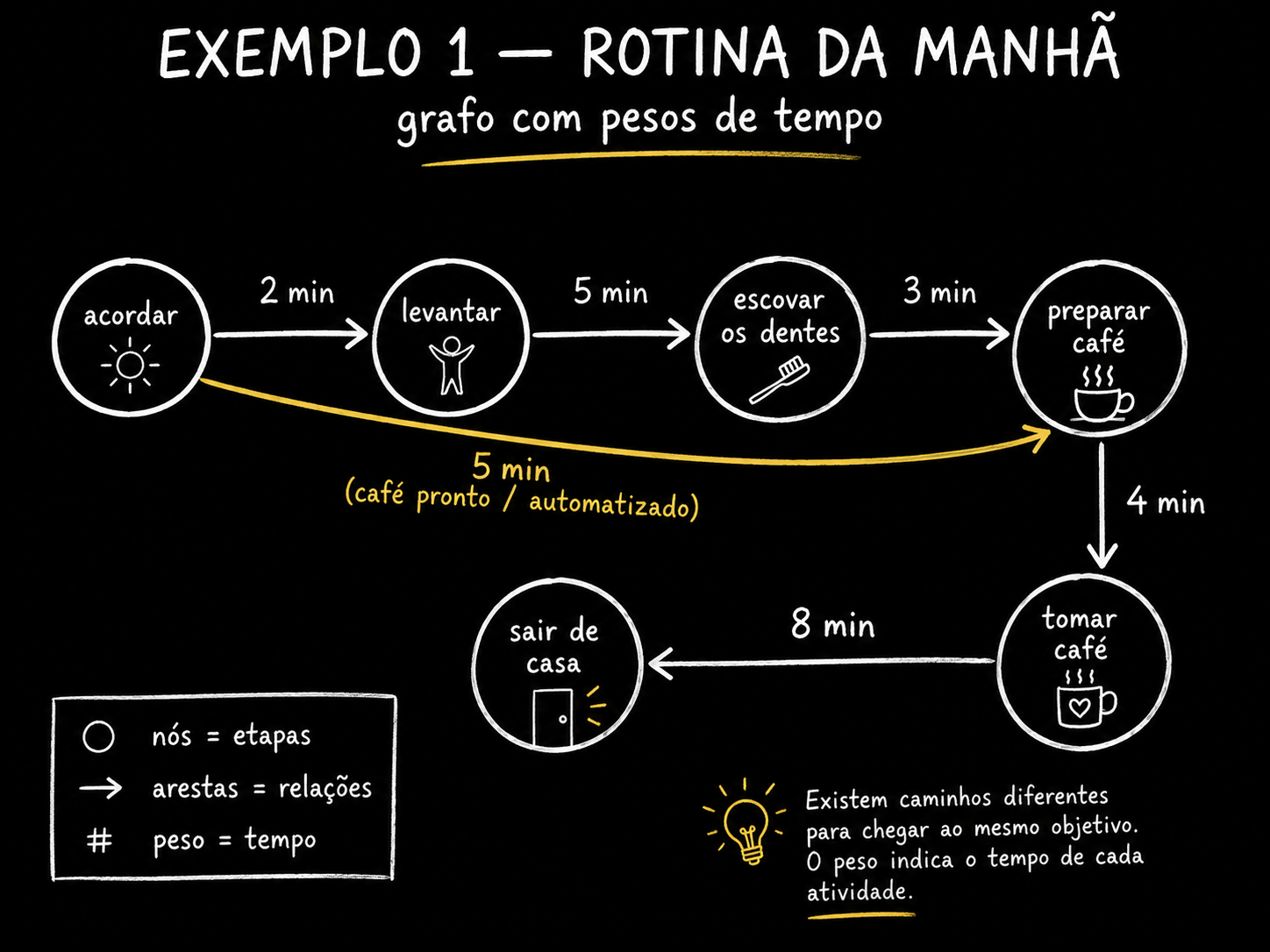
The cheapest example to understand is your morning. You asleep are one node. You awake are another. Two minutes pass between waking up and getting out of bed—that 2 is the weight. Five from getting up to brushing your teeth. Three from brushing your teeth to coffee in the cup. A weighted graph already answers “how long does it take to get from bed to coffee?”—and lets you compare alternative paths.
What to look at: the little numbers above the arrows. Add them up along a path and you get the cost of that path. The dashed cyan line is a shortcut: skips two nodes and costs 4 instead of 10. Finding this kind of shortcut is literally what shortest-path algorithms do—and what you’ll want from your agent graph when the weight is “cost in tokens.”
📊 What tends to become overhead in an agent system
- Tokens / dollar cost — the most concrete: how much that step burns
- Latency — how long the step takes (it matters if the user is waiting)
- Confidence — 0 to 1: how much you believe in that transition
- Risk — how much damage that step causes if it goes wrong (delete a file > read a file)
Key concepts
Cost, time, confidence
Path cost = sum
Without weights, there is no “best”
Dynamic weight changes the route
🔁 Recognize the cycle: a loop is a graph
Cycle is a path that starts at a node and returns to it. When a directed graph no has no cycles, it gets a name you'll hear a lot: DAG, by Directed Acyclic Graph — directed acyclic graph. It has been the standard workflow format for decades (every data pipeline, every build, and every CI system is a DAG).
🎯 The sentence that underpins the entire course
A loop already is a graph — a graph whose path returns to a previous node.
Remember this. When someone announces that “the loop is dead; now it’s a graph,” you’ll know the statement makes no technical sense: a loop is the smallest graph with a cycle. What really changes is how many in nodes you have and how you connect them — and that’s what Tracks 3 and 4 will unpack.
What to look at: both sides are graphs. The only difference is the bottom line on the right, which closes the loop. That line has two effects: (1) the graph can now repeat work — which is exactly what you want from an agent — and (2) it loses the guarantee that it will finish. That’s why every cycle needs a stopping condition.
⚠️ Warning: a cycle with no exit = an infinite bill
A DAG ends on its own because there’s nowhere to go back to. A cycle doesn’t. If you connect an agent in a cycle without a repetition limit and a progress criterion, it will run until your credit runs out. Every time you draw a return edge, write next to it when it stops being followed.
Key concepts
Path that returns to the start
Directed and acyclic
The minimal graph with a loop
Every return needs an exit
🌳 Separate it from the tree (and write your first graph)
Lists, trees, and graphs are the same family with different rules for how many connections each node can have. List: each item points to the next, forming a queue. Tree: each node has exactly one “parent,” nothing loops back. Graph: Anything can connect to anything. Lists and trees are special cases of graphs.
✓ Use a tree when
- ✓The hierarchy is genuine, and no one depends on a neighboring branch
- ✓You only need “contains / is inside”
- ✓Folders, book chapters, navigation menu
✗ Don’t force a tree when
- ✗One story depends on another story from another epic
- ✗Two modules import the same third module
- ✗The reviewer returns the work to the writer (that is a cycle)
🧪 Practical example: write your first graph
Objective: turn one of your processes into a JSON graph and see the computer answer questions about it. You don’t need to install anything—it runs in your browser’s own console (F12 → Console) or in Node.
// 1) O grafo: lista de adjacencia + pesos (minutos)
const grafo = {
  "dormindo": { "acordar": 0 },
  "acordar":  { "levantar": 2, "cafe": 4 },   // 'cafe' e o atalho
  "levantar": { "dentes": 5 },
  "dentes":   { "cafe": 3 },
  "cafe":     {}
};

// 2) Todos os caminhos de um no ate outro, com custo
function caminhos(g, de, ate, visitados = [], custo = 0) {
  if (de === ate) return [{ rota: [...visitados, de], custo }];
  if (visitados.includes(de)) return [];          // corta ciclo
  return Object.entries(g[de] || {}).flatMap(([viz, peso]) =>
    caminhos(g, viz, ate, [...visitados, de], custo + peso)
  );
}

const r = caminhos(grafo, "dormindo", "cafe");
r.sort((a, b) => a.custo - b.custo);
r.forEach(c => console.log(c.custo + " min:", c.rota.join(" → ")));
How to verify: you should see two lines —
4 min: dormindo → acordar → cafe e
10 min: dormindo → acordar → levantar → dentes → cafe.
If both appear, your graph is correct and you just ran a path search.
Now swap it for yours: replace the nodes with
<etapas do seu processo> and the weights for
<minutos, reais ou tokens>. If more than one path appears, you've found a decision that
your process was making automatically.
Quick check (doesn’t block anything): an agent that tries, tests, and tries again until it passes—which structure is that?
Key concepts
List ⊂ tree ⊂ graph
Cross-dependency
Node dictionary → neighbors
No framework needed
📌 Module Summary
Next Module:
1.2 — Graphs in the real world: your morning, LinkedIn, your SaaS funnel, and your team's backlog.