💡 New here? What is a "Jarvis"?
Jarvis it’s the affectionate nickname for a personal AI assistant — inspired by Iron Man’s assistant. It’s an AI that knows you, remembers your things, and does tasks for you, instead of just answering one-off questions.
- Personal — it’s yours; it knows your context, your files, and your way of doing things.
- Persistent — doesn’t forget everything with each conversation; it has memory.
- Active — does things (sends email, organizes files, finds data), not just talks.
🤖 What is a Jarvis
You already know how to use AI to do tasks (that was Track 2). A Jarvis it’s the next step: instead of opening the chat every time and explaining everything again, you set up an assistant that already knows you and stays on standby. You set it up once and use it every day.
The difference between "using AI" and "having a Jarvis" is the same as the difference between call a taxi e having a private driver. A taxi serves anyone and forgets you. A driver knows your addresses, your schedule, and your habits—they’re ready before you ask.
🔑 The central idea
Three things set a Jarvis apart from an ordinary chat:
- •Knows you: has your context saved, so it doesn't start from scratch.
- •Remember: what you said yesterday still applies today.
- •Executes: has hands—opens files, sends messages, searches for data.
✓ It’s a Jarvis
- ✓Knows who you are without you explaining
- ✓Remembers old conversations and decisions
- ✓Does real tasks on your behalf
- ✓Ready to use anytime
✗ It is NOT a Jarvis
- ✗A chat that forgets everything when you close it
- ✗Where you always have to re-explain your context
- ✗That only responds with text and does nothing
- ✗A fictional robot that thinks for itself
🧩 The 4 pieces: brain, memory, skills, and triggers
No matter how sophisticated it may seem, every Jarvis comes down to four pieces. Once you know them, any assistant—simple or advanced—stops being magic and becomes a set of parts you understand and can put together.
🧠 Brain — the AI that thinks
It’s the reasoning engine (Claude, for example). It receives the request, decides what to do, and uses the other pieces. Without it, nothing happens.
💾 Memory—what it remembers
Where the important things live: your data, your preferences, past decisions. That’s what makes Jarvis “know you” instead of starting from scratch every time.
🧰 Skills — what it can do
Practical skills: send email, read a spreadsheet, create an image, search the web. Each skill is one more “hand.” You’ll see a ready-made library in module 3.3.
⚡ Triggers — what activates it
What gets Jarvis to start acting: you talking to it, a time of day, an email that arrives. It’s the “doorbell.” We’ll go deeper in module 3.5.
💡 Tip to help it stick
Think of a new employee: the brain it’s his head, the memory it’s the notebook, the skills are the tasks it knows how to perform, and the trigger it’s the “good morning, you can get started.” One piece is missing, and the employee gets stuck.
🔗 How the Pieces Work Together
The four pieces don’t work on their own — they follow a order. Understanding this workflow is what separates building a Jarvis that works from building a Frankenstein that breaks.
📖 An everyday example
You say: "Jarvis, summarize today’s emails and send them to me on WhatsApp":
- 1.Trigger: your voice activates the assistant.
- 2.Brain: understands the request and puts together a plan.
- 3.Memory: remembers which email accounts are yours and your phone number.
- 4.Skills: the email skill reads the inbox; the WhatsApp one sends messages.
💡 Why this matters
When something goes wrong, you’ll know where to look: didn’t trigger? That’s the trigger. Forgot your name? That’s memory. Couldn’t send the message? That’s the skill. Thinking in parts makes things easier to fix.
🏠 Local vs. cloud: where Jarvis lives
Your Jarvis needs to “live” somewhere. There are two possible addresses: your own computer (local) or servers on the internet (cloud). Neither is right or wrong — it's a trade-off, and the choice depends on what you value.
🏠 Local (on your PC)
- ✓Your data never leaves your machine
- ✓No monthly server fee
- ✗Only works when your PC is on
- ✗You handle the setup
☁️ Cloud (servers)
- ✓Works 24/7, even with your PC turned off
- ✓Accessible from your phone, anywhere
- ✗Usually has a monthly cost
- ✗Your data passes through third parties
How to decide (rule of thumb)
💡 Don’t get stuck on this now
For your first Jarvis, local is simpler and safer: test it on your own computer, at no cost and without exposing anything. Moving to the cloud is a decision for later, when you want it to run on its own.
🔐 Privacy and Control
A personal assistant, by definition, handles your things — emails, files, calendar. That’s why, before giving it power, you decide what it can see, what could save and what it can do without asking you. Control isn’t distrust; it’s common sense.
The good news: you're always in control. Jarvis is a tool you configure—not a being that makes decisions on its own. You set the boundaries.
✓ Best practices
- ✓Give it access only to what it needs
- ✓Ask for confirmation before serious actions (deleting, sending)
- ✓Start small and expand gradually
- ✓Find out where its memory is stored
✗ Avoid
- ✗Give full access to everything “to make things easier”
- ✗Let it act alone on irreversible things
- ✗Store loose passwords in its memory
- ✗Forget what it's allowed to do
💡 The golden rule
Treat your Jarvis like a new assistant with limited trust: give it one key at a time, watch how it uses it, and only then give it more. Permission is earned—it’s true for people and for AI.
📐 Your Jarvis plan: design before building
The temptation is to start building right away. But, like a good conductor, you design before you conduct. A one-page plan prevents rework and gives you direction. And planning is easy: just answer, in your own words, the four parts you already know.
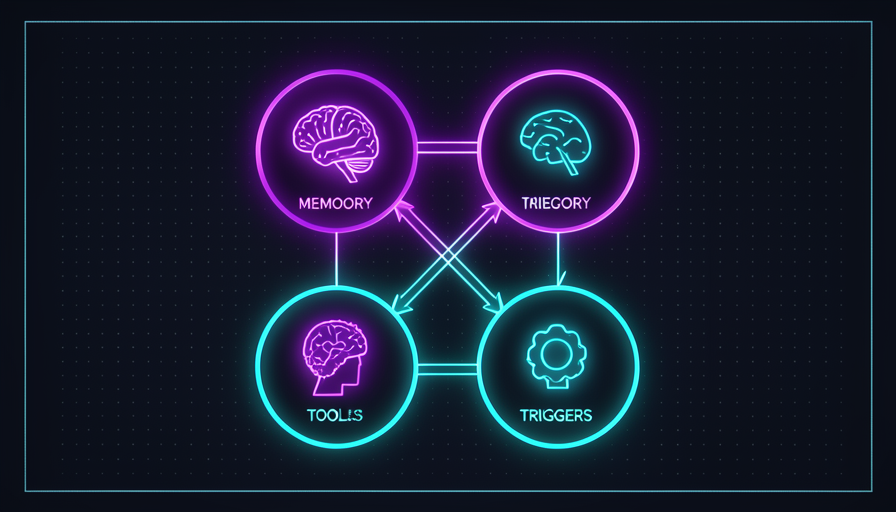
📝 The 4 questions in the plan
- 🧠Brain: what’s the main task it will handle for you?
- 💾Memory: what does it need to know about you to do this well?
- 🧰Skills: what concrete actions does it need to take?
- ⚡Trigger: how and when does it take action?
🎯 Start small
Don’t try to build a Jarvis that does everything. Choose one task that takes up your time every week and design the plan just for that. A small Jarvis that works is worth more than a big one that never gets off the ground.
✋ Before you continue — what are the 4 parts of a Jarvis?
🎓 Module summary
Next module:
3.2 — 🔭 OpenClaw, Hermes, and agentic systems: ready-to-run tools for your Jarvis and how to choose one.