Almost everyone thinks they use AI a lot, but can’t say which tasks it already handles on its own and which still pass through their hands. The AL1–AL5 ladder measures this task by task, on paper or automatically, and shows which task can move up a rung now, before you hand too much over to an AI that still makes mistakes, or keep doing by hand what it already does well.
Without measuring, you don’t know what you still do by hand, what AI already does on its own, or which doors you’ve opened to it. This kit gives you a five-rung scale, from AL1 (you do it yourself) to AL5 (AI runs on its own), and two ways to measure: a paper sheet that works with any person and any AI, and a program that reads Claude Code and Codex logs (AI assistants that work on your computer) and records each connection used. If you only use ChatGPT or another AI in a browser, the sheet is enough. At the end, you’ll know which rung each task is on, which one can move up now, and when to move down. To get started, just print the sheet.
In 2 minutes: what is your AI level? (in Portuguese)
Nei walks through the AL1 to AL5 ladder and his own measurement. The video's number (64%) came from the relogio-2027 kit's yardstick; this kit's yardstick gives 56.2% (see the Real case).
The ladder: five rungs
AL means autonomy level: how much AI does without you. The rung applies to one task, not to a person or an AI. You might be at AL5 for translating captions and AL2 for answering a customer. Example across all rungs: replying to a customer’s email.
AL1
You do it yourself
AI isn’t involved.
You read, think, write, and send.
AL2
AI helps
You ask, it answers, you do the work.
You ask, “How should I reply to this?” and write the response.
AL3
AI collaborates
You work together, step by step. You guide each step.
AI writes a draft with you; you adjust and send it.
AL4
AI leads, you review
It prepares everything; you check before it goes out.
The response is ready; you read and approve it, then AI sends it.
AL5
AI runs on its own
Schedule, rules, and alerts, with no one in the middle.
Routine questions are answered on their own; you review the summary and exceptions.
When in doubt, ask three questions
1. Was AI involved? No: AL1. 2. Who did the work? You, using its answer: AL2. Both of you, step by step: AL3. AI did it, and you checked before it went out: AL4. 3. Were you there? No, it ran on its own: AL5.
How to move up a level
One task at a time, one rung at a time. Each time you do the task, record the date, whether it’s critical, the rung you worked at, and two quality columns on the sheet: Fixed? (n = no changes needed, p = small fix, g = big fix or the answer wasn’t helpful) and Serious error? (y/n). Only big fixes and serious errors count, and only the times at your current rung: when you change rungs, the count starts over. You decide: the report checks the calculations and gives one of four recommendations: “move up,” “record N more times,” “stay on this rung,” or “move down”; if you disagree, your decision stands, with the reason recorded. The numbers are a starting point.
AL1→AL2
Start asking
Choose a task you repeat at least 3 times a month that doesn’t involve confidential data.
Do this: before doing it by hand, ask AI how it would do it and compare its approach with yours. From that point on, you’re at AL2: record AL2 on the sheet.
Ready when: No criteria. Asking has low risk; tracking starts at AL2.
AL2→AL3
Give it context and work together
Signal: You copy the answer and always make the same adjustments.
Do this: write down the fixed context once (who the customer is, the tone, good examples, where the files are) and include it with your request.
Ready when, of the last 10 times, no more than 1 required a big fix (g).
AL3→AL4
Let AI lead, then review
Signal: You approve almost everything it suggests without changes.
Do this: write a short checklist defining what “ready” means. AI does the entire task and stops before sending, publishing, or paying. You check it against the list and approve.
Ready when, of the last 20 times, no more than 2 required a big fix.
AL4→AL5
Let it run on its own, with safeguards
Before you let it run: set a schedule, time and cost limits, an error alert, a record of everything it does, and a way to return to AL4 in one minute.
Afterward: review 3 results each week and record them on the sheet.
Ready when, of the last 50 times, no more than 2 required a big fix and none had a serious error.
🛑 Critical tasks stop at AL4
When an error could cause public, financial, or security harm (publishing, money, servers, customers), AI leads and you review. It doesn’t move to AL5. Mark “critical? = y” on the sheet. If the column is blank, the program decides based on words in the task name (publish, post, customer, payment, money, server, email); anything you mark, y or n, overrides the words.
⬇️ When to move down a rung
One serious error (something incorrect went out, data was lost, or more was spent than intended): move down right away. Three big fixes in the last 10 times: move down. Since moving up allows at most two, the rules never conflict. If the tool or process changed, move down one rung on your own until you measure again. This applies at any rung, including AL5.
🧭 Your plan to move up is already in the report
The "Your plan to move up" section of the report picks the 3 tasks that have the biggest impact on your number and shows, for each one, how much the AI-led part goes up if it reaches AL4 (in points), what level it is at today, and the concrete next step, based on your data. Real example from Nei: Producing videos, AL3 → AL4, up to +15.5 points. Today, the AI does 6.5 actions per message from him, and AL4 starts at 15. The step: ask for the entire task in one message, with the completion criteria, and review only at the end. The hours that fell under "Other tasks" appear separately, with a tip to give them a name. With less than 1 hour a week with AI, the plan starts by using it more. The plan is in the report, not on the certificate.
How to measure: on paper or automatically
You can only move up what you can see. Without a record, the rung is just a guess.
📝 On paper
A sheet you can print. For each task, record the date, task, whether it’s critical, rung (1 to 5), minutes, connection used (which AI, program, website, or folder), whether you needed to make a correction (n/p/g), and whether there was a serious error. It works with any AI and is the only way to count AL1, the work you do without AI. Open the printable sheet.
🤖 Automatically
For people who use Claude Code or Codex (AI assistants that work on your computer). A program reads their logs, assigns each conversation to a rung, and records every connection used: programs, websites, external services, AI helpers, and ready-made recipes (skills), with the first and last time each was used. It can run on its own every day. How to use ↓
🔗 The same columns
The paper sheet and program use the same columns. Start on paper today and enter the sheet into a spreadsheet whenever you’re ready: the report combines both, including connections you recorded (ChatGPT, spreadsheets, email).
Question
Where it appears
Which rung is each task on?
“Suas tarefas” (“Your tasks”) in the report, or the rung column on the sheet
What’s already running on its own that I’d forgotten about?
AL5: sessions without a conversation (schedule, script, bot)
Which doors have I opened to AI?
“Conexões registradas” (“Recorded connections”), with the first and last time each was used
Which task can move up or down now?
“Pode subir” (“Can move up”) and “Descer um degrau” (“Move down a rung”) in the report, checked against the sheet’s quality columns
Did AI get it right?
Only the sheet’s “corrigi?” (“Fixed?”) and “erro grave?” (“Serious error?”) columns. The program measures autonomy, not accuracy.
Where do I start to move up?
"Your plan to move up" in the report: the 3 tasks with the biggest gains and the next step for each
Real case: Nei’s measured ladder
Nei Maldaner (INEMA) ran the meter on his own records from the last 30 days, through 11/12/2026: 16,228 work sessions and 133,885 AI actions. 1,057 sessions were conversations with him; the others were started by scripts, bots, and schedules. In the 12/11 video, he showed 64%, measured with the relogio-2027 kit, which uses a different yardstick. This kit counts as “runs on its own” only a session started by a script, bot, or schedule with up to 2 messages; if you exchanged 3 or more messages, it counts as a conversation, even if it was through the app or the bot. By this yardstick, it comes to 56.2%. The number changes with the yardstick and the time window: that’s why the yardstick is written down and the measurement is repeated every day.
AI leads 56.2% of the measured work
Share of AI work time at each rung (AL4 + AL5 = AI leads)
AL1 · you alone
only on the sheet
AL2 · assistance
3.3%
AL3 · collaborates
40.5%
AL4 · leads
28.2%
AL5 · on its own
28.0%
AI leadsyou lead
By task: current rung and the next one
Hours per week of AI work (parallel sessions are added together)
Task
h/wk
Rung
Next
Produce videos
59.0
AL3
AL4
Create guides, kits, and websites
58.5
AL3
AL4
Images and design
13.8
AL5
at the cap
Publish and promote ⚠️
9.3
AL3
AL4 (cap)
Translate content
5.5
AL5
at the cap
Research and summarize
5.2
AL3
AL4
Create courses and lessons
3.9
AL4
AL5
Excerpt covering 7 tasks from the report (excluding “Other tasks,” 40.7 h, and the small critical tasks: “Maintain systems and bots,” 2.2 h, “Email and calendar,” 0.4 h, and “Clients and money,” 0.3 h). ⚠️ = critical task, capped at AL4. The rung shown is the one that appears most often in the task; “Publish” still has 28% of its time running on its own: the report flags this, and that’s where you check for review, an alarm, and a way back.
🔗 8,039 connections recorded in 30 days
7,696 programs and scripts, 292 websites, 23 ready-made recipes (skills), 19 external services, 7 types of AI helper (agents), and 2 types of web search. Some of the most used: Codex image generation (5,231 sessions, all on their own), git, which stores file versions (774), ffmpeg, which assembles video (753), Metricool, which schedules social media posts (299 sessions, 271 on their own), and YouTube publishing (197). This doesn’t include background commands (listing, copying, and moving files) or the folders and files it opened or changed: those appear only on the sheet. This is the list of doors the AI can access: each one is something you chose to open, and the kit shows when it was first and last used.
Certificate
Show which rung you are on and how far you have climbed
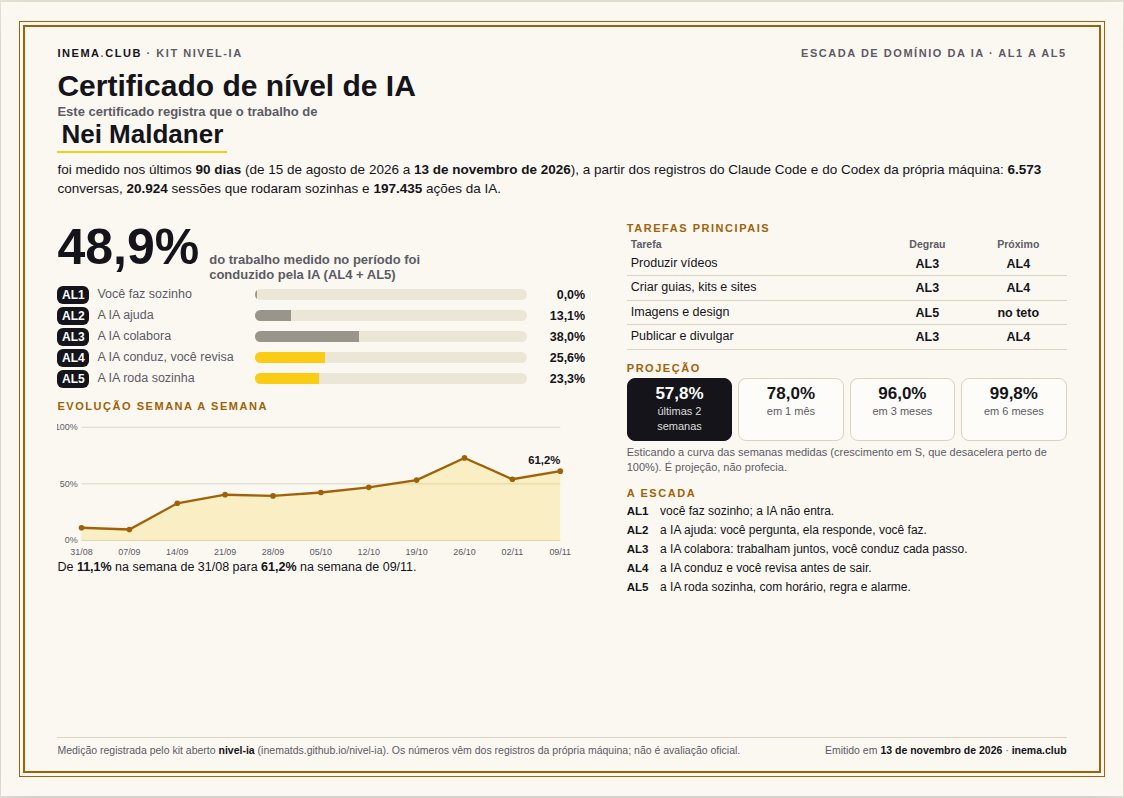
The kit turns your measurements into a one-page certificate: the % of work conducted by AI, the AL1 to AL5 ladder, the main tasks with the next rung, your week-by-week progress, and the projection for 1, 3, and 6 months. You choose the period (30, 90 days, or more). It is an HTML page: open it in any browser and turn it into a PDF with the “Save as PDF” button, without image software.
What it proves, and what it does not: it is a measurement recorded from your own machine’s records, not an official assessment. It lets you show your current standing and track progress from one measurement to the next. In the example, Nei over 90 days: he went from 11% to 61% of work conducted by AI. During that period, the Codex records start on Aug 16 and the Claude Code records on Aug 25.
Two ways to run it, and what happens to your data
The meter is a Python program that runs only on your computer: it reads the Claude Code and Codex records already on your machine, does not connect to the internet, and saves the result in the registro/ folder. The difference is who reads the report afterward.
🔒 A. In the terminal
You run the commands (step by step) and open the certificate in your browser. Nothing leaves your computer. Use this option if your data is confidential: client work, an NDA, or a project that cannot be disclosed.
💬 B. Ask your AI
Claude Code or Codex runs the same commands and then reads the report to summarize it for you. That reading becomes part of the conversation, and the conversation goes through the provider’s server (Anthropic or OpenAI), like any other session. The report shows the names of your tasks and the connections used: programs, agents, skills, and sites the AI accessed. The text of your requests is stored only in registro/sessoes.json, and the AI does not need to open that file. These names may reveal the name of a client or project.
Option B, the easiest: ask your AI
Open Claude Code or Codex on your computer, paste the request below (replace the name), and wait a few minutes. It downloads the kit, measures your activity, generates the certificate, and opens it in your browser.
Download the kit from https://github.com/inematds/nivel-ia into a folder named nivel-ia (use it if it already exists), measure my last 30 days with python3 medir/nivel.py varrer --dias 30 and python3 medir/nivel.py relatorio --lang en, generate my certificate with python3 medir/certificado.py --nome "Your Name" --lang en, and open the certificate in the browser. At the end, tell me where the certificate and report were saved and summarize the results in 3 lines. Do not open the file registro/sessoes.json and do not send my data to any other service or website.
Want 90 days? Add this to your request: "measure 90 days in a separate folder (--registro /tmp/n90), without changing the daily log". First, keep in mind: Claude Code deletes records older than 30 days unless you increase cleanupPeriodDays in its settings (e.g., to 365) and wait for the history to accumulate. Anything already deleted cannot be recovered. If the records cover fewer days than you requested, the meter will warn you in the report and certificate.
Work on multiple machines?
Run the kit on each machine. Each one generates three separate things: the machine certificate ("from the Notebook machine"), the file medicao-<máquina>-AAAA-MM-DD.json to combine (numbers only, connections, and task name; no text from your prompts and no folders) and, after combining, the overall certificate ("from 3 machines"). To combine them, move the measurement files to one machine, or provide the path to each one (usuario@host:/caminho/do/registro). The same conversation is never counted twice. Step by step ↓
Where the files are saved
File
What it is
nivel-ia/registro/certificado-AAAA-MM-DD-en.html
The certificate. Open it in your browser and use the "Save as PDF" button.
nivel-ia/registro/relatorio.md
The full report: ladder, tasks, next step, who can advance, connections.
nivel-ia/registro/relatorio.json
The same numbers in data format (the certificate reads them from here).
nivel-ia/registro/sessoes.json
The session-by-session measurement (stored only on your machine, outside git).
The kit: for those who want to measure on their own computer
You don’t need this section to understand what came before. The paper sheet is enough.
What’s in the kit
🪜 ESCADA.md (in Portuguese)
The five rungs, the three questions, how to move up each rung, the cap for the critical task, and when to move down.
📝 Paper sheet
kit/ficha-papel.html to print (landscape A4) and kit/papel-modelo.csv for typing, with the same columns.
🤖 Meter
medir/nivel.py: reads the logs, classifies each session, combines the sheet, records connections, and writes the report. Python standard library only, no network, no API.
How it works
Claude Code and Codex logs→scan→each session’s rung + connections→+ paper sheet→report→you decide who moves up
What’s in the record
Rung
Session started by a script, bot, or schedule (claude -p, codex exec) with up to 2 messages; 3 or more = conversation
AL5
Your request sent by a bot (for example, if you talk to AI through Telegram): AI handles the entire request, and you review the result
AL4
Conversation with 15 or more AI actions per message from you
AL4
5 to 14 actions per message from you
AL3
Fewer than 5 actions per message from you (includes a standalone question)
The file to combine with other machines. It is created next to the certificate, without the text of your prompts.
The thresholds are at the top of medir/nivel.py (LIMITE_AL4, LIMITE_AL3). Tasks are inferred from words in the first request of each session; to use your own, copy medir/tarefas.exemplo.json to medir/tarefas.json and edit it (each line: task name, whether it is critical, identifying words). Moving up and down is checked against the sheet: up to 1 big fix in the last 10 times to reach AL3, up to 2 in 20 for AL4, up to 2 in 50 and no serious errors for AL5; 1 serious error or 3 big fixes in the last 10 times = move down. Folders and files used are recorded only on the sheet: the program records programs, sites, services, helpers, and skills.
Prerequisites
Terminal + Python 3.9+
Type the commands below in the Terminal (on Mac: Applications › Utilities › Terminal; on Linux: Ctrl+Alt+T). Python uses only the standard library, nothing to install. On Windows, use WSL (Linux inside Windows).
python3 --version
git (or the ZIP)
To download the kit. Without git, download the ZIP: nivel-ia-main.zip, extract it, and open the Terminal inside the folder.
Claude Code or Codex
The meter reads ~/.claude/projects and ~/.codex*/sessions. Without them, use only the sheet: skip steps 2 and 4, do step 5, and run step 3; the report will include only the sheet.
systemd (optional)
The Linux scheduler, to run automatically every day at 06:20.
How to use
1
Download the kit
One folder, no installation. Without git, use the ZIP from the prerequisites.
git clonehttps://github.com/inematds/nivel-ia && cd nivel-ia
2
Measure the last 30 days
Reads the logs on this machine and saves registro/sessoes.json (outside git).
python3 medir/nivel.py varrer --dias 30 # "16701 sessões (9820 Claude Code, 6881 Codex) em 30 dias"
3
Read the report
Ladder, tasks, next rung, who can move up or down, and connections. It’s saved in registro/relatorio.md. Background sessions from other programs are excluded, so the report counts slightly fewer than the scan. Note: the report, the command output and the column names of kit/papel-modelo.csv are in Portuguese (data, tarefa, nivel, minutos, conexao, corrigi, grave); the program also accepts the English names on the sheet (date, task, level, minutes, connection, fixed, serious) and y/yes. At the end comes "Your plan to move up": the 3 tasks that have the biggest impact on your number and the next step for each.
python3 medir/nivel.py relatorio --lang en# "A IA conduz **56.2%** do trabalho medido (AL4 + AL5)"
4
See all connections
Each program, site, service, agent, and skill, with the number of sessions and the first and last time it appeared.
python3 medir/nivel.py conexoes
5
Combine the paper sheet (and AL1)
Copy the template to the registro/ folder. Open registro/papel.csv in a spreadsheet (Excel, LibreOffice, or Google Sheets), enter one row for each time you did the task, and save it again as CSV. Dates can be dd/mm/yyyy or yyyy-mm-dd; column names can match the printed sheet in Portuguese, English, or Spanish. Then check: the program will warn you if it can’t understand a row or column. The next report will add everything together.
Turns on a timer at 06:20 that measures and saves the history in registro/historico.jsonl.
sh systemd/instalar.sh# undo: systemctl --user disable --now nivel-ia.timer
7
Generate your certificate
A page with your rung, week-by-week progress, and projection. Open the file in a browser and use “Save as PDF”. For a longer period (e.g., 90 days), measure in a separate folder without changing the daily record.
On each machine, step 7 saves the file medicao-<máquina>-AAAA-MM-DD.json next to the certificate. On one machine, combine the files (or provide the direct path to each machine) and generate the report and overall certificate. nivel.py maquinas lists what was combined; --tirar NOME removes a machine. The name of each machine is its hostname, or what you specify with varrer --maquina "Notebook".
Choose ONE task to move up a rung using the criterion above, and move down the one with a serious mistake. Kit tests: python3 tests/run.py (50 tests with fake records). Start with the 1st task in "Your plan to move up".
Certificate · step by step
From scratch to a PDF certificate
You need Linux or Mac (on Windows, use WSL), Python 3.9 or newer (python3 --version), and you must have used Claude Code or Codex on this machine, because the certificate is generated from their logs. If you only use ChatGPT in a browser, use the paper form.
1
Download the kit
Without git: download the ZIP (https://github.com/inematds/nivel-ia/archive/refs/heads/main.zip), extract it, and enter the folder.
Reads the Claude Code and Codex logs on this machine. Nothing leaves your computer.
python3 medir/nivel.py varrer --dias 30
3
Build the report
Writes registro/relatorio.md (for reading) and registro/relatorio.json (for the certificate).
python3 medir/nivel.py relatorio --lang en
4
Generate the certificate
Writes registro/certificado-AAAA-MM-DD-en.html and shows the path.
python3 medir/certificado.py --nome "Your Name" --lang en
5
Open and save as PDF
In your browser, click "Save as PDF / print" and choose "Save as PDF". The page is already set to landscape A4.
xdg-open registro/certificado-*.html # Linuxopen registro/certificado-*.html # Mac
6
Longer period (optional)
Measure into a separate folder so you don't change the daily log. It can only go back as far as the machine keeps logs: Claude Code deletes logs older than 30 days unless you have increased cleanupPeriodDays.
python3 medir/nivel.py --registro /tmp/n90 varrer --dias 90
python3 medir/nivel.py --registro /tmp/n90 relatorio --lang en
python3 medir/certificado.py --nome "Your Name" --lang en --registro /tmp/n90   # saved in /tmp/n90/
7
Track progress over time (optional)
Measures automatically every day at 06:20. Generate a new certificate whenever you want (step 4): with more weeks of data, the chart and projection improve.
sh systemd/instalar.sh
What the measurement doesn’t see
AL1 and other AIs
What you do without AI and what you do in ChatGPT in a browser aren’t in the logs. Record them on the sheet.
Accuracy
The rung shows how much freedom AI had, not whether it got things right. Accuracy is tracked in the “Fixed?” and “Serious error?” columns.
Time
This is time spent working with AI; parallel sessions are added together. Use it to compare tasks, not to count your hours.
Privacy: nothing leaves your machine. The first request in each session is saved briefly, with keys, email addresses, and long numbers replaced by [oculto], and the registro/ folder stays outside git.